
ComfyUI Extension
ComfyUI-Simple-Prompt
Provide a simple interface to simplify prompt writing.
0nikod/ComfyUI-Simple-Prompt
Nodes1
On cloudLocal install
CategorySimplePrompt
Stars3
Updated6 months ago
Readme
ComfyUI Simple Prompt
A powerful, visual prompt editing node for ComfyUI that blends the best of text-based and visual tag management.
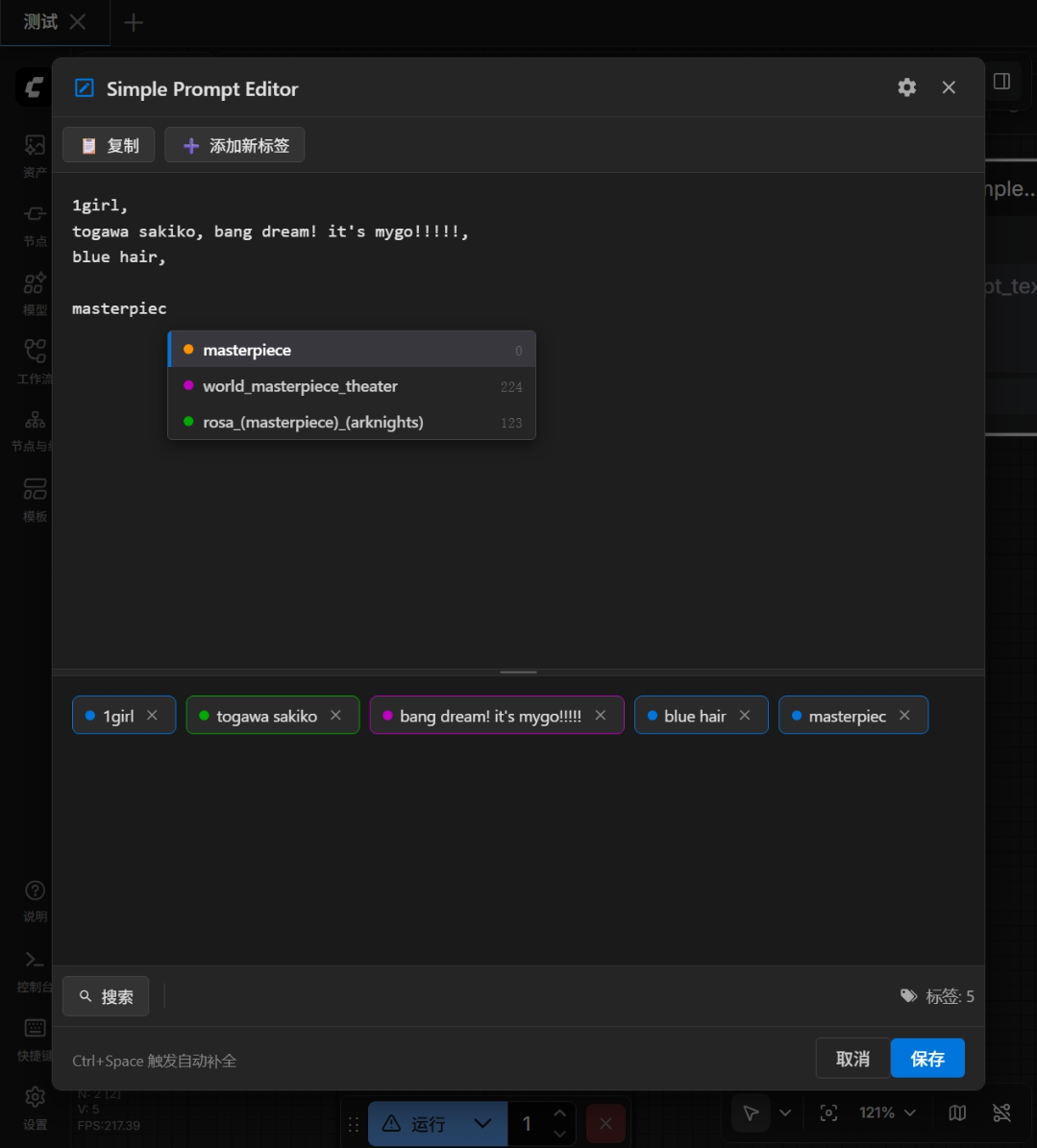
✨ Key Features
- ⚡ High-Performance Backend: Built with DuckDB to handle 70k+ Danbooru tags with millisecond-level search and autocomplete latency.
- 🎨 Visual & Text Modes:
- Visual Mode: Drag-and-drop tags, double-click to adjust weights, color-coded categories (Character, Artist, etc.).
- Text Mode: Classic text editing with syntax highlighting and smart autocomplete.
- 🔍 Advanced Search:
- Search by tag name or alias (e.g., "miku" finds "hatsune_miku").
- Filter by categories (Artist, Style, Character, etc.).
- Sort by post count to find the most popular tags.
- ❤️ Personalization:
- Like Tags: Star your favorite tags for quick access.
- Custom Tags: Add your own tags that aren't in the database.
- Data Updates: One-click update of tag data from the cloud.
- 🛠️ Deep Integration: Fully integrated into the ComfyUI node graph workflow.
🚀 Installation
Method 1: ComfyUI Manager (Recommended)
- Open ComfyUI Manager.
- Search for
Simple Prompt. - Click Install.
Method 2: Manual Installation
- Navigate to your ComfyUI
custom_nodesdirectory:cd ComfyUI/custom_nodes/ - Clone this repository:
git clone https://github.com/0nikod/ComfyUI-Simple-Prompt.git cd Comfyui-Simple-Prompt - Install dependencies (DuckDB is required):
pip install -r requirements.txt # OR directly pip install duckdb - Restart ComfyUI.
📖 Usage
Basic Controls
- Adding Tags: Type in the text box or use the Search button to find tags.
- Autocomplete: Press
Ctrl + Spaceor simply type to see suggestions. - Weight Adjustment:
- Visual: Double-click a tag capsule to edit weight.
- Shortcuts: Select a tag and press
Ctrl + Up/Ctrl + Downto increase/decrease weight.
Data Management
- Updating Tags: Go to Settings -> Data Management -> Click Update Now to get the latest Danbooru tag dataset.
- User Tags: Add custom tags via the Search Modal -> "Add Custom Tag".
⚙️ Settings
Click the Settings (gear icon) to configure:
- Smart Backspace: Automatically delete associated commas/spaces when deleting a tag.
- Underscore Conversion: Auto-convert
_to space when adding tags. - Language: Switch between English and Chinese.
🏗️ Architecture
- Frontend: Vue 3 + Vite + PrimeVue
- Backend: Python + DuckDB + Parquet
- Communication: ComfyUI API Routes
🤝 Contributing
Contributions are welcome! Please check the Design Document (EN) / 设计文档 (ZH) for architectural details.
📄 License
MIT License