
Vsaan212-workflow-utilities
Subject & Scenario Selectors (with subfolders), Text Split, and Optional Switch LoRA utilities for ComfyUI.
Nodes (20)
A dropdown for your scene files, so paths never live in the graph
A character library on disk, one dropdown away
A Markdown manual that lives inside ComfyUI
One dropdown that decides what your whole video workflow does
Crop to any aspect ratio by dragging, no crop node required
T2V, I2V, FL2V and R2V in a single conditioner
Two MiniMax UNETs, one sampler path
Pause your video workflow and hand-pick up to 6 frames
Let an LLM write your prompt so you don't have to
A named prompt library that lives next to your graph
The VRAM eject button you'll forget you need
Turn any frame into a scene caption, locally
One refmod blob in, three clean characters out
The one node that replaces a wall of selectors, LoRA loaders and text nodes
Turn a mode string into a number
Same trick as its float sibling, for whole numbers
Pick between two prompt strings based on a mode
One LoRA loader that can also be a wire-through
Bolt a quality-tail onto any prompt, on demand
One prompt, eight outputs, and a remainder you don't lose
Vsaan212-workflow-utilities
ComfyUI custom nodes: selectors, dual-stack subject/scene automation, text utilities, optional LoRA bypass, prompt library, Lazy Image Loader, Lazy Multi Frame Select, Lazy MiniMax All-in-One (H3), Lazy Switch (float/int/text), Lazy Docs (Markdown viewer), and LazyPrompt (multi-target prompt engineer + optional vision). MIT licensed.
Nodes (summary)
| Node | What it does | Full guide |
|------|----------------|------------|
| Subject Selector | Load .txt from ComfyUI/lazynodes/subjectselector/SubjectFiles/ (recursive). | docs/nodes/subject-selector.md |
| Scenario Selector | Load .txt from ComfyUI/lazynodes/scenarioselector/ScenarioFiles/ (recursive). | docs/nodes/scenario-selector.md |
| Lazy-subject-and-scene-automation | One to three subject files + two scenario files. Wan model_high/model_low (LoraHigh*/LoraLow*); MiniMax minimax_model (VideoModelLoraA–D); image image_model (ImageModelLoraA–D); LTX video_model. [Refmod] + multisubject_refmod for MiniMax H3 RefMods. video_length injects [video_length] (not [Time]). Live editors + scenario 2 strength sliders. | docs/nodes/lazy-subject-scene-automation.md |
| Lazy-refmod-split | SAS refmod blob → COMBO mod_1–3, FLOAT strength_1–3, INT copies_1–3 for Load H3 RefMods. Multi-character identity without stacking character LoRAs (no LoRA bleed). | docs/nodes/lazy-refmod-split.md |
| Lazy Global Selector | One dropdown (T2V / I2V / FL2V / R2V) that fans out to Image Loaders, SAS [Workflow], Prompt Engineer, MiniMax, and Model Switcher. Does not switch SAS model sockets. | docs/nodes/lazy-global-selector.md |
| Lazy Model Switcher | Pick fl2va vs ref2va UNET from the mode string. Wire output to SAS minimax_model. | docs/nodes/lazy-model-switcher.md |
| Lazy Switch (Float / Integer / Text) | Compare an upstream string to match; output on_true or on_false (typed). Unused branch is lazy-skipped. | docs/nodes/lazy-switch.md |
| Lazy Docs | Split-pane Markdown docs from lazy_docs/Docs/ (optional subfolder). Index from frontmatter; click to load HTML/Raw. | docs/nodes/lazy-docs.md |
| Text Split | Split by separator, regex, or tagged format ([Tag] headers). Auto-detects v2 subject/scenario files when the first line is [LoraHighA]; otherwise tagged_format or separator # for legacy graphs. | docs/nodes/text-split.md |
| Optional Switch LoRA | Apply a LoRA or pass through when path is bypass / empty. | docs/nodes/optional-switch-lora.md |
| Lazy Prompt Saver | Save / clone / delete named prompts in ComfyUI/lazynodes/lazy_prompts.json. | docs/nodes/lazy-prompt-saver.md |
| Lazy Image Loader | Load from input/: browse, drag-and-drop upload, open input folder, cover crop to popular ratios (default 9:16), optional megapixel resize (0.2–4.0 MP, multiple of 32), live drag-to-position preview. Optional workflow_role + global_selector_input hard-gates IMAGE. | docs/nodes/lazy-image-loader.md |
| Lazy Multi Frame Select | IMAGE batch from VAE Decode → grid of every Nth frame (default 4), pauses until you pick up to 6 and click Continue. Six IMAGE outputs (image_1–image_6). | docs/nodes/lazy-multi-frame-select.md |
| Lazy MiniMax All-in-One | MiniMax H3 conditioner: auto T2V / I2V / FL2V / R2V from bare mode or automation selector. Seconds → H3 frame length. Requires ComfyUI 0.30+ native H3. | docs/nodes/lazy-minimax-all-in-one.md |
| LazyPrompt | Prompt Engineer (LTX / Wan / Flux / SDXL / Pony / SD 1.5 / MiniMax H3), Vision Describe (Qwen2.5-VL), Unload local model. LM Studio API uses native /api/v1/chat with OpenAI fallback. Mode-gated first/last/refs + selector_Out. Prompt [LoraH] / [LoraL] (Wan) and [Lora1]–[Lora5] (singular) dynamic LoRA loads. | docs/nodes/lazyprompt.md |
Documentation index: docs/README.md · MiniMax template: docs/workflows/video_minimax_h3_global_selector.md
Installation
Via Comfy Registry (recommended)
Search for vsaan212/Vsaan212-workflow-utilities in the ComfyUI Manager and click Install.
Manual (development)
Clone into your Comfy install:
<ComfyUI root>/ └─ custom_nodes/ └─ vsaan212_workflow_utilities/ # this repo's custom_nodes/* contents
Restart ComfyUI.
Folder layout & auto-creation
User libraries live in ComfyUI/lazynodes/ (same level as custom_nodes/, input/, models/). Pack updates replace the custom node folder; they do not delete lazynodes/.
On first load (and whenever a shipped example is missing), the pack creates that folder and copies defaults from the install. Existing files are never overwritten.
Standalone selectors
<ComfyUI>/
└─ lazynodes/
   ├─ README.txt
   ├─ lazy_prompts.json
   ├─ subjectselector/SubjectFiles/
   └─ scenarioselector/ScenarioFiles/
Lazy-subject-and-scene-automation (separate library)
<ComfyUI>/
└─ lazynodes/
   └─ lazy_subject_scene_automation/
      ├─ ScenarioFiles/
      └─ SubjectFiles/
Put .txt files under the folder that matches the node you use. Dropdowns show relative paths without .txt (POSIX-style); nested subfolders are supported.
Subject & scenario file formats (selectors + Text Split)
- Tagged (current): sections start with a
[Tag]line (e.g.[LoraHighA],[desciption]), body on following lines until the next tag. Shipped examples:Bypass and format example.txt,none.txt. - Legacy: sections separated by a line containing only
#(blank line,#, blank line).
Lazy-subject-and-scene-automation parses tagged files internally. The browser extension js/lazy_subject_scene_live.js adds editable subject / scenario / scenario 2 panes, Save edits, and scenario 2 high/low strength sliders (see lazy-subject-scene-automation.md). For Subject Selector / Scenario Selector → Text Split, v2 files (first line [LoraHighA]) split automatically; legacy # files use separator # unless you force tagged_format ON. Text Split details: text-split.md.
Lazy Image Loader reads from ComfyUI’s global input/ folder (not a pack subfolder). Extension js/lazy_image_loader.js adds the preview, pan crop, upload, and Open input folder button. Details: lazy-image-loader.md.
Lazy Multi Frame Select sits after VAE Decode. Extension js/lazy_multi_frame_select.js shows every Nth decoded frame (default 4) in a grid, waits for up to six clicks, then Continue emits image_1–image_6. Details: lazy-multi-frame-select.md.
Example workflow (Lazy automation + LazyPrompt)
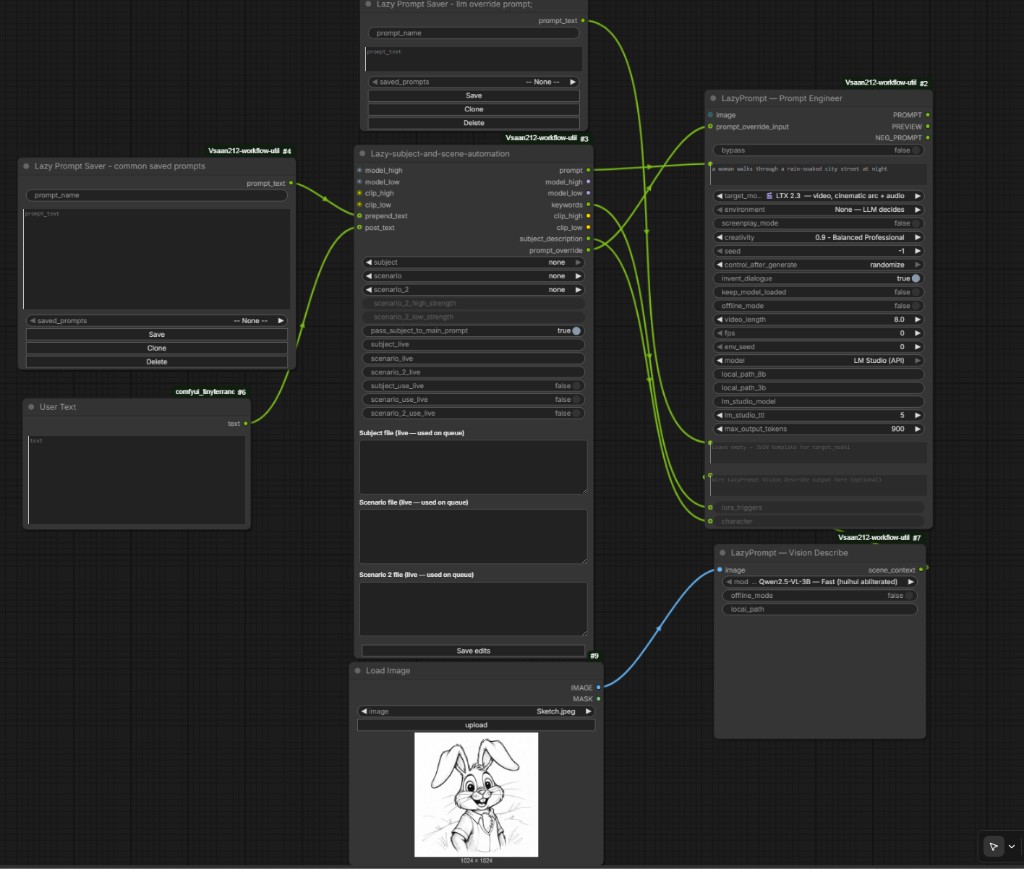
This pack is meant to replace long chains of selector + LoRA + text nodes with one automation node plus LazyPrompt for LLM expansion. The screenshot below is a typical LTX / LM Studio graph:
Full node reference: lazy-subject-scene-automation-workflow.md · lazyprompt.md
How to wire it
1. Lazy-subject-and-scene-automation (center)
- Wan: wire
model_high/clip_high(andmodel_low/clip_lowfor dual stacks). MiniMax: TxtImg + reference UNETs → Lazy Model Switcher →minimax_model(CLIP can stay onclip_highas LoRA companion). Krea2 / Z-Image:image_model. LTX:video_model. - Pick
subject,scenario, and optionalscenario_2from the dropdowns (.txtunderComfyUI/lazynodes/lazy_subject_scene_automation/SubjectFilesand…/ScenarioFiles). For MiniMax multi-character RefMods, setmultisubject_refmodand optionalsubject_2/subject_3. - Set
video_length(seconds). The node replaces[video_length]in prompt text, or appends a[video_length]block.[Time]is time of day and is not changed. - Edit the live panes on the node; queue uses that text (not necessarily disk). Use Save edits to write back to
.txt. - Optional
prepend_text/post_text: wire STRING inputs (e.g. Lazy Prompt Saver for a saved prefix, User Text or any string node for postfix). - Outputs
model_high/clip_high(and optionalmodel_low/clip_low),minimax_model,image_model,video_model,keywords,prompt,subject_description,prompt_override, andrefmodgo to the rest of your graph. - Output
refmod: wire to Lazy-refmod-split then Load H3 RefMods when subject files use[Refmod]. A linked loadermod_#is empty at queue time; this pack treats that as(none)so you do not need to fork MiniMaxH3Mod. - Output
prompt_override: wire when a scenario file uses a[Prompt]block (see below). - LoRA tip: Wan files keep
LoraHigh*/LoraLow*. MiniMax / LTX files useVideoModelLoraA–D. Image files useImageModelLoraA–D. High slots are not auto-applied to MiniMax. Whenmultisubject_refmod≥ 1 and a subject file has[Refmod], that subject’s LoRAs are skipped — identity comes from Luisacaotica’s ComfyUI-MiniMaxH3Mod RefMods instead of stacked character LoRAs, which is what stops multi-character LoRA bleed.
2. LazyPrompt — Prompt Engineer (LLM)
user_input: your rough idea (or leave minimal when override carries the scene).prompt_override_input←prompt_overridefrom the automation node when the scenario file defines[Prompt]instead of[desciption]. When connected/non-empty, this replacesuser_inputfor the LM Studio / local HF request. You can also wire a Lazy Prompt Saver here for a fixed override string.character←subject_descriptionfrom the automation node so the subject file’s[desciption]always reaches the LLM (including whenprompt_override_inputis set).scene_context← LazyPrompt — Vision Describe (or paste text manually).image: optional reference frame for LM Studio (API) with a vision model loaded.- Optional: wire automation
model_high/clip_high(and low) into Prompt Engineer for[LoraH]/[LoraL]. Wireminimax_model/video_model/image_modelinto Prompt Engineerlora_modelfor[Lora1]–[Lora5](optional strength[Lora1[0.5]]path[/Lora1]). Those load after the LLM and are stripped fromPROMPT. - Set
target_model,model(e.g. LM Studio (API)),lm_studio_model, and token/temperature as needed. - Use output
PROMPT(and model/clip outs when wired) downstream.
3. LazyPrompt — Vision Describe (optional)
image← Lazy Image Loader or Load Image (or any IMAGE output).scene_context→ Prompt Engineerscene_context(or usecharacterfor subject-file text from automation).- Run once per reference frame; caption text steers the LLM without inventing the subject from scratch.
4. Scenario file tips for this graph
[desciption]→ merged into automationprompt(CLIP-side text).[Prompt]→ sent onprompt_overrideonly (LLM path); mutually exclusive with[desciption]in the same file. Optional closed[LoraH]/[LoraL]/[Lora1]–[Lora5]tags in that Prompt (or LLM output) are handled by LazyPrompt after enhancement.{left|right}in scenario text → random choice each queue run.scenario_2+ strength sliders → second scenario LoRA set and tunable[LoraHighA]/[LoraLowA]model strength.
5. Lazy Prompt Saver (optional)
- Saved snippets for
prepend_text, manualprompt_override_input, or ad-hocuser_inputcopy/paste — not required if you only use live editors and scenario files.
Python dependencies
Install from requirements.txt if your ComfyUI environment is missing anything (transformers, torch, qwen-vl-utils, Pillow, numpy, etc.).
Credits
MiniMax H3 RefMods — Luisacaotica / ComfyUI-MiniMaxH3Mod. Extract, Load H3 RefMods, and Apply H3 RefMod are his. This pack only wires subject files into those nodes ([Refmod], Lazy-refmod-split). Stacking several character LoRAs on one MiniMax graph mixes identities; RefMods keep each character on the native ref path instead, which is the multi-character LoRA-bleed fix. Huge thanks.
LazyPrompt in this pack reuses and adapts MIT-licensed community work. Thank you to the original authors:
- LoRa-Daddy — LTX-2 Easy Prompt (LTX2EasyPrompt-LD): cinematic LTX-style expansion, Qwen2.5-VL →
scene_context, negative hints, LoRA triggers, dialogue / bypass, frame pacing, local Hugging Face + LM Studio patterns, output cleaning. LazyPrompt’s Prompt Engineer and Vision Describe descend from that design. - seanhan19911990-source — MIT-licensed LTX2EasyPrompt-LD tree (copyright in that project’s
LICENSE); original upstream listing may no longer be on GitHub. - Brojakhoeman — MIT Gemma4Prompt (copyright in that project’s
LICENSE): per-target system prompts (LTX 2.3, Wan 2.2, Flux.1, SDXL, Pony XL, SD 1.5), LTX screenplay variant, and environment presets merged into LazyPrompt.
vsaan212 maintains this integrated repository (selectors, lazy subject/scene automation, Lazy Prompt Saver, LazyPrompt merge, and packaging) separately from those upstreams.
Troubleshooting
- New
.txtfiles not in dropdown: PressRin ComfyUI or recreate the node. Lazy-subject-and-scene-automation also refreshes via/vsaan212/lazy-subject-scene/…when the node is created. - Same filename in two folders: Use the full relative path in the dropdown.
- Line endings: Nodes normalize
\r\n/\rto\n. - Lazy Image Loader missing from menu: Restart ComfyUI after updating the pack; node is under
vsaan212/lazy. - Lazy Multi Frame Select grid empty / won’t continue: Restart ComfyUI so
js/lazy_multi_frame_select.jsloads; click Continue on the node (do not queue a second prompt). - DEBUG logs: set Comfy logging to DEBUG / detail. Nodes log under logger
vsaan212(e.g.SAS added lora "…",Lazy Model Switcher set to "R2V" selecting ref2video_model).
License
MIT (see LICENSE)