
ComfyUI-Chord
Custom nodes for the paper: Chord: Chain of Rendering Decomposition for PBR Material Estimation from Generated Texture Images
Nodes (3)
ComfyUI-Chord
<a href="https://arxiv.org/abs/2509.09952"><img src="https://img.shields.io/badge/arXiv-2509.09952-B31B1B?logo=arxiv&logoColor=white&style=flat-square" alt="arXiv"></a> <a href="https://ubisoft-laforge.github.io/world/chord/"><img src="https://img.shields.io/badge/Project-Page-brightgreen?logo=ubisoft&logoColor=white&style=flat-square" alt="Project Page"></a> <a href="https://github.com/ubisoft/ubisoft-laforge-chord"><img src="https://img.shields.io/badge/Github-Code-blue?logo=github&logoColor=white&style=flat-square" alt="Code"></a>
ComfyUI custom node for the paper: Chord: Chain of Rendering Decomposition for PBR Material Estimation from Generated Texture Images
Installation
-
Download and install ComfyUI. If you are new to ComfyUI, refer to the original repository to get started. Make sure you have the latest version.
-
Download the pretrained model chord_v1.safetensors from Hugging Face and place it in the folder ./ComfyUI/models/checkpoints.
-
Install the custom nodes from the ComfyUI-Manager or by manually cloning this repository in the custom nodes folder:
# Clone the repository
cd ./ComfyUI/custom_nodes
git clone https://github.com/ubisoft/ComfyUI-Chord.git

# Install dependencies
## For Windows portable version
..\..\python_embeded\python.exe -s -m pip install -r .\ComfyUI-Chord\requirements.txt

## Or for Python version
pip install -r .\ComfyUI-Chord\requirements.txt
Example Workflow
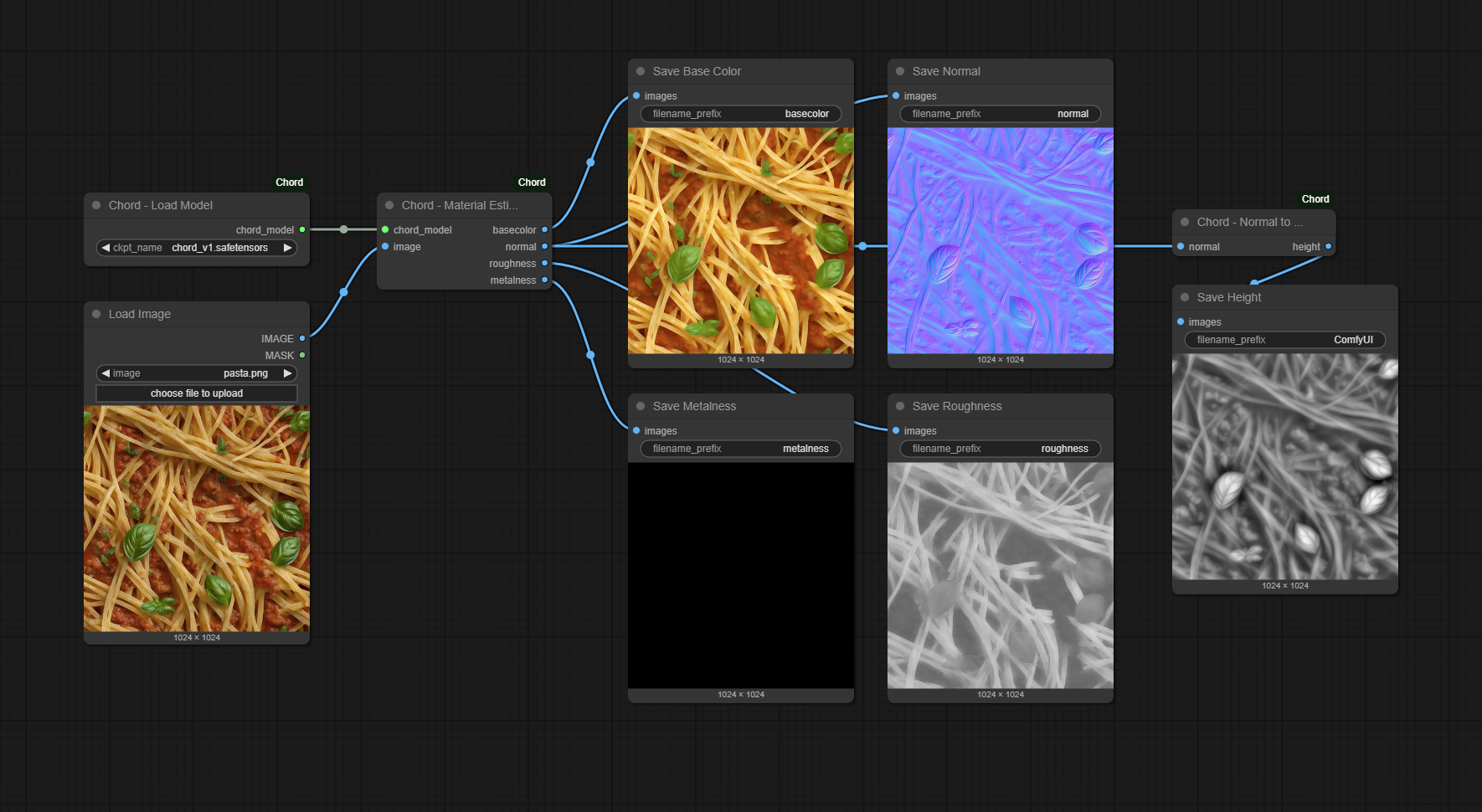
You can load this workflow using the JSON file example_workflows/chord_image_to_material.json or by dropping the image in ComfyUI.
License
This project is released under the Ubisoft Machine Learning License (Research-Only - Copyleft). See the full terms in the LICENSE file.
Citation
If you find our work useful, please consider citing:
@inproceedings{ying2025chord,
    author = {Ying, Zhi and Rong, Boxiang and Wang, Jingyu and Xu, Maoyuan},
    title = {Chord: Chain of Rendering Decomposition for PBR Material Estimation from Generated Texture Images},
    year = {2025},
    isbn = {9798400721373},
    publisher = {Association for Computing Machinery},
    address = {New York, NY, USA},
    url = {https://doi.org/10.1145/3757377.3763848},
    doi = {10.1145/3757377.3763848},
    booktitle = {Proceedings of the SIGGRAPH Asia 2025 Conference Papers},
    articleno = {164},
    numpages = {11},
    keywords = {Appearance Modeling, Material Generation, Texture Synthesis, SVBRDF, Image-conditional Diffusion Models},
    series = {SA Conference Papers '25}
}
© [2025] Ubisoft Entertainment. All Rights Reserved.