
ComfyUI-FlowMatching-Upscaler
Progressive upscaling node for flow-matching models that incrementally doubles resolution with flow-consistent re-noising, denoising, and skip residual blending to preserve composition.
Nodes (7)
Flux2 past 1024 without the twin-torsos — DyPE, the Flux2 edition
Generate Qwen Image at 4K natively instead of praying the sampler holds together
The upscaler that rewinds the clock instead of dumping noise on your image
The single-stage version of the flow-matching upscaler
The tiny node that puts your custom-sampled latent back on the flow path
The 'rewind' half of a flow-matching upscale stage, for people who like their own sampler
A latent upscaler that respects all 16 channels — or just acts like stock
ComfyUI Flow Matching Upscaler
Overview
This repository ships a progressive upscaling node designed for flow-matching models such as Qwen Image and Flux2, alongside a powerful model patcher (DyPE) to enable high-resolution generation.
- Flow Matching Progressive Upscaler: Implements the approach outlined in
docs/Approach.pdf. It incrementally doubles resolution, re-noises the latent in a flow-consistent manner, denoises with the selected sampler, and blends skip residuals to preserve composition. - DyPE for Qwen Image: A model patch node that extends Qwen Image’s spatial rotary embeddings. It allows the diffusion model to stay coherent far beyond its native training resolution by applying Dynamic Position Extrapolation (DyPE).
- DyPE for Flux2: A model patch node for Flux2 that applies the same DyPE approach while respecting Flux2’s 4-axis positional scheme (text stays static while spatial axes extrapolate).
- Latent Upscale Advanced: A covariance-aware latent resampler inspired by
upscaling.md(optional global whitening / moment matching around the spatial upscaler). Defaults to matching ComfyUI’s standard latent upscale behavior unless you enable covariance processing.
The mesh drag and latent diagnostic nodes that previously shipped here now live
in the Skoogeer-Noise node pack.
Batch-oriented utility nodes (including Batch Filter Empty Images) now live in
the Skoogeer-Batch-Ops node pack.
Installation
- Clone this repository inside the
custom_nodes/directory of your ComfyUI installation. - Launch ComfyUI; the nodes will be registered under latent/upscaling and model_patches/unet categories.
(Mesh drag + latent debug moved to
Skoogeer-Noise.)
Example Workflow
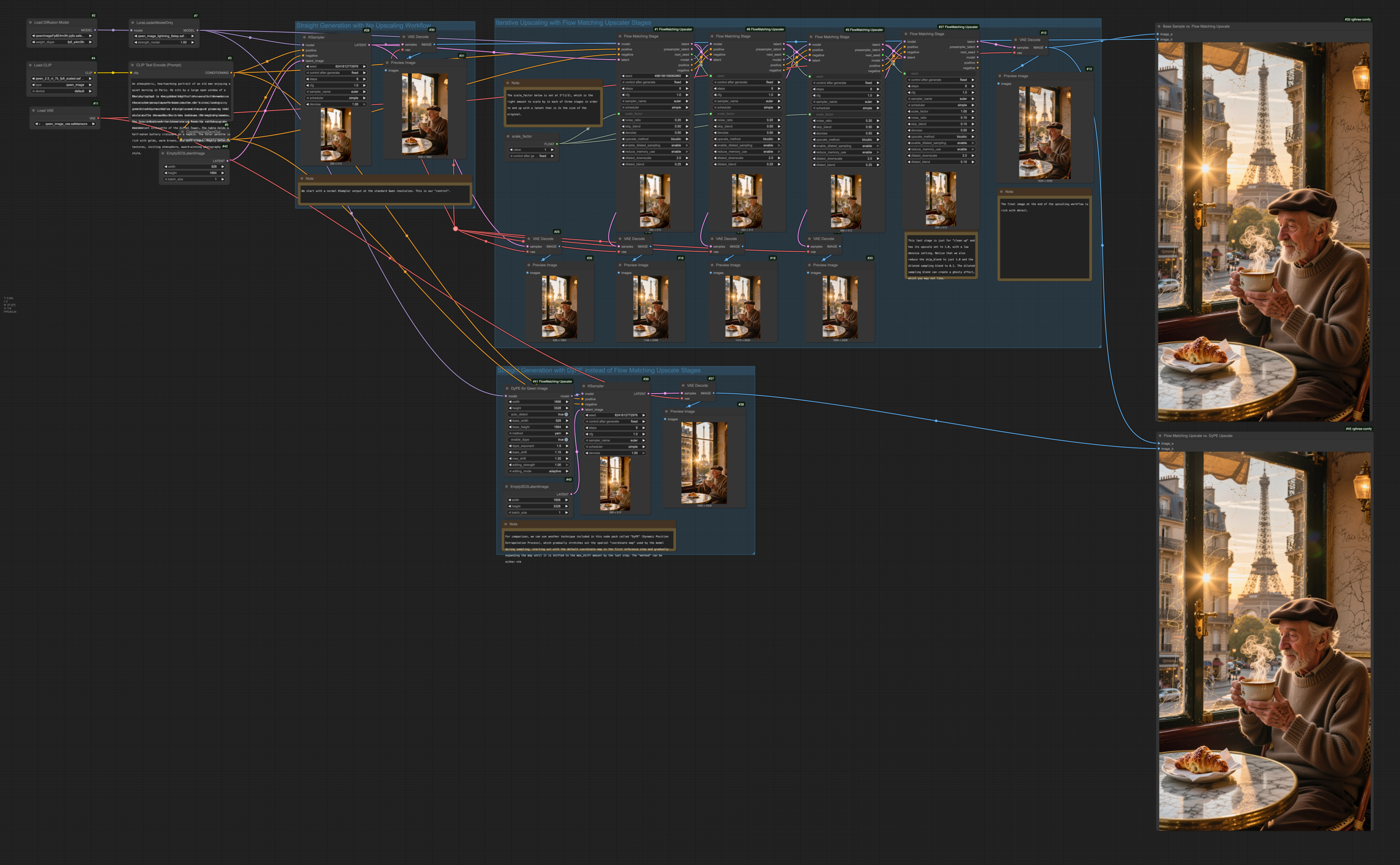
Part 1: Flow Matching Progressive Upscaler
How Flow Matching Upscaling Works
<p align="left"> <img src="images/Flow-Matching-Upscale-Process.jpeg" alt="How Flow Matching Upscaling works"> </p>In traditional diffusion models (like SD1.5 or SDXL), generating an image is often described as "removing noise" layer by layer. However, Flow Matching models (like Qwen) work a bit differently: think of them as calculating a direct, straight-line path (a "flow") from a chaotic state (noise) to an ordered state (your image).
When you use Flow Matching Upscaler nodes, you aren't just denoising; you are traveling along a specific trajectory.
- Stage 1: Generates your base image by following this path at a lower resolution.
- Stage 2 (The Upscale): Instead of just stretching the image and adding random noise (like standard "img2img"), the node physically resizes your latents and then mathematically "rewinds" the clock.
As shown in the center of the diagram, we step back along the timeline—for example, rewinding from the finished state ($t=0.0$) back to a mid-point ($t=0.6$). This places the model back onto the flow trajectory but at a much higher resolution. Because the model is resuming an existing journey rather than starting a new one, it doesn't hallucinate new objects or change your composition; it simply "flows" forward again, filling in the missing high-frequency details.
Key Concepts
The Role of the Noise Parameter
In Flow Matching, noise isn't just "randomness"—it is mathematical validity.
- Validating Time: A specific time on the flow trajectory (e.g., $t=0.6$) mathematically expects a specific mix of signal and noise. If you provide a clean upscaled image at $t=0.6$, the model gets confused. The noise parameter adds the necessary static back so the latent matches the statistical expectations of that timestep.
- Texture Fuel: The noise provides a substrate for the model to "carve" details into. Without it, upscales can look waxy or plastic.
- Preventing Burn-in: Noise dithers upscaling artifacts (like blocky edges), allowing the model to hallucinate cleaner, sharper edges in their place.
Dilated Sampling
Dilated sampling adds a coarse refinement lap immediately after the main sampler completes each stage.
- Downscale: Shrinks the freshly denoised latent (acting as a low-pass filter).
- Sample: Runs a short sampler pass in that reduced space.
- Blend: Upscales and mixes it back into the main result.
Use this to suppress high-frequency hallucinations (like extra pores or glittering artifacts).
Dilated Blend Strategy
Dilated refinement now always uses a frequency-domain blend when recombining the low-pass latent with the original samples. The FFT-based mix pulls low frequencies from the dilated pass and preserves high-frequency detail from the base latent, which consistently avoids the grid artifacts that the alternative modes were designed to mitigate. With this default in place, no explicit blend selector is required.
Usage Tips
- Upscaling is Optional: You don't have to upscale! Set
total_scaleto 1.0 to use this node for "Refinement." It gives the model a second chance to generate details on an existing latent without changing the resolution. - Memory Use: The upscaler samples the full latent. If VRAM is exhausted, the node automatically switches to a streaming fallback (LOW_VRAM mode), throttling the attention kernels. It will be slower, but it will not crash.
- Mask-aware Upscaling: When the input latent ships with a
noise_mask, the nodes upscale the mask alongside the latent so inpaint workflows keep their boundaries aligned at every stage.
Node Parameters: Progressive Upscaler
Required inputs
| Field | Type | Default | Purpose |
|-------|------|---------|---------|
| model | MODEL | – | Flow-matching diffusion model. |
| positive | CONDITIONING | – | Positive conditioning. |
| negative | CONDITIONING | – | Negative conditioning. |
| latent | LATENT | – | Base latent to upscale. |
| seed | INT | 0 | Base seed. |
| steps_per_stage | INT | 16 | Sampler steps per stage. |
| cfg | FLOAT | 4.5 | Guidance strength. |
| sampler_name | choice | – | Sampler backend. |
| scheduler | choice | – | Scheduler curve. |
| total_scale | FLOAT | 4.0 | Final size = base size × total_scale. |
| stages | INT | 2 | Number of progressive stages to reach total scale. |
| renoise_start | FLOAT | 0.35 | Noise ratio at the first stage. |
| renoise_end | FLOAT | 0.15 | Noise ratio at the final stage. |
| skip_blend_start | FLOAT | 0.8 | Mix weight of the upscaled latent before denoising (Stage 1). |
| skip_blend_end | FLOAT | 0.05 | Final-stage skip weight. |
| upscale_method | choice | bicubic | Resampling algorithm. |
Optional controls
| Field | Type | Default | Purpose |
|-------|------|---------|---------|
| noise_schedule_override | STRING | "" | Comma-separated overrides for renoise ratios. |
| skip_schedule_override | STRING | "" | Comma-separated overrides for skip weights. |
| denoise | FLOAT | 1.0 | Global denoise strength. |
| enable_dilated_sampling | enum | "enable" | Adds the dilated refinement pass. |
| dilated_downscale | FLOAT | 2.0 | Downscale factor for dilation. |
| dilated_blend | FLOAT | 0.25 | Blend weight of the dilated result. |
| cleanup_stage | enum | "disable" | Adds an extra non-scaling polish stage. |
Modular Nodes
For complex workflows, you can use the individual components of the upscaler.
1. FlowMatchingStage
Chain these nodes manually for caching benefits.
Key Inputs:
scale_factor: How much to resize in this specific step.noise_ratio: Amount of flow-noise to inject.skip_blend: Blend factor between pre-sampler latent and denoised result.next_seed: Connect this output to theseedof the next stage for deterministic chains.- Dilated refinement blends results in the frequency domain automatically—no manual method selection is required (FlowMatchingStage only).
Custom Sampler workflow (modular):
FlowMatchingStagePrepoutputsskip_latent+presampler_latent(+seed/next_seed).- Feed
presampler_latentinto ComfyUI’sSamplerCustom/SamplerCustomAdvanced(useseedas the noise seed). FlowMatchingStageMergeblends the sampled latent withskip_latentviaskip_blend.- This modular path intentionally omits the stage node’s low-VRAM fallback and dilated refinement.
2. Latent Upscale Advanced
Upscales latents like ComfyUI’s built-in latent upscale node by default, with optional covariance-aware whitening (PCA/eigenbasis) and an optional moment_match pass to restore mean/covariance after interpolation. Note: ComfyUI’s lanczos path is image/PIL-based and is treated as bicubic for latents here.
Part 2: DyPE for Qwen Image
How DyPE Works
<p align="left"> <img src="images/DyPE-Extrapolation-Process.jpeg" alt="How DyPE works"> </p>Models like Qwen are trained on a specific "map" size (e.g., 1024x1024). When you generate 4K images, you force the model off the edge of its map, causing it to hallucinate repeating patterns (cloning artifacts).
DyPE (Dynamic Position Extrapolation) treats generation as a journey.
- Early Steps: It keeps coordinates close to the native training size to secure solid composition.
- Later Steps: It dynamically expands the grid (using an exponential ramp) as the sampler progresses.
This allows the model to "see" the massive 4K canvas clearly exactly when it needs to paint high-frequency details, preventing the "washed out" look of standard stretching.
Understanding the Methods
The method parameter determines the math used to handle coordinates outside the training resolution.
| Method | Fidelity | Sharpness | Recommended Use Case | | :--- | :--- | :--- | :--- | | YaRN | High | High | Default for Images. Best for 2K/4K generation. Preserves texture by handling frequency bands separately. | | NTK | Medium | Medium | Smoother. Uniformly scales rotation speed. Use this if YaRN looks "jagged" or over-sharpened. | | Base | Native | N/A | Vanilla. Turns off spatial extrapolation. Use for testing or native-resolution generation. |
Node Parameters: DyPE for Qwen Image
Required inputs
| Field | Type | Default | Purpose |
|-------|------|---------|---------|
| model | MODEL | – | Qwen Image diffusion model. |
| width / height | INT | 1024 | Target render resolution (must match your latent). |
| auto_detect | BOOLEAN | True | Automatically infer patch size/base resolution from model. |
| method | enum | yarn | Extrapolation strategy (see table above). |
| enable_dype | BOOLEAN | True | Toggle the dynamic scaling over time. |
| dype_exponent | FLOAT | 2.0 | How aggressively DyPE ramps. Higher = stays closer to base res longer. |
| base_shift | FLOAT | 1.15 | Baseline noise schedule shift. |
| max_shift | FLOAT | 1.35 | Max noise schedule shift at target resolution. |
| editing_strength | FLOAT | 1.0 | Lower this to preserve original structure during Inpainting/Img2Img. |
| editing_mode | enum | adaptive | Tapering strategy for edits. |
Outputs
model: The patched model ready for the KSampler.
Part 3: DyPE for Flux2
Flux2 models use a 4-axis RoPE layout (index, height, width, text). DyPE for Flux2 extrapolates only the spatial axes (height/width) while keeping the text axis static so prompt conditioning remains stable.
Node Parameters: DyPE for Flux2
Required inputs
| Field | Type | Default | Purpose |
|-------|------|---------|---------|
| model | MODEL | – | Flux2 diffusion model. |
| width / height | INT | 1024 | Target render resolution (must match your latent). |
| auto_detect | BOOLEAN | True | Automatically infer patch size/base resolution from model. |
| method | enum | yarn | Extrapolation strategy (same as Qwen Image). |
| enable_dype | BOOLEAN | True | Toggle the dynamic scaling over time. |
| dype_exponent | FLOAT | 2.0 | How aggressively DyPE ramps. Higher = stays closer to base res longer. |
| base_shift | FLOAT | 2.02 | Baseline Flux2 noise schedule shift. |
| max_shift | FLOAT | 2.35 | Max noise schedule shift at target resolution. |
| editing_strength | FLOAT | 1.0 | Lower this to preserve original structure during Inpainting/Img2Img. |
| editing_mode | enum | adaptive | Tapering strategy for edits. |
Outputs
model: The patched model ready for the KSampler.
Mesh Drag / Latent Debug Nodes
The mesh drag and latent debug nodes previously shipped in this repo were split
into the Skoogeer-Noise node pack so they can be installed independently.
Development
Running tests
Use pytest; the suite installs lightweight comfy and nodes stubs so it can
run outside of a live ComfyUI process:
pytest
Logging
The node uses Python's logging subsystem. Enabling DEBUG level emits per-channel mean and standard deviation diagnostics, useful for probing latent space behavior.