
Better-Gemini
A better node for using Google Gemini models, supporting the latest API endpoints with a v3 ComfyUI node interface.
Nodes (3)
ComfyUI Better Gemini
ComfyUI V3 nodes for generating images and text with Google Gemini and xAI Grok, plus image generation and editing through OpenRouter.
This repo provides three nodes:
Better Geminifor Gemini image and text generationBetter Grokfor Grok image generation, image editing, and text chatBetter OpenRouterfor OpenRouter image generation and reference-guided editing
Install
- Clone into your ComfyUI
custom_nodesdirectory:cd /path/to/ComfyUI/custom_nodesgit clone https://github.com/<you>/ComfyUI-Better-Gemini.git
- Install Python deps with
uv:uv syncuv pip install --python /path/to/ComfyUI/python/bin/python -e ./ComfyUI-Better-Gemini
- Set API keys as needed:
export GOOGLE_API_KEY="..."orexport GEMINI_API_KEY="..."export XAI_API_KEY="..."(optional for Grok Imagine after OAuth login)export OPENROUTER_API_KEY="..."
- Restart ComfyUI.
Nodes
Better Gemini
- Inputs: prompt, model,
response_modalities(IMAGE,IMAGE+TEXT,TEXT), optional prompt images, aspect ratio, resolution or width+height, temperature, top_p, top_k, max tokens, thinking controls, seed, optional output caching - Outputs:
IMAGE,STRING - Use it when you want one node that can handle both Gemini image models and Gemini text-only models
Better Grok
- Inputs: prompt, model, authentication mode (
auto,oauth,api_key),response_modalities(IMAGE,IMAGE+TEXT,TEXT), reasoning effort (none,low,medium,high), optional prompt images, aspect ratio, resolution,n, optional output caching - Outputs:
IMAGE,STRING - Use it when you want Grok image generation, image editing, or a text-only Grok call from the same node
xAI OAuth Login
Better Grok can use xAI device authorization for Imagine image generation and editing without storing an API key in the workflow:
- Add or open a Better Grok node with ComfyUI's V3 node renderer.
- Click
Loginin the node header. - Open the xAI verification page, sign in, enter the displayed code if requested, and approve access.
- Leave ComfyUI running while the node polls for approval. The button changes to
Logoutwhen authorization completes, and the initiating node switches toauth_mode=oauth.
Authentication modes:
autopreserves existing workflows: an inline API key wins, then a saved OAuth login is used for Imagine requests, thenXAI_API_KEYremains the fallback.oauthrequires a completed node-header login and never uses the API-key field.api_keyuses the inline key orXAI_API_KEYand ignores saved OAuth credentials.
OAuth credentials are stored server-side under ComfyUI's protected system-user directory (user/__better_gemini/xai_oauth.json), not in workflows or browser storage. The directory and token file use private permissions where the platform supports them. Each workflow run checks token expiry asynchronously; near-expiry credentials refresh in the background, while an already expired token is refreshed before the xAI request is sent. Logout cancels pending login/refresh work and deletes the stored credentials.
The OAuth client follows xAI's Grok-compatible device endpoints at auth.x.ai and sends the resulting bearer only to xAI's public Imagine image endpoints. Better Grok TEXT mode continues to require an API key because xAI OAuth chat traffic uses a separate CLI-proxy wire contract. This OAuth surface is not documented as a stable public xAI integration API and may require maintenance if xAI changes it.
xAI Rate Limiting
All Better Grok calls in one ComfyUI process share a thread-safe, per-model request coordinator. By default it starts no more than 5 requests per second and allows no more than 5 logical requests for the same model in flight. Starts are evenly spaced instead of released in one burst. The coordinator retains one minute of attempt timestamps for accounting and removes active entries in a finally block after success, terminal failure, retry exhaustion, or eventual completion of a cancelled coroutine's worker thread.
An xAI 429 Too Many Requests response pauses the whole model bucket, then retries with exponential backoff and jitter. Retry-After is honored when xAI supplies it. The default is five retries after the initial attempt, with delays based on 1, 2, 4, 8, and 16 seconds and a 30-second cap.
Restart ComfyUI after changing any of these optional environment settings:
BETTER_GROK_MAX_RPS(default5)BETTER_GROK_MAX_IN_FLIGHT(default5)BETTER_GROK_MAX_RETRIES(default5)BETTER_GROK_BACKOFF_BASE_SECONDS(default1)BETTER_GROK_BACKOFF_MAX_SECONDS(default30)
Keep the configured RPS below the personalized per-model limit shown in the xAI Console. Coordination is process-local; separate ComfyUI processes or other clients using the same xAI team can still consume the team's shared capacity and trigger adaptive 429 backoff.
Better OpenRouter
- Inputs: prompt, OpenRouter image model, optional reference images, aspect ratio, resolution tier or explicit width+height, quality, raster output format, background, compression, image count, seed, optional output caching
- Outputs:
IMAGE,STRING - Calls OpenRouter's dedicated
POST /api/v1/imagesendpoint and supports local ComfyUI images throughinput_references - Use it when you want one ComfyUI node for the image-generation and editing models available through OpenRouter
Output Behavior
- In
TEXTmode, the usable model output is returned throughSTRING. - In
TEXTmode, theIMAGEoutput is a minimal blank1x1tensor so ComfyUI graphs can stay connected without allocating a large placeholder. - In
IMAGE+TEXTmode, image generation still runs and any returned notes or revised prompt text are placed inSTRING. - If Gemini, Grok, or OpenRouter returns no images when image output was requested, the node emits a blank placeholder image and includes a note in
STRING. - If
cache_outputsis enabled, model outputs are stored under.cache/and identical future requests reuse the cachedIMAGE/STRINGoutputs without calling the provider.
Model Dropdowns
- Gemini model options are populated via
client.models.list()without action-based filtering, so both image-capable and text-only Gemini models can appear in the same dropdown. - Grok model options merge xAI
/v1/image-generation-modelsand/v1/language-models, so image and language models can appear in the same dropdown. - OpenRouter model options are populated from
/api/v1/images/models, which returns image-model capability metadata. The node uses the selected model slug while OpenRouter routes the request to an eligible provider. - If an API key is unavailable or model listing fails, each node falls back to bundled default model names.
Bundled fallback models:
- Gemini:
gemini-3.1-flash-lite-image,gemini-3-flash-preview,gemini-3.1-flash-image-preview,gemini-3.1-flash-lite-preview,gemini-3-pro-image-preview,gemini-3.1-pro-preview,imagen-4.0-generate-001,imagen-4.0-ultra-generate-001 - Grok:
grok-imagine-image,grok-imagine-image-2.0,grok-imagine-image-pro,grok-imagine-image-quality,grok-latest,grok-4,grok-4-fast-non-reasoning,grok-3-mini,grok-code-fast-1 - OpenRouter:
openai/gpt-image-2,openai/gpt-image-1,openai/gpt-image-1-mini,google/gemini-3.1-flash-image,google/gemini-3-pro-image,bytedance-seed/seedream-4.5,black-forest-labs/flux.2-pro
Recommended text-only examples:
- Gemini:
gemini-3-flash-preview,gemini-3.1-flash-lite-preview,gemini-3.1-pro-preview - Grok:
grok-latest,grok-4,grok-4-fast-non-reasoning,grok-3-mini,grok-code-fast-1
Example Workflow
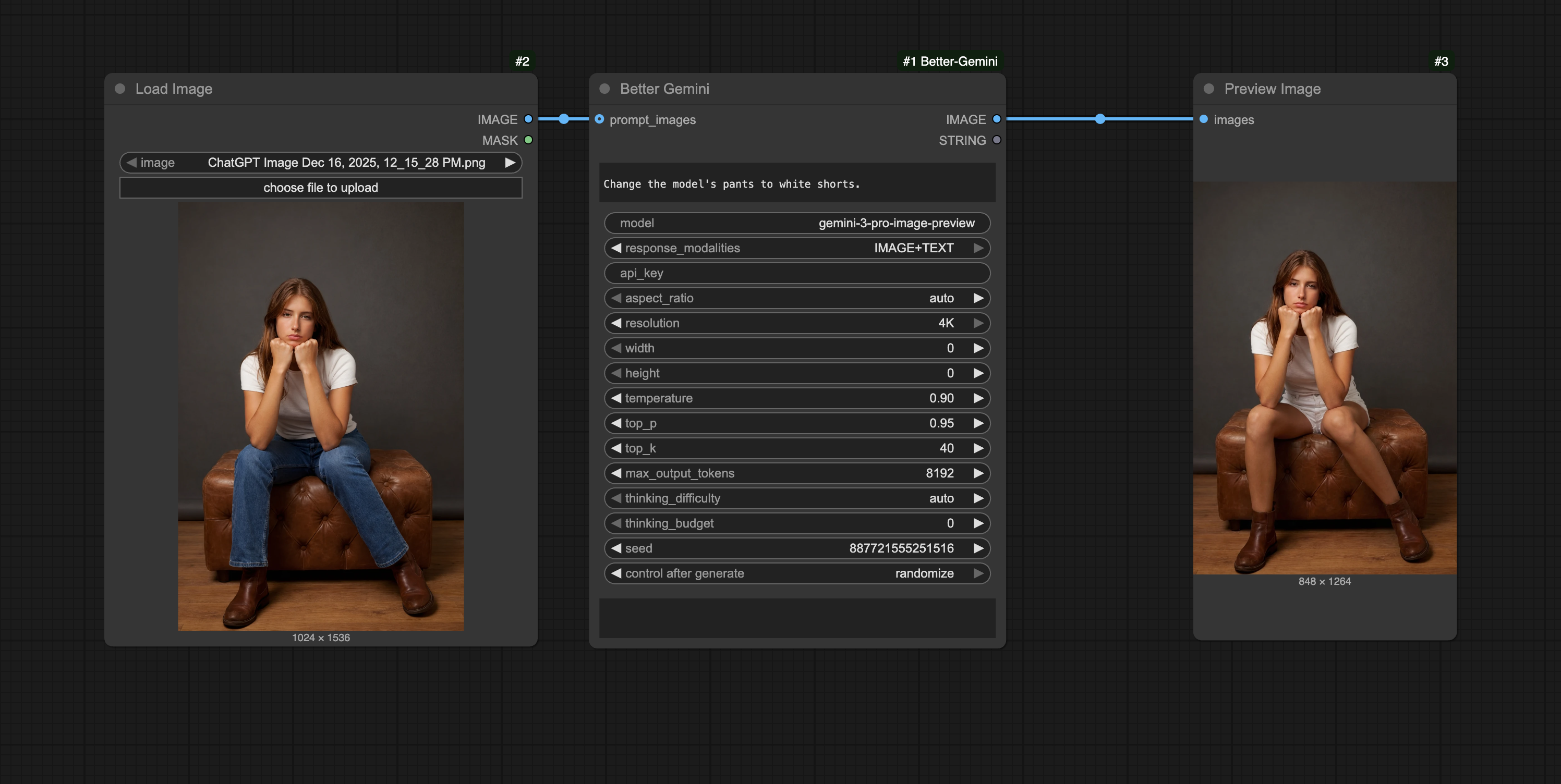
Implementation Notes
- The Gemini node imports
google-genailazily so ComfyUI can still boot even if dependencies are not installed yet; execution raises a clear error until installed. - This extension uses ComfyUI's V3 extension loader via
comfy_entrypoint. - Gemini requires
seedto fit in anint32; larger ComfyUI seeds are deterministically folded viaseed % 2**31. - When
response_modalities=TEXT, Gemini requests omit image-specific config. - Grok image generation is wired against xAI's documented image endpoints and requests
response_format="b64_json", so the node can return image tensors directly instead of downloading temporary URLs. - The Grok HTTP client sends an explicit application
User-Agentbecauseapi.x.aican reject the defaultPython-urllibsignature with Cloudflare 1010. - Grok image edits use xAI's JSON-based
/v1/images/editsAPI and send ComfyUIIMAGEinputs as PNG data URIs. Multiple prompt images are supported for edit and merge workflows. - Grok inference calls share a process-wide, thread-safe per-model coordinator that spaces request starts, caps in-flight work, tracks recent attempts, and coordinates bounded 429 retries across parallel ComfyUI executions.
- Better Grok's Login button uses xAI device authorization at
auth.x.ai; the browser sees only the verification URL and user code, while access and refresh tokens stay in ComfyUI's protected server-side system-user storage. - The OAuth frontend initializes during ComfyUI's early
initlifecycle (with an idempotentsetupfallback), so an unrelated malformed node definition cannot prevent the Login button from being installed. Nodes 2.0 places it in the DOM title bar; the canvas renderer receives an equivalent ComfyUI button widget in the node body. - OAuth refresh is deduplicated across concurrent workflow runs. Near-expiry tokens refresh in an asynchronous background task; expired tokens block only until the refresh completes, preventing an avoidable request with an expired bearer.
- Grok
TEXTmode uses xAI's/v1/responsesendpoint with configurable reasoning effort andstore=false, since node calls are not reused as xAI chat sessions. If prompt images are attached, the node sends them as response image inputs and returns the model's text throughSTRING. - OpenRouter returns generated images as base64 in
data[].b64_json; the node decodes raster outputs directly into ComfyUI tensors and reports API cost inSTRINGwhenusage.costis present. - OpenRouter reference images are encoded as PNG data URLs under
input_references. The selected model determines how many references and which settings are supported. - OpenRouter explicit width+height values are sent as
sizeand take precedence overresolutionandaspect_ratio, matching the API's mutually exclusive sizing rules. - OpenRouter SVG generation is not exposed because ComfyUI
IMAGEoutputs require raster data; select a raster model and PNG, JPEG, or WebP output. - Output caching uses the SHA-256 checksum of canonical Gemini, Grok, or OpenRouter request data as the manifest filename, with string and image payloads stored as separate content-addressed files.
resolutionandaspect_ratioare best-effort, model-dependent settings. The node logs a warning if the returned size does not match the request.
Dev
- Sync dev environment:
uv sync --dev - Run unit tests:
uv run python -m unittest discover -s tests -p 'test_*.py' -v