
ComfyUI Extension
siray-comfyui
Custom ComfyUI nodes for Siray image/video models with dynamic schema-based inputs, authentication, and video streaming. (Description by CC)
siray-ai/siray-comfyui
Nodes—
On cloudLocal install
Stars88
Updated10 months ago
Readme
<div align="center">
<a href="https://siray.ai" aria-label="Siray">
<img src="https://www.siray.ai/black-logo.svg" alt="Siray logo" width="220">
</a>
<p>
<a href="https://discord.com/invite/CmSbUzPSVP">
<img src="https://console.siray.ai/images/discord-fill.webp" alt="Discord" width="18" style="vertical-align: middle; margin-right: 6px;">
Join the Siray Discord
</a>
</p>
</div>
Siray ComfyUI Nodes
Custom ComfyUI nodes that call Siray image/video models through the official siray-python SDK. Model nodes are generated dynamically from Siray Model Verse schemas, so the inputs match the API for each model.
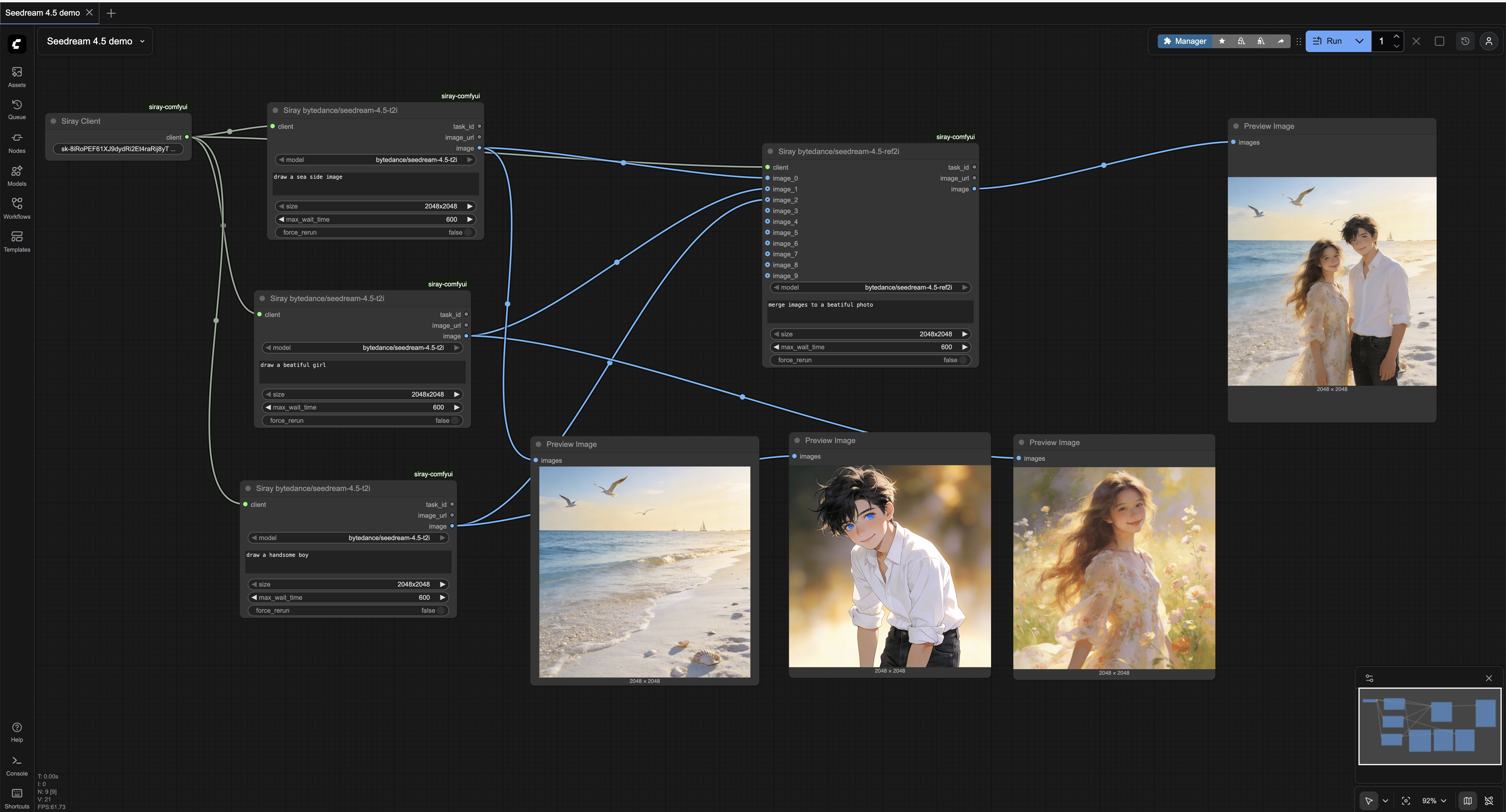
What you get
- Siray Client: Creates an authenticated client. Reads
config.iniwhen the input is empty; auto-createsconfig.inibeside this repo if missing. - Siray Video Player: Output node that streams any HTTP/HTTPS video URL in the UI (no download). Frontend lives in
web/videoPlayer.js. Not compatible with ComfyUI Nodes 2.0. - Siray <model_name>: One node per Siray model fetched from Model Verse (
text-to-image,image-to-image,text-to-video,image-to-video,image,videotags). When a schema includes animagesarray, nodes createimage_0...image_ninputs based onminItems/maxItems.
How generated model nodes behave
- Inputs are derived from the model JSON schema:
- Numbers →
FLOAT(step 0.01) orINT; booleans →BOOLEAN; enums → dropdown. - Fields containing
promptare multiline; fields containingimageaccept a ComfyUI image tensor and are converted to Siray data URLs. - Array fields accept newline-separated strings;
imagesarrays become multipleimage_*inputs to matchminItems/maxItems. modeldefaults to the model’s own name.- Extra controls:
max_wait_time(image default 300s, video default 600s) andforce_rerun.
- Numbers →
- Execution:
- Image nodes return
(task_id, image_url, image)whereimageis a tensor fetched fromimage_url. - Video nodes return
(task_id, video_url). - Tasks are created via the Siray SDK and polled until completion (
poll_intervaldefaults to 5s).
- Image nodes return
Install
Option 1: ComfyUI Manager (Recommended)
- Open ComfyUI and go to Manager
- Search for "siray-comfyui" or "Siray" in the custom nodes list
- Click Install
- Restart ComfyUI. On load, nodes fetch model schemas from Siray; if offline, only Siray Client and Siray Video Player will appear.
Option 2: Manual Installation
- Clone this repo to
ComfyUI/custom_nodes/siray-comfyui:cd ComfyUI/custom_nodes git clone https://github.com/siray-ai/siray-comfyui.git cd siray-comfyui - Install dependencies (ComfyUI usually has most already):
pip install -r requirements.txt - Restart ComfyUI. On load, nodes fetch model schemas from Siray; if offline, only Siray Client and Siray Video Player will appear.
Configuration
Add API key: pass it to Siray Client node or fill config.ini (copy from config.ini.tmp).
Usage
- Drop Siray Client and supply an API key (or rely on
config.ini). - Pick a Siray <model_name> node, set prompts/params, and execute.
- For video URLs, connect to Siray Video Player to preview inline.
Requirements
siray, requests, Pillow (see requirements.txt); ComfyUI provides torch/numpy.
License
Apache-2.0.
Roadmap
- Optional download-to-output node for videos with file management controls.
- Batch task orchestration helpers (queue, cancel, retry) for Siray jobs.
- Support more models from Siray.