
comfyui-sg-llama-cpp
llama-cpp-python wrapper, with support for vision models. It allows the user to generate text responses from prompts using llama.cpp.
comfyui-sg-llama-cpp
ComfyUI custom node that acts as a llama-cpp-python wrapper, with support for vision models. It allows the user to generate text responses from prompts using llama.cpp.
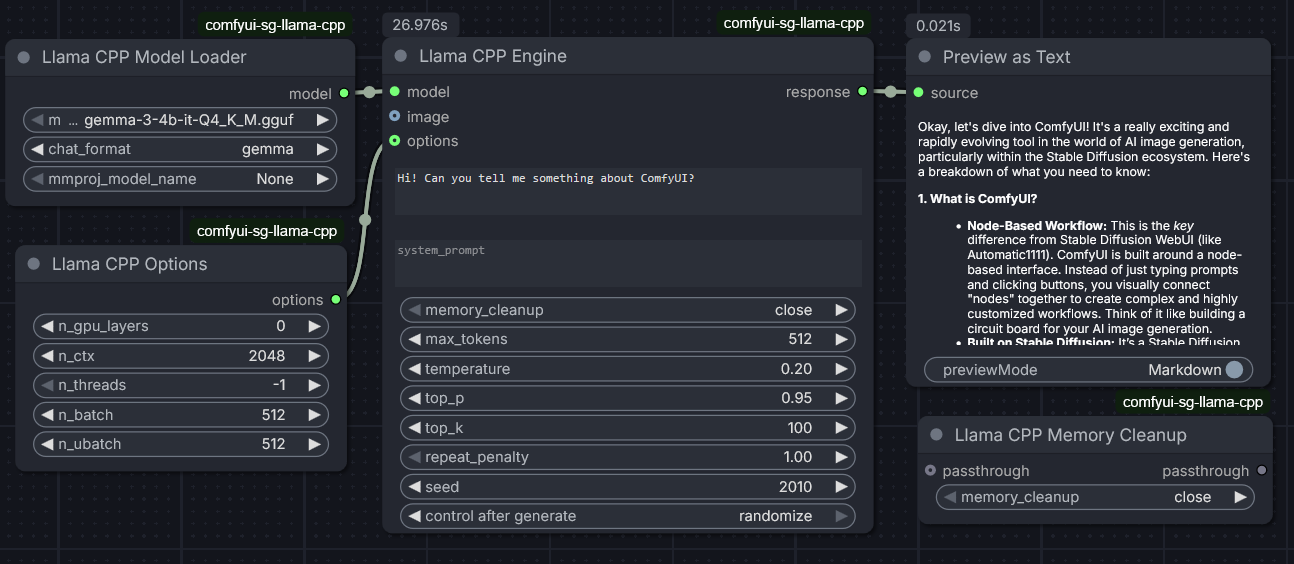
- Load and use GGUF models (including vision models)
- Generate text prompts using llama.cpp
- Support for multi-modal inputs (multiple images/batches)
- Advanced sampling (Min-P, Presence/Frequency penalties)
- JSON Schema support for structured output (json_object)
- Memory management options
- Integration with ComfyUI workflows
Installation
-
Install the required dependency/wheel from:
https://github.com/JamePeng/llama-cpp-python/releases -
Clone this repository into your ComfyUI custom nodes directory:
cd ComfyUI/custom_nodes git clone https://github.com/sebagallo/comfyui-sg-llama-cpp -
Restart ComfyUI.
Node Reference
LlamaCPPModelLoader
Loads GGUF model files and prepares them for use.
Inputs
- Required:
model_name: Select the GGUF model file to load.
- Optional:
chat_format: Chat template to use (default:llama-2).mmproj_model_name: Multi-modal projector model for vision (default:None).
Outputs
MODEL: The loaded Llama model object.
LlamaCPPOptions
Configures advanced parameters for the model.
Inputs
- Optional:
n_gpu_layers: Number of layers to offload to GPU (default:-1for all).n_ctx: Context window size (default:2048).n_threads: CPU threads to use (default:-1for auto).n_threads_batch: Threads for batch processing (default:-1for auto).n_batch: Batch size (default:2048).n_ubatch: Micro-batch size (default:512).main_gpu: Main GPU ID (default:0).offload_kqv: Offload K/Q/V to GPU (default:Enabled).numa: NUMA support (default:Disabled).use_mmap: Memory mapping (default:Enabled).use_mlock: Memory locking (default:Disabled).use_direct_io: Enable direct I/O for library (Linux only, default:Disabled).verbose: Verbose logging (default:Disabled).vision_use_gpu: Enable GPU for vision handler (default:Enabled).vision_image_min_tokens: Minimum image tokens (default:-1).vision_image_max_tokens: Maximum image tokens (default:-1).vision_enable_thinking: Enable thinking mode for GLMV models (default:Disabled).vision_force_reasoning: Force reasoning for QwenVL models (default:Disabled).vision_add_vision_id: Add vision ID for QwenVL models (default:Enabled).
Outputs
OPTIONS: A configuration dictionary.
LlamaCPPEngine
The main generation node.
Inputs
- Required:
model: The model fromLlamaCPPModelLoader.prompt: The text prompt.
- Optional:
images: Input image(s) for vision models (supports batches).options: Options fromLlamaCPPOptions.system_prompt: System instruction (default: empty).memory_cleanup: Strategy to clean memory after generation (default:close).response_format:textorjson_object(default:text).json_schema: JSON Schema to enforce (available only whenjson_objectis selected).max_tokens: Max new tokens (default:512).temperature: Randomness (default:0.2).top_p: Nucleus sampling (default:0.95).top_k: Top-k sampling (default:40).min_p: Min-p sampling (default:0.05).repeat_penalty: Penalty for repetition (default:1.1).present_penalty: Penalty for presence of tokens (default:0.0).frequency_penalty: Penalty for frequency of tokens (default:0.0).seed: Random seed (default:-1).
Outputs
RESPONSE: The generated text.
LlamaCPPMemoryCleanup
Utility to manually free resources.
Inputs
- Required:
memory_cleanup: Cleanup mode (close,backend_free,full_cleanup,persistent).
- Optional:
passthrough: Any input to pass through (allows chaining).
Outputs
PASSTHROUGH: The input passed through unmodified.
Custom Model Folders
By default, the node loads GGUF models from ComfyUI's text_encoders folder. You can optionally specify additional folders to load models from by creating a config.json file in the custom nodes directory.
Configuration
- Create a file named
config.jsonin the same directory as this README - Add your custom model folders in the following JSON format:
{
  "model_folders": [
    "C:\\Users\\YourUsername\\models",
    "D:\\AI\\LLM\\models",
    "/home/user/models"
  ]
}
Notes
- The
config.jsonfile is optional - the node works without it - Paths can be absolute or relative
- Both Windows (
C:\) and Unix (/) style paths are supported - Non-existent paths are automatically filtered out
- Models from all folders (ComfyUI's
text_encoders+ your custom folders) will appear in the model selection dropdown - See
config.example.jsonfor additional examples
Requirements
- llama-cpp-python (from https://github.com/JamePeng/llama-cpp-python, make sure to install the right version for your hardware and torch/cuda version)
License
This project is licensed under the GNU AGPLv3 License - see the LICENSE file for details.
Repository
https://github.com/sebagallo/comfyui-sg-llama-cpp