
ComfyUI-PersonaLive
A ComfyUI custom node implementation of PersonaLive: Expressive Portrait Image Animation for Live Streaming, enabling portrait animation driven by reference images. (Description by CC)
Nodes (2)
ComfyUI-PersonaLive
This is a ComfyUI custom node implementation of PersonaLive: Expressive Portrait Image Animation for Live Streaming.
[!NOTE] This implementation supports both Image Input and Video Input (driving the portrait with a frame sequence).
Original Repository: GVCLab/PersonaLive
Paper: ArXiv 2512.11253
I deeply appreciate the authors Zhiyuan Li, Chi-Man Pun, Chen Fang, Jue Wang, and Xiaodong Cun for their amazing work and for sharing their code.
🛠 Installation
-
Clone this repository into your
ComfyUI/custom_nodes/directory:cd ComfyUI/custom_nodes/ git clone https://github.com/okdalto/ComfyUI-PersonaLive cd ComfyUI-PersonaLive pip install -r requirements.txt -
Model Setup:
Option 1: Automatic Download (Recommended)
Models will be automatically downloaded from Hugging Face when you first use the
PersonaLiveCheckpointLoadernode. The node will:- Detect missing models in your selected directory
- Download required models (~15-20GB total):
lambdalabs/sd-image-variations-diffusers(Base Model)stabilityai/sd-vae-ft-mse(VAE)huaichang/PersonaLive(PersonaLive Weights)
- Organize them into the correct structure automatically
[!NOTE] The first download will take some time depending on your internet speed. Models are cached locally, so subsequent loads will be instant.
Option 2: Manual Download
If you prefer to download models manually or have connectivity issues:
Create a folder named
persona_liveinside yourComfyUI/models/directory with the following structure:ComfyUI/models/ └── persona_live/ ├── sd-image-variations-diffusers/ <-- Base Model ├── sd-vae-ft-mse/ <-- VAE └── persona_live/ <-- PersonaLive Repository └── pretrained_weights/ <-- .pth files location └── personalive/ <-- .pth files location ├── denoising_unet.pth ├── motion_encoder.pth ├── motion_extractor.pth ├── pose_guider.pth ├── reference_unet.pth └── temporal_module.pth- Download Base Models:
- Download PersonaLive Weights:
- Clone or download the entire repository from Hugging Face
🚀 Usage
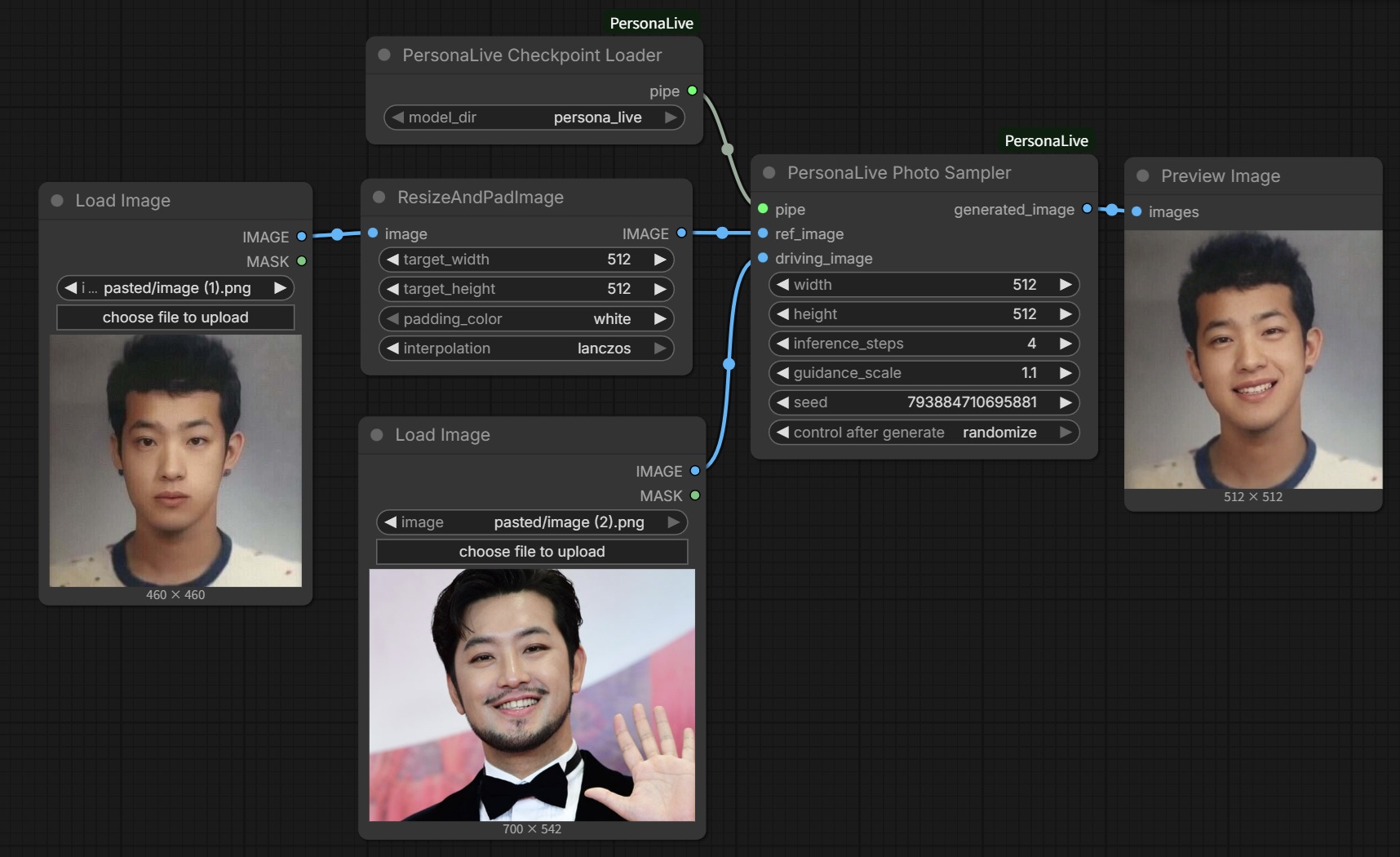
- PersonaLiveCheckpointLoader: Select the
model_dir(e.g.,persona_live) that contains all your models. - PersonaLivePhotoSampler:
- Connect the pipeline from the loader.
- Connect
ref_image(source portrait) anddriving_image(pose reference).driving_imagecan be a single image or a video frame batch. - Set
widthandheight(default 512). The node automatically resizes inputs to this resolution for processing and then restores the original resolution for the output.
Usage Tips
- Input Images: It is highly recommended to use square images (1:1 aspect ratio) for both
ref_imageanddriving_imageto ensure the best face alignment and generation quality. - Inference Steps: The model is optimized for 4 steps. If you increase this value, ensure it is a multiple of 4 (e.g., 8, 12, 16) to prevent errors.
🧪 Example Workflow
An example workflow is provided in the example folder. You can drag and drop the .json file from there into ComfyUI to get started quickly.
❤️ Acknowledgements
This project is simply a ComfyUI wrapper. All credit for the underlying technology and model architecture goes to the original authors of PersonaLive and the projects they built upon (Moore-AnimateAnyone, X-NeMo, StreamDiffusion, RAIN, LivePortrait).