
gemini-3-simply-comfyui
Two lightweight ComfyUI nodes for Gemini 3 preview models: Gemini 3 Pro (Text) and Gemini 3 Pro Image. (Description by CC)
Nodes (4)
A 3D camera widget that writes the shot for you — no API key, no Gemini call
Nano Banana Pro in your ComfyUI graph — at API prices, with the censorship you'd expect
Gemini 3's brain inside ComfyUI — text in, text out, no local weights
Your SD seed is too big for Gemini. This node fixes that.
Gemini 3 Custom Nodes for ComfyUI
Lightweight ComfyUI nodes for Gemini text/image models, plus a seed helper and a 3D camera prompt widget.
适用于 Gemini 文本/图像模型的轻量 ComfyUI 节点,包含种子辅助节点与 3D 相机提示词控件。
Features / 功能
-
Text + multimodal prompting for current Gemini text models, including
gemini-3-pro-preview,gemini-3-flash-preview, and thegemini-2.5-*family. -
Image generation/editing for Gemini image models, including Nano Banana 2 (
gemini-3.1-flash-image-preview) and Nano Banana Pro (gemini-3-pro-image-preview). -
Seed helper to normalize any value into Gemini's signed int32 range.
-
3D camera prompt widget with snapping camera angles and optional background image.
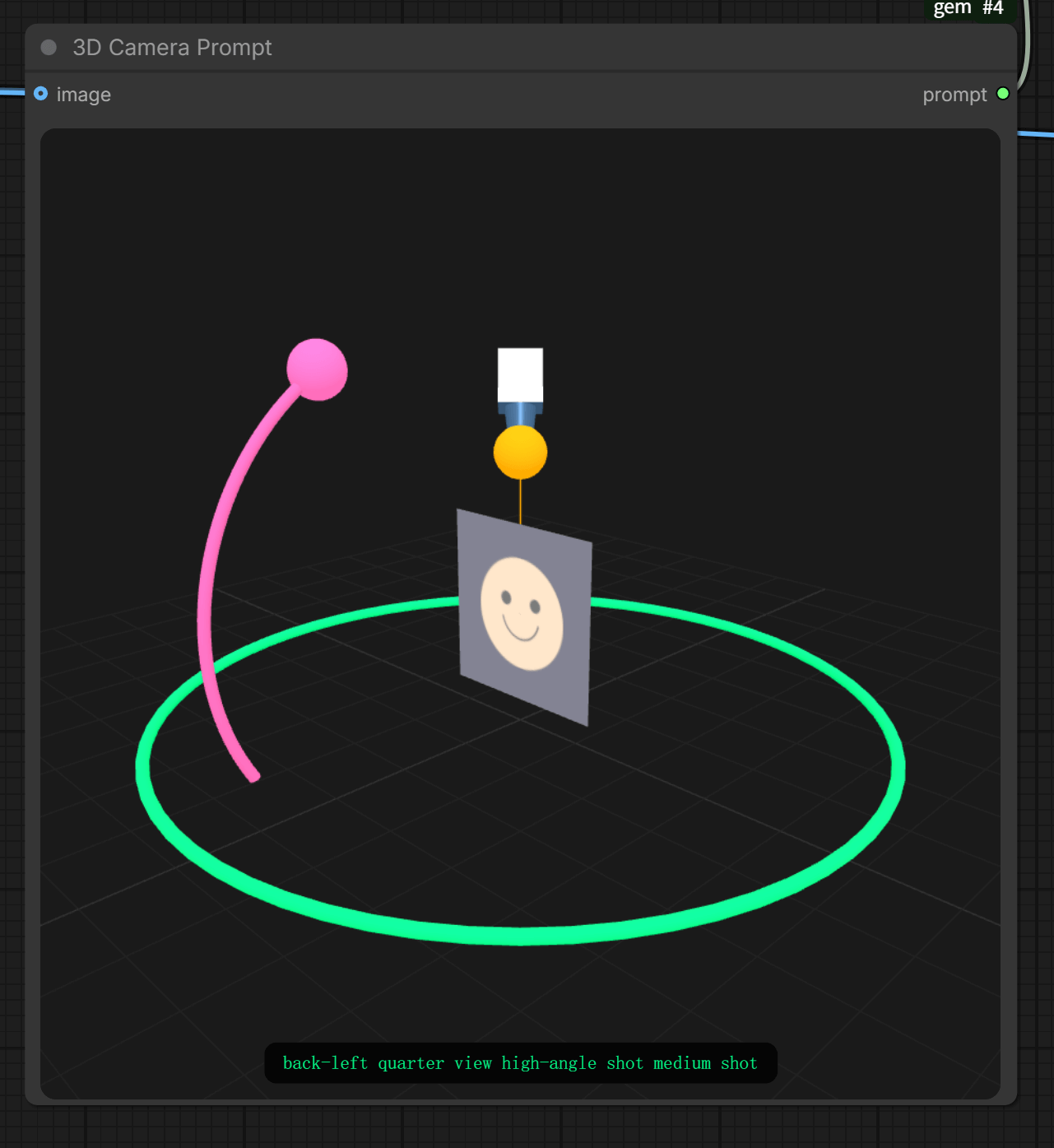
-
支持当前 Gemini 文本/多模态模型,包括
gemini-3-pro-preview、gemini-3-flash-preview和gemini-2.5-*系列。 -
支持 Gemini 图像模型(含 Nano Banana 2:
gemini-3.1-flash-image-preview、Nano Banana Pro:gemini-3-pro-image-preview)的图像生成/编辑。 -
Seed 辅助节点将任意数值归一到 Gemini 的 int32 范围。
-
3D 相机提示词控件(角度自动吸附,可显示输入图像)。
Quick Start / 快速开始
- Install dependencies:
pip install -r requirements.txt
-
Copy
config.example.jsontoconfig.jsonand fill in your API key(s). -
Restart ComfyUI.
-
安装依赖:
pip install -r requirements.txt
- 将
config.example.json复制为config.json并填写 API key。 - 重启 ComfyUI。
If the node is placed directly under custom_nodes, ComfyUI will also try to auto-install requirements.txt on startup when google-genai is missing. Manual install is still the fallback if your environment blocks package installation.
如果节点是直接放进 custom_nodes 目录,ComfyUI 在启动时检测到缺少 google-genai 后也会尝试自动安装 requirements.txt。如果当前环境不允许安装依赖,再手动执行上面的命令即可。
If you see No module named 'google' on macOS, install in the Python environment used by ComfyUI:
python3 -m pip install -r requirements.txt
如果 macOS 出现 No module named 'google',请在 ComfyUI 实际使用的 Python 环境里安装依赖:
python3 -m pip install -r requirements.txt
API Keys / API 密钥
-
Preferred: put keys in
config.json(ignored by git). -
Fallback: set
GEMINI_API_KEYin your environment. -
Node input
api_keycan override. When quota/limit errors occur, the node automatically tries the next key. -
推荐:在
config.json里配置(不会提交到 Git)。 -
备用:设置环境变量
GEMINI_API_KEY。 -
节点输入的
api_key可覆盖配置。遇到额度/限流错误时会自动轮换下一枚 key。
Nodes / 节点说明
Gemini Text
- Model options:
gemini-3-pro-preview,gemini-3-flash-preview,gemini-2.5-pro,gemini-2.5-flash,gemini-2.5-flash-lite - Inputs:
system_doc,prompt, optionalimage_1...image_10,media_resolution,thinking_level,seed - Outputs:
text
文本/多模态节点,支持最多 10 张图像输入,返回文本结果。
system_doc 会通过 Gemini API 的 system_instruction 字段传给模型,不会直接拼接到用户 prompt 里。
Gemini 3 Pro Image
- Model options:
nano-banana-pronano-banananano-banana-2
- Inputs:
prompt, optionalreference_image...reference_image_10,aspect_ratio,image_size,thinking_level,seed - Outputs:
image+text - Aspect ratio options:
auto,1:1,2:3,3:2,3:4,4:3,4:5,5:4,9:16,16:9,21:9,4:1,1:4,8:1,1:8 - Image size options:
0.5K,1K,2K,4K(0.5Kis sent to Gemini as512) - Thinking level options:
default,minimal,high
图像生成/编辑节点,支持参考图像、比例与尺寸控制,返回图像和模型文本。
比例可选值:auto、1:1、2:3、3:2、3:4、4:3、4:5、5:4、9:16、16:9、21:9、4:1、1:4、8:1、1:8。
尺寸可选值:0.5K、1K、2K、4K,其中 0.5K 会自动转换为 Gemini API 要求的 512。
thinking_level 目前仅对 Gemini 3.1 Flash Image 系列生效,可选 minimal / high;nano-banana-pro 对应的 Gemini 3 Pro Image Preview 按官方 API 说明使用默认 thinking,不能显式调级或关闭。
0.5K 目前仅对 Gemini 3.1 Flash Image 系列生效,因此建议配合 nano-banana-2 使用;若使用 nano-banana,节点会自动跳过不兼容的 2.5 模型回退项。
当 thinking_level 选择 minimal 或 high 且模型为 nano-banana 时,节点会自动跳过不支持该参数的 2.5 Image 候选,转而使用 3.1 Flash Image 候选。
当 thinking_level=default 或不传该参数时:
nano-banana-pro使用gemini-3-pro-image-preview的默认动态highthinking。nano-banana-2使用gemini-3.1-flash-image-preview/gemini-3.1-flash-image的默认动态highthinking。nano-banana优先使用gemini-2.5-flash-image,其默认行为是 2.5 系列的动态 thinking(不是thinking_level接口);只有回退到 3.1 Flash Image 时,才是默认动态highthinking。 当模型为nano-banana-pro且thinking_level选择minimal或high时,节点会直接报错,因为 Gemini 3 Pro Image Preview 不支持显式设置thinking_level。
Image Model Aliases / 图像模型别名与回退
-
nano-banana-promaps togemini-3-pro-image-preview. -
nano-bananafirst triesgemini-2.5-flash-image, then falls back togemini-3.1-flash-image-previewif needed. -
nano-banana-2first triesgemini-3.1-flash-image-preview, then falls back togemini-3.1-flash-imageif needed. -
Unsupported model values return a clear error listing only these three accepted options.
-
nano-banana-pro映射到gemini-3-pro-image-preview。 -
nano-banana默认映射到gemini-2.5-flash-image,若不可用会自动回退尝试gemini-3.1-flash-image-preview。 -
nano-banana-2默认映射到gemini-3.1-flash-image-preview,若不可用会自动尝试gemini-3.1-flash-image。 -
输入不支持的模型值会返回清晰报错,且仅列出这 3 个可选值。
Gemini Seed (int32)
- Inputs:
seed,mode(random_if_negative,wrap,clamp) - Outputs: normalized
seed
Seed 归一化节点,适用于任何来源的种子数值。
3D Camera Prompt
- Inputs:
azimuth,elevation,distance, optionalimage - Outputs:
prompt
3D 相机提示词控件,输出相机角度对应的 prompt,可显示输入图像。
3D Camera Prompt Details / 3D 相机参数
-
azimuth: horizontal rotation (0° front, 90° right, 180° back, 270° left). Snaps to 8 angles.
-
elevation: vertical tilt (-30° low, 0° eye-level, 60° high). Snaps to 4 heights.
-
distance: camera distance (0.6 close, 1.0 medium, 1.8 wide). Snaps to 3 distance levels.
-
azimuth:水平旋转角(0°=正面,90°=右侧,180°=背面,270°=左侧)。自动吸附到 8 个视角。
-
elevation:垂直仰俯角(-30°=低机位,0°=平视,60°=高机位)。自动吸附到 4 个高度。
-
distance:镜头远近(0.6=近景,1.0=中景,1.8=远景)。自动吸附到 3 个距离档位。
Seed Behavior / Seed 规则
-
seed = -1generates a new random seed each run. -
Valid range:
0to2147483647(Gemini expects signed int32). -
Gemini Seed (int32)modes:random_if_negative: negative becomes random; otherwise wrapped.wrap: always wrap into range.clamp: out-of-range values are clamped.
-
seed = -1每次运行都会随机生成新种子。 -
合法范围:
0到2147483647(Gemini 要求有符号 int32)。 -
Gemini Seed (int32)模式:random_if_negative:负数变随机,否则取模。wrap:始终取模到合法范围。clamp:超出范围则截断到边界。
Notes / 说明
-
Images are sent as PNG and returned as standard ComfyUI
IMAGE. -
The image node returns both the generated image and any model text.
-
aspect_ratio=autopicks the closest ratio based on the first valid reference image. -
图像请求会自动转为 PNG,输出为 ComfyUI 标准
IMAGE。 -
图像节点会返回生成图像与模型文本。
-
aspect_ratio=auto会根据第一张有效参考图像选择最接近的比例。
The original project was inspired by: https://huggingface.co/spaces/multimodalart/qwen-image-multiple-angles-3d-camera