
AfterDark Film AR Selector
A collection of utility nodes for ComfyUI, including resolution presets for film and photography aspect ratios.
Nodes (8)
The teal-and-orange movie look, without re-rolling your seed
That red glow around neon at night, without shooting on CineStill
Your Lightroom .cube LUTs, plugged into ComfyUI in two milliseconds
Light leaks, sprocket flares, and vignetting — procedural, no texture packs
The film-stock grain node with 32 named emulsions — the crown jewel of this pack
The AfterDark Film AR Selector just saves you from typing 1344x768 again
The AfterDark Gemini Prompter is a whole Gemini client — but it won't do a thing until you add an API key
Stop re-running the queue to see your grade — this node previews it at 60 FPS
HackAfterDark Custom Nodes for ComfyUI
Just a few ComfyUI custom nodes that I created for various needs, I hope you find them useful.
AfterDark Film AR Selector
A custom ComfyUI node that provides a dropdown menu of preset resolutions for film and photography aspect ratios. These resolutions are optimized for models with a native resolution of 1024x1024, such as Z-Image Turbo, SDXL, Pony, and Flux.
Preview
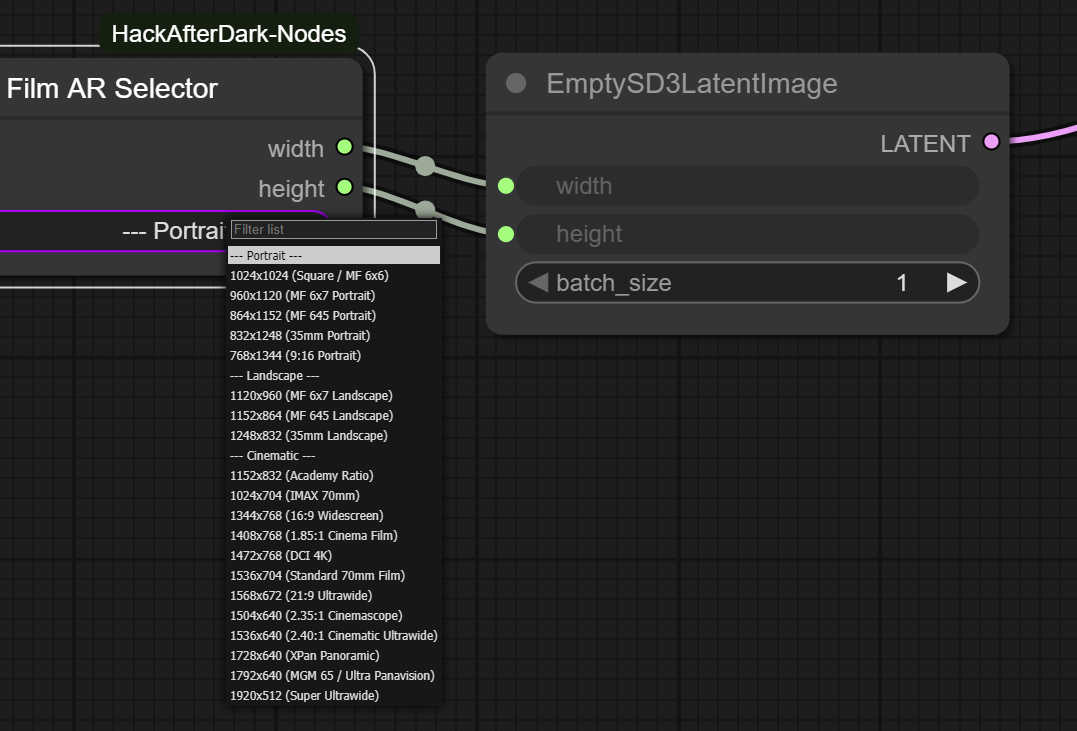
Features
- Preset Resolutions: Select from a curated list of common aspect ratios and resolutions, including 4:5 Instagram Portrait, 3:4 / 4:3 Classic Photography, film formats, and widescreen options.
- Manual Numeric Override: Easily override width and/or height with custom numeric values directly on the node (
custom_width,custom_height). - Easy to Use: Simply select a preset from the dropdown or dial in custom dimensions to output the corresponding width and height.
- Customizable: The list of resolutions can be easily modified in the Python script.
Installation
- Clone or download this repository into your
ComfyUI/custom_nodes/folder. - Restart ComfyUI.
Usage
- Add the "AfterDark Film AR Selector" node to your workflow from the "HackAfterDark" category.
- Select a preset from the dropdown menu, or specify
custom_widthand/orcustom_heightnumeric values to manually override the preset. - The node will output the corresponding width and height, which you can then connect to other nodes in your workflow.
AfterDark Gemini Prompter
A powerful and versatile custom ComfyUI node that connects to the Google Gemini API. It can be used as a sophisticated prompt builder, an image generator, or a multi-modal analysis tool.
Preview
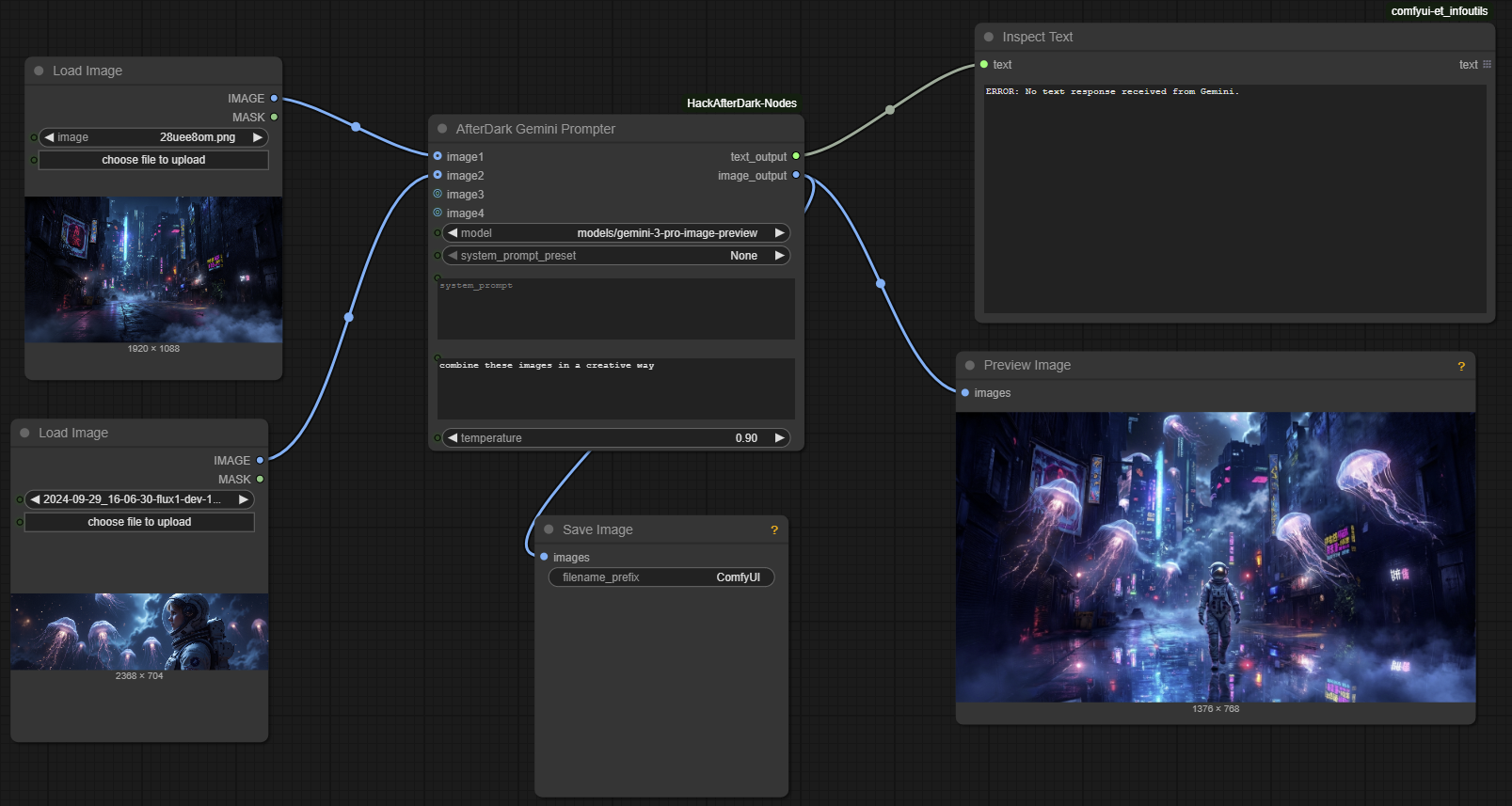
Features
- Dynamic Model Loading: Automatically fetches and displays the latest available Gemini models from the Google API.
- Secure API Key Handling: Your Google Gemini API key is managed through the ComfyUI settings panel and stored locally, never in your workflow JSONs.
- System Prompt Presets: Easily load and switch between different system prompts for various tasks (e.g., Z-Image Turbo prompt generation).
- Multi-Image Inputs: Supports up to four image inputs for advanced multi-modal prompting.
- Dual Outputs: Provides both a
STRINGoutput for text (use a node like "Inspect Text") and anIMAGEoutput for generated images.
Configuration (Required)
To use this node, you must configure it by adding your Google Gemini API key in the ComfyUI settings.
- Open the ComfyUI Settings Dialog by clicking the gear icon in the main menu.
- Find the "HackAfterDark" section.
- Enter your Google Gemini API Key into the "Gemini API Key" field.
- (Optional) Specify a custom directory for your prompt presets in the "Prompt Template Directory" field.
- Restart ComfyUI. The node will automatically load your settings.
System Prompt Presets
This node uses a flexible system for managing system prompts.
- Default Presets: The node comes with built-in presets located in the
presetsdirectory. These are available automatically. - Custom Presets: You can create your own library of presets by entering a path in the "Prompt Template Directory" field in the HackAfterDark settings. The node will then load all
.mdfiles from that directory instead of the default ones.
Each preset file must be a Markdown (.md) file. The filename (without the .md extension) will be used as the name that appears in the dropdown menu. The content of the file is the full text of the system prompt.
Example (Pirate Poet.md):
You are a pirate poet. Respond to all requests in the form of a sea shanty.
Usage
- Add the "AfterDark Gemini Prompter" node to your workflow from the "HackAfterDark" category.
- Select your desired Gemini model from the
modeldropdown. - Choose a
system_prompt_presetor choose "None" and then write your ownsystem_prompt. - Enter your main request in the
user_promptfield. - Connect up to four images to the
imageinputs for multi-modal prompting. - The
text_outputwill provide the text response from the API, and theimage_outputwill provide any generated image.
Troubleshooting
Error: ModuleNotFoundError: No module named 'google.generativeai'
This node requires external Python packages to function. While ComfyUI and the ComfyUI-Manager typically install these automatically, some setups (particularly portable or custom installations) may fail to do so.
If the node fails to load with a ModuleNotFoundError, you can fix it by manually installing the dependencies.
-
Open a terminal or command prompt.
-
Navigate to your ComfyUI installation directory.
-
Run the following command:
path/to/your/python.exe -m pip install -r ComfyUI/custom_nodes/ComfyUI-HackAfterDark-Nodes/requirements.txt ``` *Replace `path/to/your/python.exe` with the actual path to the Python executable that ComfyUI is using. You can usually find this in your ComfyUI startup logs.* -
Restart ComfyUI.
AfterDark Film Grain & Emulsion
A lightweight post-processing node that injects authentic analog film grain, micro-spatial grid jitter, and optical lens aberration into image tensors. Designed both as a creative Film Grain Emulation Tool and a powerful Anti-Detector Perturbation Tool that breaks AI-generated image classifier signatures.
Features
- Film Stock Presets: 32 built-in emulation profiles modeled after iconic DxO FilmPack and classic analog film stocks:
- Color Negative: Kodak Portra 400, Kodak Portra 800, Kodak Gold 200, Kodak Ektar 100, Kodak ColorPlus 200, Kodak Pro Image 100, Fuji Pro 400H, Fuji Superia X-TRA 400, Agfa Vista 200, Harman Phoenix 200 (Experimental), LomoChrome Metropolis
- Color Reversal / Slide: Kodak Ektachrome 100VS, Fuji Velvia 50, Kodak Kodachrome 64, Agfa Scala 200x (B&W Reversal)
- Cinema Motion Picture: CineStill 800T (Tungsten), CineStill 400D (Daylight), Kodak Vision3 250D (Daylight)
- B&W Silver Halide: Kodak Tri-X 400, Kodak T-Max 3200, Fuji Neopan Acros 100 II, Ilford HP5 Plus 400, Ilford Delta 100, Ilford Delta 3200, Ilford Pan F Plus 50, Fomapan 400, Rollei Retro 80S (Infrared), ADOX CHS 100 II, Lomography Potsdam Kino 100, Lomography Lady Grey 400 (120 Medium Format), Lomography Earl Grey 100
- Instant Analog: Polaroid 600 Emulsion
- Physical Noise Distributions:
gaussian(standard),poisson(shot noise),multiplicative(dye cloud), andlaplacian(heavy-tailed halide spikes). - Luminance Exposure Response: Choice of exposure modulation profiles:
Film (Midtone & Shadow): Silver halide density curve with heavy grain in shadows/midtones and soft highlight roll-off.Digital (Shadow Heavy): Low Signal-to-Noise Ratio (SNR) digital thermal dark current noise.Uniform (Flat): Equal noise distribution across all brightness levels.
- Anti-Detector Protections: Sub-pixel
micro_jitter,spatial_resample, non-lineargamma_shift, andedge_softeningto disrupt Vision Transformer (ViT) patch token classifiers.
Exposure Response & Luminance Physics
In real physical photography, film grain is never a uniform noise layer pasted evenly across an image.
In physical film stock, grain is the visual result of metallic silver halide crystal clumping and organic C-41 dye cloud formation. Because chemical development reacts differently depending on light exposure, film grain looks completely different depending on the brightness or darkness of the scene:
- Specular Highlights: Bright highlights saturate into dense metallic silver on negative film, dampening grain variance.
- Midtones & Shadows: Midtones and dark shadows exhibit the highest grain density and visual structure.
Without factoring in local pixel luminance, noise applied equally across bright skies, skin tones, and deep shadows immediately looks artificial—like a flat digital overlay rather than authentic analog film emulsion.
Choosing the Right Exposure Response Mode
| Mode | Real-World Physics | When to Use |
| :--- | :--- | :--- |
| Film (Midtone & Shadow) (Default) | Analog Silver Halide Emulsion: Grain density peaks in dark shadows and midtones ($L = 0.1 \to 0.6$) and rolls off smoothly in bright highlights ($L > 0.85$). | Best for Authentic Film Look: Use this for film stock emulations (Portra, Ektachrome, Tri-X). Keeps bright skies and specular highlights clean while giving shadows and skin midtones rich, organic film texture. |
| Digital (Shadow Heavy) | Digital Sensor Thermal Noise: Low Signal-to-Noise Ratio (SNR) in dark current causes sensor read noise to dominate dark shadow regions. | Best for Digital High-ISO Look: Use when emulating low-light photography shot on digital camera sensors (e.g. DSLR/mirrorless at ISO 6400). Concentrates noise in deep darks ($L < 0.30$). |
| Uniform (Flat) | Mathematical Uniform Overlay: Noise is applied with equal intensity across all pixels, regardless of brightness. | Best for Anti-Detector Perturbations: Use when your primary goal is disrupting Vision Transformer (ViT) patch classifiers across every spatial token, or for creative graphic texturing. |
AfterDark Film Optics & Artifacts
Simulates physical camera optical lens falloff, film gate framing, and procedural organic light leaks modeled after real analog film reference photos.
Features
- Procedural Organic Light Leaks: Generated entirely via PyTorch tensor math—no overlay images required! Features 10 authentic real-world film stock leak styles:
C-41 Fiery Core Flare(red-orange to white-hot yellow core),Crimson Red Base Burn(acetate backing leak),Tungsten Blue Burn(front-element leak),Vintage Magenta Leak(expired film fog),Sunburst Golden Flare,E-6 Slide Solarized Yellow,Overexposed White-Hot Flare,Anamorphic Prism Diffraction(glass refraction: Amber $\to$ Rose $\to$ Cyan),Dual-Tone Cyan & Amber, andRandom Organic Multi-Layer. - Realistic Film Burn Patterns: Modeled directly after authentic analog camera light leaks:
Triple-Chamber Solarized Burn: Heavy tropical overexposures (crimson gate bar + center white-hot blowout + right blue/magenta fogging).Dual-Border Holga Leak: Toy camera dual-spool leak (bottom-left golden flare + right vertical column + top sky fog).Wide Gate Leak (Asymmetric Bar): Asymmetric wide vertical light band with sharp metal film gate shadow boundary and mid-strip gap breaks.First Frame Load Leak (Full Wash): Heavy upper and side fogging caused by exposing the film leader while loading into the camera.Anamorphic Lens Flare Streak: Horizontal optical streak flare across the frame center.35mm Sprocket Hole Flares: Modeled after shooting 35mm film in unmasked medium-format cameras, featuring 8 discrete rectangular perforation tab flares confined strictly to the outer 8% edge margins.Vertical Curtain Gap,Bottom Frame Burn,Dual-Edge Cross Burn, corners, and edge strips.
- Dynamic
Random / ScatteredMode: SelectingRandom / Scatteredwith a seed dynamically samples across ALL 17 location templates with unique spatial jitter, scaling, and bicubic organic noise cloud shapes on every single run! - Physical Lens Vignetting: Physically accurate radial light falloff ($\cos^4 \theta$ optical law) with adjustable intensity and falloff exponents.
- Film Gate Borders: Soft film frame gate shading.
AfterDark Film Halation & Bloom
Simulates specular highlight red/orange halation diffusion caused by light reflecting off the film pressure plate back into emulsion layers (famous in CineStill 800T and Harman Phoenix 200).
Features
- Specular Highlight Isolation: Adjustable threshold to isolate bright light sources ($L > 0.85$).
- Multi-Scale Gaussian Bloom: PyTorch spatial downsampling pyramid for resolution-independent diffusion blur.
- Authentic Spectral Tints:
Red / Orange (CineStill 800T),Golden Amber,Warm Yellow, andSoft White.
AfterDark Film Color Split & Clarity
Split toning and local micro-contrast enhancement for cinematic film grading.
Features
- Split Toning: Independent shadow tint (
Teal / Cyan,Deep Blue,Emerald Green,Warm Sepia) and highlight tint (Golden Amber,Warm Yellow,Peach Rose,Cool Cyan). - Micro-Contrast (Clarity): High-pass spatial frequency filter to boost local texture without clipping global exposure.
AfterDark Film LUT
A high-performance 3D LUT (Look-Up Table) color grading node. Reads .cube LUT files directly from ComfyUI's central models/luts/ directory.
Features
- Central Model Directory Integration: Loads
.cubefiles directly fromComfyUI/models/luts/via ComfyUI's standardfolder_pathsmanager. Your LUT files are preserved safely across node updates. - Built-In Dropdown Search: Standard ComfyUI combo dropdown select with built-in search filter support for quickly finding files across nested subdirectories.
- GPU Hardware Acceleration: Uses PyTorch
torch.nn.functional.grid_samplefor 3D trilinear interpolation on GPU, applying complex LUTs in under 2 milliseconds. - Strength / Alpha Blending: Smooth slider control ($0.0 \to 1.0$) to blend between the original image and the color-graded LUT result.
- Tone & Lighting Controls: Includes
contrast($0.5 \to 1.5$) for fine-tuning midtone contrast andblack_lift($0.0 \to 0.10$) to simulate authentic physical film shadow density (film toe). - Color Space Transfers: Supports
"sRGB (Standard)","Linear -> sRGB", and"sRGB -> Linear"gamma transfers to accommodate log/linear film print LUTs.
AfterDark Live Grade
An interactive real-time color grading node featuring a dual-column layout, client-side offscreen rendering for instant 60 FPS slider reactivity, split-wipe comparison tools, and a full-screen inspection lightbox.
Features
- Instant Client-Side Offscreen Live Preview: Adjusting sliders triggers real-time 60 FPS preview updates directly in your browser without waiting for ComfyUI execution queues or node re-renders.
- Interactive Viewport Modes:
- Graded Only: Full-frame view of the final color-graded output.
- Dual View: Side-by-side comparison rendering ORIGINAL alongside LIVE GRADED output.
- Split Wipe: Interactive drag handle allowing 0% to 100% side-by-side wipe comparison directly on the image viewport.
- Full-Screen Lightbox Modal: Click anywhere on the preview viewport to open a full-resolution inspection lightbox with zoom and pan controls.
- 3D LUT Integration: Direct access to
.cubeLUT files fromComfyUI/models/luts/with"None"as the default top option for quick clearing. - Complete Grade Suite:
- Tonality: Exposure EV stops ($-2.0 \to +2.0$), midtone
contrast($0.0 \to 2.0$), and film toeblack_lift($0.0 \to 0.20$). - Color Science: Vectorized
hueshift ($-180^\circ \to +180^\circ$) andsaturation($0.0 \to 2.0$). - Split Toning: Independent
shadow_tintandhighlight_tintwith dual-axis intensity offset controls. - Spatial Sharpness:
micro_contrastfor fine textures andclarityfor midtone structural pop.
- Tonality: Exposure EV stops ($-2.0 \to +2.0$), midtone
- Precision Drag UI: Color spectrum sliders, white thumb position indicators, 1:1 visual feedback, and quick reset buttons.
- 1:1 Backend Parity: Client-side canvas shaders match the PyTorch GPU tensor processing pipeline 1:1 when executing standard workflow runs.
Micro Contrast vs. Clarity: What's the Difference?
Both controls enhance spatial detail and local contrast, but they target different spatial frequencies and tonal regions:
| Control | Spatial Scale | Tonal Scope | Visual Effect | Best Used For |
| :--- | :--- | :--- | :--- | :--- |
| MICRO CONTRAST | Tiny $3 \times 3$ Pixels (1px radius) | Global (All Pixels) | Fine Detail Sharpening: Crisp, pin-sharp detail extraction. | Film grain structure, hair strands, fabric weaves, skin pores, and fine text. |
| CLARITY | Broader $9 \times 9$ Pixels (4px radius) | Midtones Only (4 * L * (1 - L)) | Midtone Contour & Depth: Local midtone contrast pop and 3D structure. | Facial structure, clothing folds, jawlines, and subject pop without sharpening shadow noise or blowing highlights. |
[!NOTE] Why do both controls feel like sharpening?
Both controls utilize spatial high-pass frequency math under the hood (subtracting local neighborhood averages from original pixels). Enhancing spatial edge gradients is naturally interpreted by the human brain as sharpening.MICRO CONTRASTfocuses on 1-pixel micro textures globally, whileCLARITYfocuses on 4-pixel midtone contours.
Credits
- Author: HackAfterDark (https://hackafterdark.com)
Follow me on Civitai! https://civitai.com/user/HackAfterDark