
ComfyUI_FL-SongGen
FL Song Gen - AI-powered song generation nodes for ComfyUI. Generate complete songs with vocals and instrumentals from lyrics using Tencent's SongGeneration (LeVo) model. Features style transfer, auto style presets, dual-track output, and up to 4m30s song generation.
Nodes (6)
One dropdown, no style strings — FL SongGen Auto Style
Build the style string without the syntax errors — FL SongGen Description Builder
Your lyrics become an actual song — FL SongGen Generate
Lyrics that actually parse — FL SongGen Lyrics Formatter
Pick your song model before you write a lyric — FL SongGen Model Loader
Steal the vibe, not the song — FL SongGen Style Transfer
FL Song Gen
AI-powered song generation nodes for ComfyUI based on Tencent's SongGeneration (LeVo) model. Generate complete songs with vocals and instrumentals from lyrics.


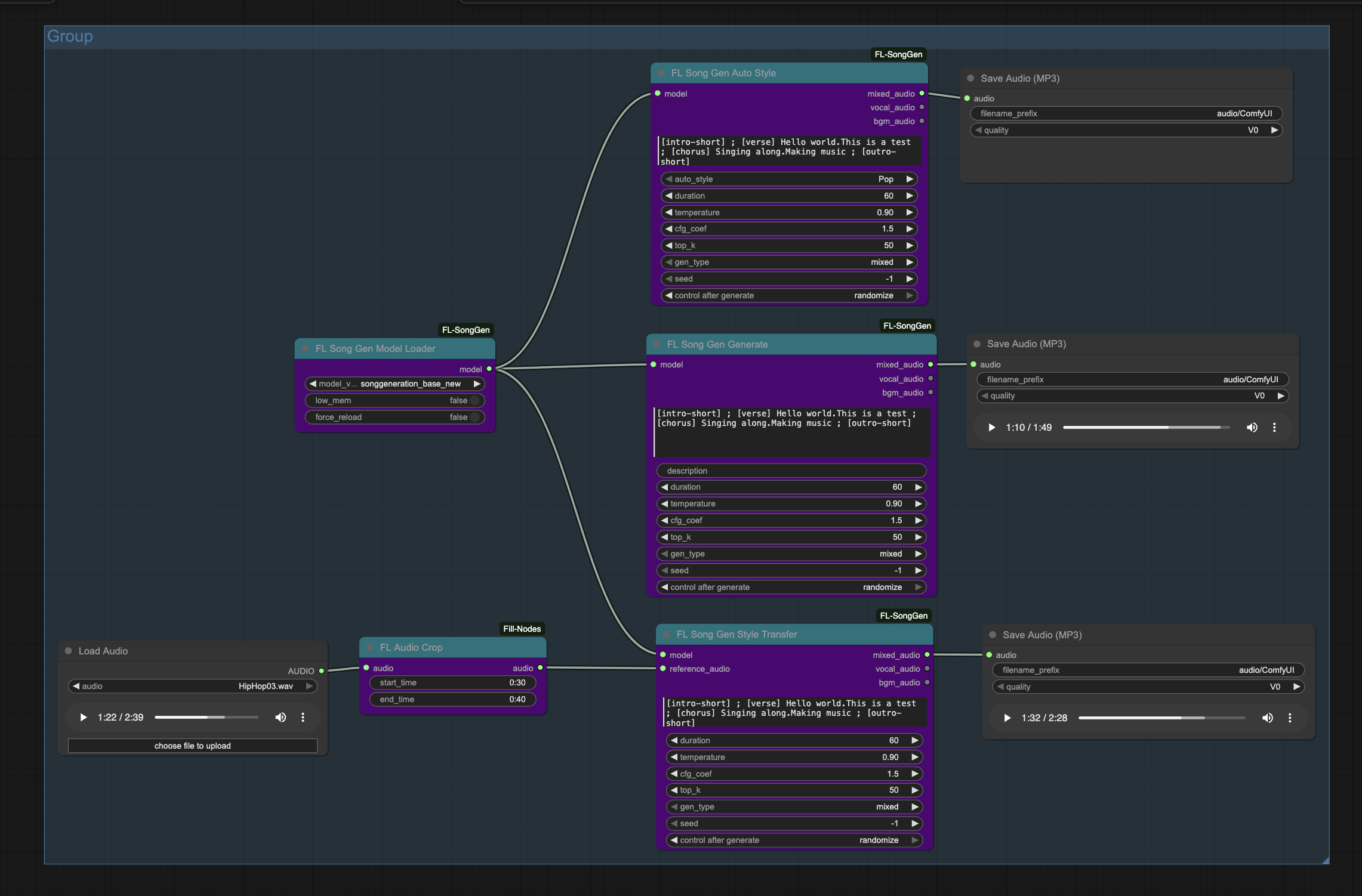
Features
- Full Song Generation - Complete songs with vocals and instrumentals
- Dual-Track Output - Separate vocal and background music tracks
- Lyrics-to-Song - Structured lyrics with sections (verse, chorus, bridge, intro, outro)
- Style Transfer - Use reference audio to guide the musical style
- Text Descriptions - Control gender, timbre, genre, emotion, and BPM
- Auto Style Presets - Quick generation with Pop, Rock, Jazz, and more
- Long-Form Generation - Up to 4 minutes 30 seconds per song
- Automatic Downloads - Models download automatically on first use
Nodes
| Node | Description | |------|-------------| | Model Loader | Load SongGeneration model with memory options | | Lyrics Formatter | Build properly formatted lyrics from sections | | Description Builder | Create style descriptions from components | | Generate | Main generation with text conditioning | | Style Transfer | Generate using reference audio for style | | Auto Style | Generate with preset style prompts |
Installation
<details> <summary><strong>ComfyUI Manager (Recommended)</strong></summary>Search for "FL Song Gen" in ComfyUI Manager and install.
</details> <details> <summary><strong>Manual Installation</strong></summary>cd ComfyUI/custom_nodes
git clone https://github.com/filliptm/ComfyUI_FL-SongGen.git
cd ComfyUI_FL-SongGen
pip install -r requirements.txt
Models
Models download automatically on first use to ComfyUI/models/songgen/.
| Model | Max Duration | VRAM | Languages |
|-------|:------------:|:----:|-----------|
| songgeneration_base | 2m 30s | 10-16 GB | Chinese |
| songgeneration_base_new | 2m 30s | 10-16 GB | Chinese, English |
| songgeneration_base_full | 4m 30s | 12-18 GB | Chinese, English |
| songgeneration_large | 4m 30s | 22-28 GB | Chinese, English |
Note: VRAM range shows low memory mode vs normal mode. Enable
low_memin the Model Loader for reduced VRAM usage.
Quick Start
- Add FL Song Gen Model Loader and select model variant
- Add FL Song Gen Lyrics Formatter to build your lyrics
- Add FL Song Gen Description Builder for style (optional)
- Connect to FL Song Gen Generate node
- Connect outputs to audio save/preview nodes
Prompting Guide
Getting the best results requires understanding how to format lyrics and descriptions properly.
<details> <summary><strong>Lyrics Format</strong></summary>Basic Structure
Lyrics use section tags separated by ; (space-semicolon-space) with phrases separated by periods .:
[intro-short] ; [verse] First line. Second line. Third line ; [chorus] Chorus line one. Chorus line two ; [outro-short]
Structure Labels
Instrumental sections (no lyrics):
| Tag | Duration | Description |
|-----|:--------:|-------------|
| [intro-short] | ~0-10s | Short instrumental intro |
| [intro-medium] | ~10-20s | Medium instrumental intro |
| [inst-short] | ~0-10s | Short instrumental break |
| [inst-medium] | ~10-20s | Medium instrumental break |
| [outro-short] | ~0-10s | Short instrumental outro |
| [outro-medium] | ~10-20s | Medium instrumental outro |
Lyrical sections (lyrics required):
| Tag | Description |
|-----|-------------|
| [verse] | Verse - typically tells the story |
| [chorus] | Chorus - the catchy, repeated hook |
| [bridge] | Bridge - contrasting part before final chorus |
Formatting Rules
- Sections are separated by
;(with spaces) - Lyrics within sections are separated by periods
. - Each period represents a phrase/line break
- Do NOT add lyrics to instrumental tags
[intro-short] ; [verse] These faded memories of us. I can't erase the tears you cried before. Unchained this heart to find its way. My peace won't beg you to stay ; [chorus] Like a fool begs for supper. I find myself waiting for her. Only to find the broken pieces of my heart. That was needed for my soul to love again ; [inst-short] ; [verse] Silhouettes where you once stood. Life's rhythm changed its beat for good. Numb to whispers we once knew. My path won't circle back to you ; [chorus] Like a fool begs for supper. I find myself waiting for her. Only to find the broken pieces of my heart. That was needed for my soul to love again ; [outro-short]
Format
"gender, timbre, genre, emotion, instruments, the bpm is X"
All dimensions are optional and can be combined in any order.
Available Options
| Dimension | Options |
|-----------|---------|
| Gender | male, female |
| Timbre | dark, bright, warm, soft, rock |
| Genre | pop, rock, jazz, hip hop, R&B, folk, electronic, blues, country, classical, soul, reggae, k-pop |
| Emotion | sad, happy, emotional, angry, uplifting, romantic, melancholic, intense |
| Instruments | See list below |
| BPM | the bpm is 120 (use this exact phrase format) |
Common Instrument Combinations
piano and drumsguitar and drumssynthesizer and pianoacoustic guitar and pianopiano and stringsguitar and synthesizerpiano and saxophoneelectric guitar and drumssynthesizer and drumsacoustic guitar and drums
Example Descriptions
female, warm, pop, emotional, piano and drums, the bpm is 120
male, dark, hip hop, sad, synthesizer and drums
female, bright, jazz, romantic, piano and saxophone, the bpm is 90
male, rock, intense, electric guitar and drums, the bpm is 140
When using Auto Style mode, select from these presets:
| Preset | Description | |--------|-------------| | Pop | Modern pop music | | R&B | Rhythm and blues | | Dance | Electronic dance music | | Jazz | Jazz style | | Folk | Folk/acoustic | | Rock | Rock music | | Chinese Style | Modern Chinese pop | | Chinese Tradition | Traditional Chinese music | | Chinese Opera | Chinese opera style | | Metal | Heavy metal | | Reggae | Reggae style | | Auto | Let the model choose |
</details> <details> <summary><strong>Style Transfer (Reference Audio)</strong></summary>Use a 10-second reference audio to guide the musical style:
- Only the first 10 seconds of the audio will be used
- Using the chorus section of a reference song works best
- Influences: genre, instrumentation, rhythm, and voice characteristics
Combining with Descriptions
You can optionally provide a text description alongside reference audio to further guide the generation. This can be useful to:
- Specify voice gender when the reference audio is ambiguous
- Add specific emotions or timbres
- Set a specific BPM
</details> <details> <summary><strong>Tips for Better Results</strong></summary>Note: If the description conflicts with the reference audio style, results may be unpredictable. Use complementary descriptions for best results.
Lyrics Tips
- Keep phrases natural and singable
- Use repetition strategically, especially in the chorus
- Match syllable counts roughly between verses
- Use emotionally evocative language
Description Tips
- Use commas to separate attributes
- Stick to predefined tags for best results
- Don't overload with too many conflicting descriptors
- BPM must use the exact format:
the bpm is X
General Tips
- Start with shorter songs to test your prompts
- The
base_newmodel is recommended for English lyrics - Enable
low_memmode if you're running low on VRAM - Instrumental sections help create natural song flow
Requirements
| Requirement | Specification | |-------------|---------------| | Python | 3.10+ | | CUDA | 11.8+ (for GPU acceleration) | | RAM | 16 GB minimum (32 GB+ recommended) | | VRAM | 10-28 GB (depends on model) |
Note: CPU-only mode is supported but very slow. Mac MPS may have limited support.
License
Apache 2.0
Credits
Based on SongGeneration (LeVo) by Tencent AI Lab.