
ComfyUI-Freepik
Integrates Freepik's AI capabilities into ComfyUI workflows with features for photorealistic generation, upscaling, and background removal, plus smart caching and cost management. (Description by CC)
Nodes (4)
A 2K image from a prompt — and it never touches your GPU
Cut out a background without downloading a single model
Magnific in a node — paid per upscale, not per month
The upscaler that promises not to invent anything
ComfyUI-Freepik
Professional Freepik AI integration for ComfyUI workflows



Bring Freepik's powerful AI capabilities directly into your ComfyUI workflows with seamless integration, smart caching, and pay-as-you-go pricing.
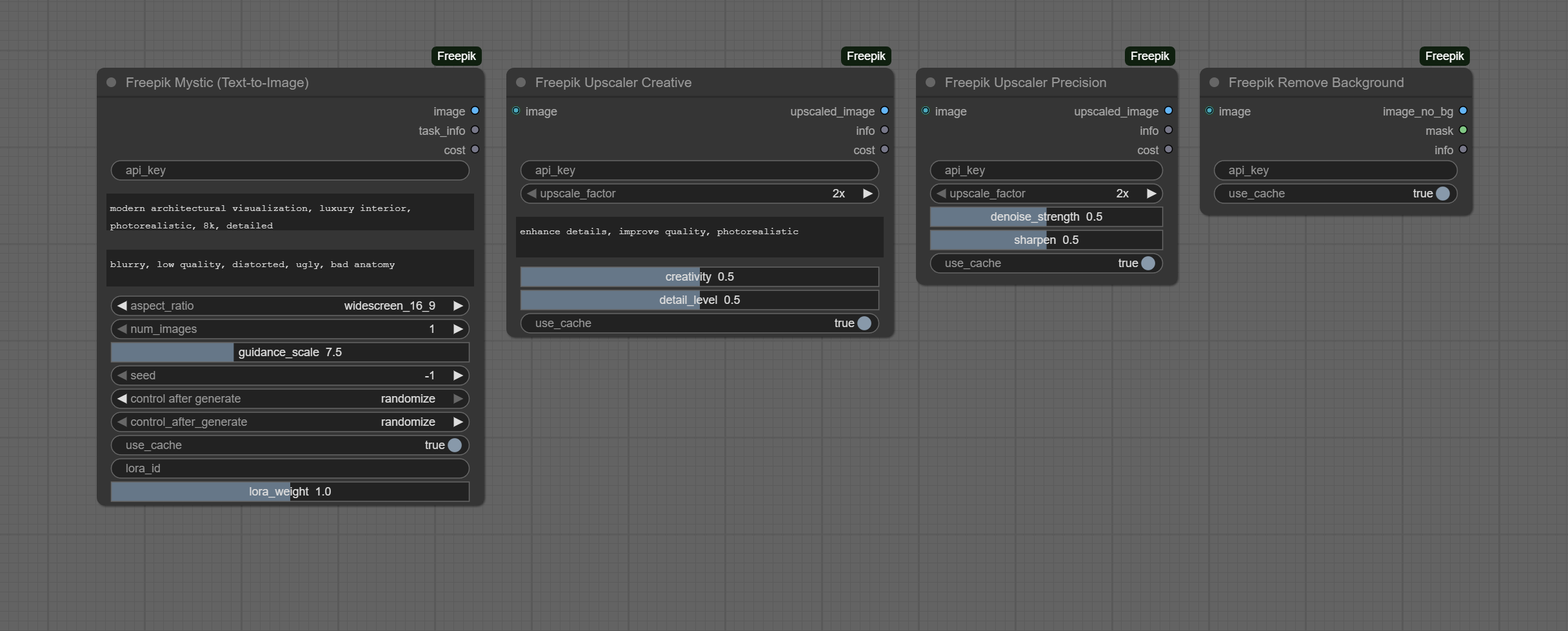
✨ Features
- 🎨 Mystic AI - Photorealistic text-to-image generation
- 🔍 Creative Upscaler - Magnific.ai powered prompt-guided enhancement (2x-16x)
- 🎯 Precision Upscaler - High-fidelity upscaling without hallucinations
- ✂️ Background Removal - Instant AI-powered background removal
- 💾 Smart Caching - Automatic result caching (30-day retention)
- 💰 Cost Management - Real-time cost estimation before execution
- 🔄 Async Processing - Non-blocking task management with progress tracking
🚀 Quick Start
Installation
- Clone or download into your ComfyUI custom nodes directory:
cd ComfyUI/custom_nodes
git clone https://github.com/yourusername/ComfyUI-Freepik.git
cd ComfyUI-Freepik
- Install dependencies:
pip install -r requirements.txt
-
Get your API key:
- Visit Freepik API Dashboard
- Sign up and create an API key
- Get $5 free credits to start
-
Restart ComfyUI and look for nodes under
Freepik/category
First Generation
- Add
Freepik Mysticnode - Enter your API key
- Write a prompt
- Connect to
Preview ImageorSave Image - Queue prompt!
📦 Available Nodes
🎨 Freepik Mystic (Text-to-Image)
Generate photorealistic 2K images from text prompts.
Features:
- Multiple aspect ratios (16:9, 1:1, 9:16, 4:3, 21:9)
- LoRA style support
- Seed control for reproducibility
- Cost: €0.10 per image
Outputs:
square_1_1: 2048×2048widescreen_16_9: 2752×1536social_story_9_16: 1536×2752
🔍 Freepik Upscaler Creative
AI-powered upscaling with prompt guidance (Powered by Magnific.ai)
Features:
- Upscale factors: 2x, 4x, 8x, 16x
- Prompt-guided enhancement
- Creativity control (0.0-1.0)
- Detail level control (0.0-1.0)
- Cost: €0.10 - €1.60+ depending on output size
Best for:
- Architectural renders (creativity: 0.3-0.5)
- Interior design (detail: 0.6-0.7)
- Concept art enhancement
🎯 Freepik Upscaler Precision
High-fidelity upscaling without AI hallucinations
Features:
- Faithful to original content
- Perfect for logos, UI, technical drawings
- Denoise strength control
- Sharpen control
- Same cost structure as Creative
✂️ Freepik Remove Background
Instant background removal with alpha mask output
Features:
- Returns image + alpha mask
- Fast and reliable
- Minimal cost
💰 Pricing & Cost Comparison
Pay-As-You-Go (No Subscription Required)
| Operation | Cost | |-----------|------| | Text-to-Image (2K) | €0.10 | | Upscale 2x | €0.10 | | Upscale 4x | €0.40 | | Upscale 8x | €1.60 | | Remove Background | Low/Free |
vs Magnific AI Platform
ComfyUI-Freepik is more cost-effective when:
- ✅ You process < 90 upscales/month → Save 33-89%
- ✅ You need automation and complex workflows
- ✅ Usage is variable month-to-month
- ✅ You prefer pay-as-you-go with no monthly commitment
Breakeven Analysis:
| Monthly Volume | Magnific Subscription | API Pay-as-you-go | Savings | |----------------|----------------------|-------------------|---------| | 10 upscales | $39 | $4.32 | $34.68 (89%) | | 50 upscales | $39 | $21.60 | $17.40 (45%) | | 90 upscales | $39 | $38.88 | Breakeven | | 200 upscales | $39 | $86.40 | -$47.40 |
For most users (< 90/month): ComfyUI-Freepik saves 33-89%
🎯 Example Workflows
Basic Generation
Freepik Mystic → Preview Image
Generation + Enhancement
Freepik Mystic (2K, 16:9) →
Freepik Upscaler Creative (4x) →
Save Image

Output: 2752×1536 → 11008×6144
Architectural Visualization Pipeline
Freepik Mystic (architectural prompt) →
Freepik Upscaler Precision (2x-4x) →
Post-processing nodes →
Final delivery
Background Removal
Load Image →
Freepik Remove Background →
Composite with new background
🏗️ Architecture
ComfyUI_Freepik/
├── __init__.py              # Node registration
├── requirements.txt         # Dependencies
├── api/
│   ├── client.py           # HTTP client with retry logic
│   └── tasks.py            # Async task manager
├── nodes/
│   ├── generation/
│   │   └── mystic_node.py  # Text-to-image
│   ├── editing/
│   │   └── upscaler_nodes.py # Upscalers
│   └── utilities/
│       └── remove_bg_node.py # Background removal
└── utils/
    ├── cache.py            # Caching system
    └── image_utils.py      # Image conversions
🔧 Technical Highlights
- Smart Caching: MD5-based parameter matching with automatic cleanup
- Async Processing: Non-blocking execution with configurable intervals
- Error Recovery: Exponential backoff retry strategy (3 retries)
- Multi-format Support: JSON + multipart/form-data requests
- Progress Tracking: Real-time status updates during processing
- Cost Transparency: Estimation before execution
📋 Requirements
- Python 3.9+
- ComfyUI (latest version recommended)
- Internet connection
- Freepik API key
Python Dependencies:
- requests
- Pillow
- torch
🎨 Parameter Reference
Magnific Creative Upscaler Equivalence
| Freepik Platform | ComfyUI Node | Value Mapping |
|-----------------|--------------|---------------|
| Creativity (0-10) | creativity | 0.0-1.0 (divide by 10) |
| HDR (0-10) | detail_level | 0.0-1.0 (divide by 10) |
| Scale Factor | upscale_factor | "2x", "4x", "8x", "16x" |
| Prompt | prompt | Direct equivalent |
Recommended for Architecture:
- Creativity: 0.3-0.5
- Detail Level: 0.6-0.7
- Prompt: "enhance architectural details, photorealistic render, natural lighting"
🛠️ Advanced Usage
Batch Processing
# Process multiple images automatically
for image in image_list:
    mystic_node.generate(
        api_key=api_key,
        prompt=prompt,
        aspect_ratio="widescreen_16_9"
    )
Custom Workflows
Integrate with other ComfyUI nodes for complex pipelines:
- Pre-processing with ControlNet
- Post-processing with color correction
- Automated client delivery systems
Cost Optimization
- Enable caching to avoid redundant API calls
- Batch similar operations
- Use appropriate resolution for your needs
⚠️ Limitations
API Restrictions
- Mystic outputs fixed ~2K resolution (aspect ratio determines dimensions)
- Some Magnific parameters not available (Resemblance, Fractality, Engine)
- Rate limits apply (check Freepik API documentation)
vs Magnific.ai Platform
- ❌ No Resemblance slider
- ❌ No Fractality slider
- ❌ No Engine selection
- ✅ But: Full workflow automation
- ✅ And: Pay-as-you-go pricing
🗺️ Roadmap
Phase 2 (Future)
- [ ] Video Generation nodes (Kling v2.5, PixVerse V5)
- [ ] Image Relighting
- [ ] Style Transfer
- [ ] Image-to-Prompt utility
- [ ] LoRA Training nodes
- [ ] Batch processing manager
- [ ] Credit tracker dashboard
Improvements
- [ ] Remove debug prints
- [ ] Add architectural preset system
- [ ] Optimize cache management
- [ ] Progress bars in UI
- [ ] Better error messages
📚 Documentation
🤝 Contributing
Contributions are welcome! Please feel free to submit a Pull Request.
📄 License
MIT License - see LICENSE file for details
🙏 Credits
Developer: Felipe @ Pixelflakes
Built for: Architectural visualization workflows
Powered by: Freepik API + Magnific.ai technology
Special thanks to:
- ComfyUI community
- Freepik API team
- Magnific.ai for upscaling technology
🔗 Links
📞 Support
- Issues: GitHub Issues
- API Docs: https://docs.freepik.com
- Freepik Support: https://support.freepik.com
Made with ❤️ for the ComfyUI community
If you find this useful, please ⭐ star the repository!