
ResolutionSelector for ComfyUI
A custom node for Stable Diffusion ComfyUI to enable easy selection of image resolutions for SDXL SD15 SD21
Resolution Selector Plus - Custom node for ComfyUI
Custom node for ComfyUI providing easy resolution and empty latent selection for image generation workflows.
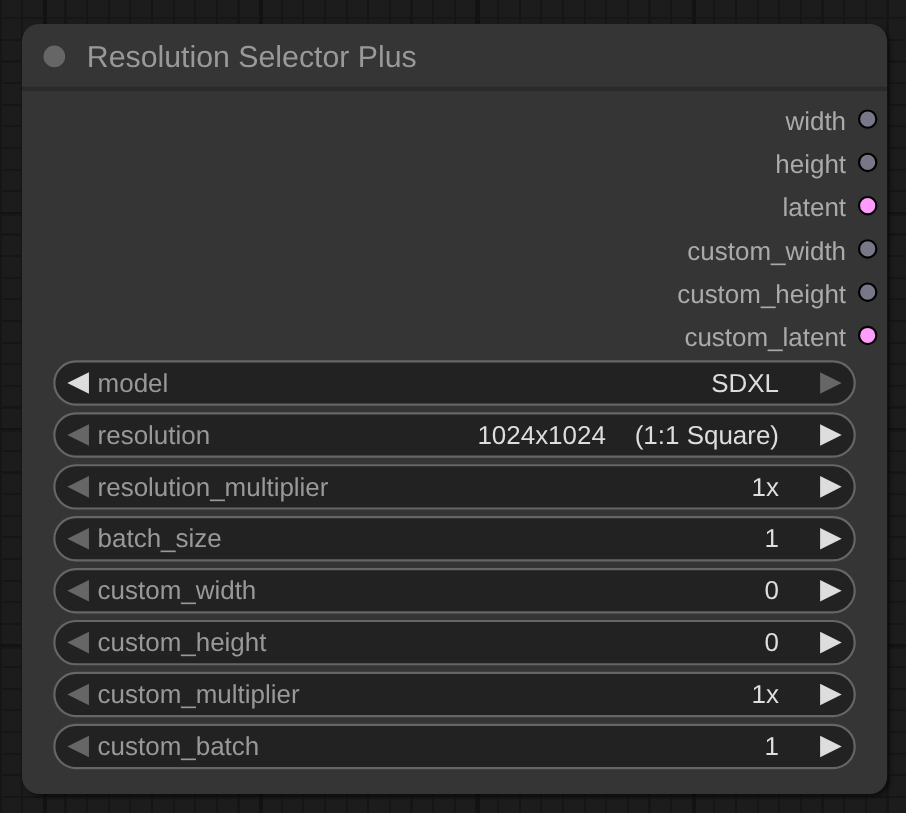
Features
Resolution Selector
- Model-optimised resolution presets (portrait, landscape, square)
- Empty latent output for direct KSampler connection, with the correct latent channel count per model (4 for SD 1.5 / SDXL, 16 for Flux / Qwen Image / Z-Image)
- Custom width/height inputs with independent multiplier and latent
Note: with model set to "All" the latent uses 4 channels. Pick the specific model (Flux, Qwen Image, Z-Image) to get a 16-channel latent for that model's sampler.
Installation
ComfyUI Manager (recommended)
In ComfyUI, open Manager > Custom Nodes Manager, search for ComfyUI_ResolutionSelectorPlus, click Install, then restart ComfyUI.
Manual install
# Change to the directory you installed ComfyUI
cd pathTo/ComfyUI

# Change to the custom_nodes directory
cd custom_nodes

# Clone the repo into custom_nodes
git clone https://github.com/bradsec/ComfyUI_ResolutionSelectorPlus.git

# Restart ComfyUI
Usage
Resolution Selector Plus
Add Node: Add Node > utils > Resolution Selector Plus
Inputs:
model(dropdown) - Select your image generation model or "All" for all resolutionsresolution(dropdown) - Choose from model-optimized presets with aspect ratios (e.g., "1920x1080 (16:9 Landscape)")resolution_multiplier(dropdown) - Multiply preset resolution (1x, 2x, 3x, 4x)batch_size(number) - Number of latent samples to generate (1-64, default: 1)custom_width(optional) - Override with custom width (0-4096, step 8)custom_height(optional) - Override with custom height (0-4096, step 8)custom_multiplier(optional) - Independent multiplier for custom dimensions (1x, 2x, 3x, 4x)custom_batch(optional) - Number of latent samples for custom resolution (1-64, default: 1)
Outputs:
width(INT) - Preset resolution width in pixelsheight(INT) - Preset resolution height in pixelslatent(LATENT) - Empty latent tensor for preset resolution (batch_size samples)custom_width(INT) - Custom width (0 if not set)custom_height(INT) - Custom height (0 if not set)custom_latent(LATENT) - Empty latent tensor for custom resolution (custom_batch samples)
Example Workflows:
Basic preset with multiplier:
Resolution Selector Plus (model: SDXL, resolution: "1024x1024 (1:1 Square)", multiplier: 2x)
  -> width: 2048, height: 2048
  -> latent -> KSampler
Custom dimensions with independent multiplier:
Resolution Selector Plus (custom_width: 1024, custom_height: 768, custom_multiplier: 2x)
  -> custom_width: 2048, custom_height: 1536
  -> custom_latent -> KSampler
Using "All" model option:
Resolution Selector Plus (model: All, resolution: "1920x1080 (16:9 Landscape)")
  -> Shows all 74 unique resolutions from all models
Compatibility
Dual API: exports the legacy V1 NODE_CLASS_MAPPINGS and a V3 comfy_entrypoint (comfy_api). Verified on ComfyUI 0.25.0. On builds whose loader reads NODE_CLASS_MAPPINGS first, the V1 path is used and comfy_entrypoint is skipped, so nodes are not registered twice.
Support
If you find this useful, please consider starring the repo. Stars help other people discover these nodes.