
ComfyUI-FailSafe-Translate-Node
Fail-safe Google Translate prompt node for ComfyUI (retry + caching).
Nodes (2)
ComfyUI-FailSafe-Translate-Node
A fail-safe translation node for ComfyUI.
Google Translate remains the primary path. If Google is unavailable or rate-limited, the Simple node can fall back to small Marian/OPUS translation models running on CPU. No Ollama, DeepL, MyMemory, LibreTranslate, or API key is required.
Preview
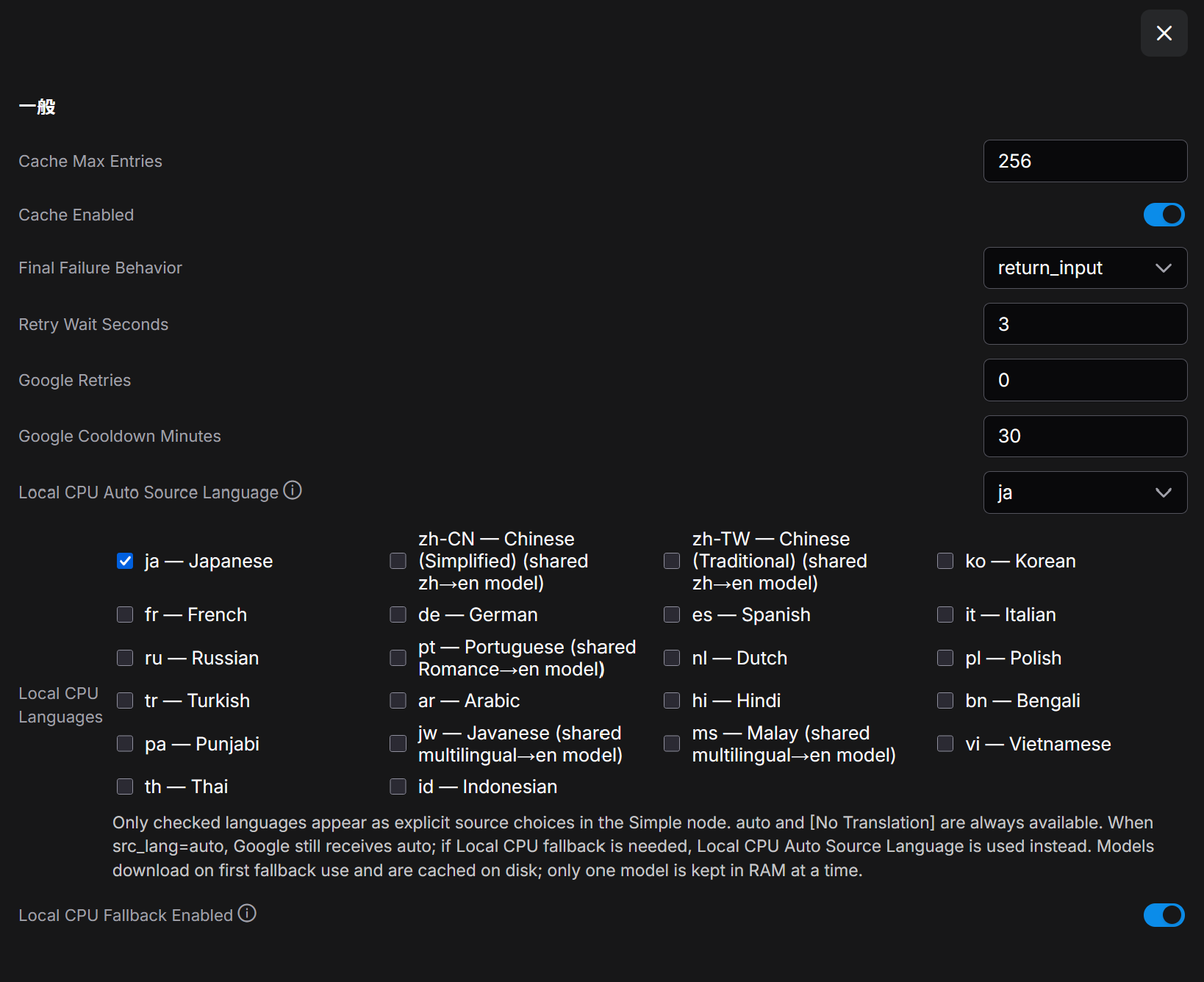
The Simple node stays compact while fallback languages, auto fallback source, Google cooldown, retry behavior, and cache are configured from Settings → FailSafe Translate.
Category: utils/text
Features
- Google first — keeps the original fast Google translation path.
- Local CPU fallback — selected source languages can translate to English without external translation services.
- Lazy model download — a model is downloaded only when that language actually needs local fallback for the first time.
- No CUDA VRAM for fallback — local models are explicitly loaded on CPU.
- Bounded RAM use — downloaded models stay cached on disk, but only the most recently used model is kept loaded in RAM.
- Google 429 cooldown — a 429 opens a process-wide cooldown (default: 30 minutes) so the node does not keep hammering Google.
- Process-wide LRU translation cache — successful translations are cached (default: 256 entries).
- Compact Simple node — still only
textandsrc_lang. - Configurable source list — the Simple node
src_langcombo always keepsautoand[No Translation], plus the languages checked in Settings → FailSafe Translate → Local CPU Languages.
Translation flow
Google
  ├─ success -> translated text
  └─ failure / 429 cooldown
        -> Local CPU model for selected src_lang -> English
             ├─ success -> translated text
             └─ unavailable/failure -> configured final failure behavior
auto is always available in the Simple node. Google receives auto exactly as before. If Google fails and Local CPU fallback is needed, the node uses Local CPU Auto Source Language (default: ja) as the assumed source language for the local model. The local fallback does not perform language detection itself. [No Translation] is always available.
The Advanced node keeps its legacy full source/destination language lists for workflow compatibility. Local CPU fallback is still only used for enabled source language → English pairs; other pairs remain Google-only.
Local CPU language models
Default enabled language: Japanese (ja) only. Enable any additional languages in ComfyUI Settings.
| src_lang | Language | Local model | Notes |
| --- | --- | --- | --- |
| ja | Japanese | Helsinki-NLP/opus-mt-ja-en | dedicated |
| zh-CN | Chinese (Simplified) | Helsinki-NLP/opus-mt-zh-en | shared with zh-TW |
| zh-TW | Chinese (Traditional) | Helsinki-NLP/opus-mt-zh-en | shared with zh-CN |
| ko | Korean | Helsinki-NLP/opus-mt-ko-en | dedicated |
| fr | French | Helsinki-NLP/opus-mt-fr-en | dedicated |
| de | German | Helsinki-NLP/opus-mt-de-en | dedicated |
| es | Spanish | Helsinki-NLP/opus-mt-es-en | dedicated |
| it | Italian | Helsinki-NLP/opus-mt-it-en | dedicated |
| ru | Russian | Helsinki-NLP/opus-mt-ru-en | dedicated |
| pt | Portuguese | Helsinki-NLP/opus-mt-ROMANCE-en | shared Romance → English model |
| nl | Dutch | Helsinki-NLP/opus-mt-nl-en | dedicated |
| pl | Polish | Helsinki-NLP/opus-mt-pl-en | dedicated |
| tr | Turkish | Helsinki-NLP/opus-mt-tr-en | dedicated |
| ar | Arabic | Helsinki-NLP/opus-mt-ar-en | dedicated |
| hi | Hindi | Helsinki-NLP/opus-mt-hi-en | dedicated |
| bn | Bengali | Helsinki-NLP/opus-mt-bn-en | dedicated |
| pa | Punjabi | Helsinki-NLP/opus-mt-pa-en | dedicated |
| jw | Javanese | Helsinki-NLP/opus-mt-mul-en | shared multilingual → English model |
| ms | Malay | Helsinki-NLP/opus-mt-mul-en | shared multilingual → English model |
| vi | Vietnamese | Helsinki-NLP/opus-mt-vi-en | dedicated |
| th | Thai | Helsinki-NLP/opus-mt-th-en | dedicated |
| id | Indonesian | Helsinki-NLP/opus-mt-id-en | dedicated |
The Hugging Face model cards are the authority for each model's license. Most of these models are Apache-2.0; opus-mt-zh-en and opus-mt-ru-en are CC-BY-4.0 at the time of this update. The node downloads model files at runtime rather than redistributing model weights.
Model downloads are cached under:
ComfyUI/models/failsafe_translate/
If ComfyUI's folder_paths is unavailable, the fallback location is ~/.cache/failsafe_translate. You can override the directory with the FAILSAFE_TRANSLATE_MODEL_DIR environment variable.
ComfyUI Settings
Open Settings → FailSafe Translate.
| Setting | Default | Notes |
| --- | ---: | --- |
| Local CPU Fallback Enabled | true | Use local CPU translation when Google fails/cools down |
| Local CPU Languages | ja | Checked languages become explicit Simple-node src_lang choices |
| Local CPU Auto Source Language | ja | Source language assumed by Local CPU only when the node is set to auto; Google still uses automatic detection |
| Google Cooldown Minutes | 30 | Process-wide cooldown after Google 429 |
| Google Retries | 0 | Simple-node retries for transient Google errors |
| Retry Wait Seconds | 3 | Delay between Google retries |
| Final Failure Behavior | return_input | return_input / return_error / raise |
| Cache Enabled | true | Process-wide LRU cache |
| Cache Max Entries | 256 | Maximum cached translations |
Changing Local CPU Languages refreshes ComfyUI node definitions so existing Simple-node combo lists should update immediately. If a frontend version does not refresh them automatically, use Refresh Node Definitions (R) or reload the browser.
Settings are stored in failsafe_translate_config.json in this custom-node directory. The file is excluded from Git.
Installation
cd ComfyUI/custom_nodes/
git clone https://github.com/ah-kun/ComfyUI-FailSafe-Translate-Node.git
cd ComfyUI-FailSafe-Translate-Node
pip install -r requirements.txt
The local fallback uses transformers, sentencepiece, and sacremoses. PyTorch is not listed because ComfyUI already provides it.
Usage
Prompt Translate (Google, Fail-safe)
text: input textsrc_lang:auto, the languages selected in Local CPU Languages, and[No Translation]- output: English
The default list is therefore very short: auto, ja, and [No Translation]. auto remains the default for newly created Simple nodes.
Prompt Translate (Google, Fail-safe, Advanced)
Keeps the existing Advanced widget contract and legacy language lists:
textsrc_langdest_langfail_mode:return_input,return_cached,return_error,raiseretriesretry_wait_sec
Advanced retry values apply to Google. Local CPU translation is not retried because local failures are generally deterministic.
日本語
ComfyUI用のフェイルセーフ翻訳ノードです。通常はGoogle翻訳を使い、Googleが429や通信エラーで利用できない場合だけ、選択した言語用の小型Marian/OPUSモデルをCPUで実行します。
主な特徴
- Googleをメインに利用
- MyMemory / LibreTranslate / DeepL / Ollama / APIキー不要
- ローカル翻訳はCPU固定で、CUDA VRAMを使わない
- 初回フォールバック時だけ、その言語のモデルをHugging Faceからダウンロード
- モデルファイルはディスクにキャッシュし、RAM上には最後に使った1モデルだけ保持
- Google 429時はプロセス全体でクールダウン
- 翻訳結果はLRUキャッシュ
- Simpleノードは
textとsrc_langだけのまま src_langの候補は 設定 → FailSafe Translate → Local CPU Languages で絞り込み可能
Local CPU Languages
デフォルトで明示的に有効なローカル言語は ja(日本語)のみです。Simpleノードの src_lang は通常、
auto
ja
[No Translation]
になります。auto と [No Translation] は常に残り、それ以外は必要な言語だけSettingsでチェックしてください。変更時にはNode Definitionsを自動更新します。
src_lang=auto の場合、Googleには従来どおり auto を渡します。Googleが失敗してローカルフォールバックに入った時だけ、Local CPU Auto Source Language(デフォルト ja)で指定した言語としてローカル翻訳します。ローカル側では言語自動判定を行いません。ローカルフォールバックは ソース言語 → 英語 のみです。
現行の旧リストにあった翻訳言語はすべてローカル候補を用意しています。ただし、pt は opus-mt-ROMANCE-en、jw と ms は opus-mt-mul-en という共有OPUSモデルを使います。Settings画面にもこの点を表示します。
モデルは通常、次へ保存されます。
ComfyUI/models/failsafe_translate/
初回だけダウンロード待ちが発生します。Googleが正常な間はローカルモデルをロードしません。