
ComfyUI-Live-Search
🌐 Live Search: Real-time web search and AI summarization. Internet search, web scraping, fact checking, weather, news, GPS coordinate conversion. DuckDuckGo search with GPT-5.1, DeepSeek-V3, Gemini 3 Pro, Claude 4.5, Qwen3, Doubao, SiliconFlow (69+ models), Llama 4, Ollama. Modular architecture with API loader. Toggle web search on/off for pure LLM mode.
Nodes (3)
🌐 Live Search - Real-time Web Search for ComfyUI
Connect Your ComfyUI to the Internet | Search, Scrape, Summarize



🔥 Use Cases: Real-time Weather · News Summary · Fact Checking · Product Reviews · Web Scraping · GPS Coordinate Conversion
🤖 Supported Models: GPT-5.1 · DeepSeek-V3 · Gemini 3 Pro · Claude 4.5 · Qwen3 · Doubao · Llama 4 · Ollama
</div>📖 Why Choose Live Search?
ComfyUI Live Search brings the internet directly to your workflows! This powerful internet search node provides:
✅ Real-time Search: DuckDuckGo search engine, stable and reliable
✅ AI Summarization: Automatically reads web pages and extracts key information
✅ Multi-LLM Support: GPT-5.1, DeepSeek-V3, Gemini 3 Pro, Claude 4.5, Qwen3, and 8+ LLM providers
✅ Modular Architecture: Separated API config, search settings, and execution logic
✅ Chinese-Friendly: Perfect support for Chinese LLM providers (Qwen, Doubao, DeepSeek)
Typical Use Cases:
- 🌤️ Query real-time weather to generate scene images
- 📰 Fetch latest news and generate related content
- 🔍 Fact checking and information verification
- 🛍️ Product information lookup and review summarization
- 📍 GPS coordinate to location conversion (e.g., "40.00023, 116.27808" → "Beijing, Haidian District")
- 💬 Pure LLM chat (disable web search for direct AI conversations)
- 🌐 Any creative workflow requiring internet information
🏗️ New Modular Architecture
Inspired by comfyui_LLM_party's excellent design, we adopt a modular layered architecture:
📊 Node Composition
🔑 API Loader → ⚙️ Settings → 🌐 Search Agent → Results
| Node | Function | Output | |------|----------|--------| | 🔑 Live Search API Loader | API config & model selection | MODEL_CONFIG | | ⚙️ Live Search Settings | Search parameters | SEARCH_SETTINGS | | 🌐 Live Search Agent | Main search logic | answer, source_urls, optimized_prompt |
✅ New Architecture Benefits
- Modular Design: Separation of config and logic, easier to maintain
- Reusability: One API Loader can connect to multiple Agents
- Flexibility: Different Settings for different scenarios
- Professional: Best practices from large-scale projects
🔄 Backward Compatibility
- Legacy single-node
🌐 Live Search (Legacy)still available - New users recommended to use the new three-node combo
✨ Key Features
-
🔍 DuckDuckGo Search Engine
Stable, proxy-friendly, no API key required. Perfect for real-time info retrieval and complements any LLM/VLM. -
🧠 Multi-Provider Model Hub (Text & Vision)
- OpenAI: GPT-5.x, GPT-4.1 family, GPT-4o (now fully TI2T-capable)
- SiliconFlow: DeepSeek, Qwen3/Qwen2.5 VL, GLM-4.5V, Qwen3-Omni, etc. (single provider covering 70+ CN models)
- DeepSeek Official / Aliyun / Volcengine, Gemini (OpenAI-format), Anthropic Claude, Qwen (Aliyun), Grok, Doubao, Ollama (local)
✅ Every provider is validated end-to-end (auth, payload, response parsing).
-
🖼️ Dual Mode: T2T & TI2T
- T2T: Traditional text-only LLM flow with web search + summarization
- TI2T: Vision-language pipeline (prompt + IMAGE) for reverse image search, landmark recognition, document reading, etc.
- TI2T supports web search + image context fusion (two-stage VLM call) and is available for OpenAI GPT-5.1 / GPT-4o families & SiliconFlow VLMs.
-
🌦️ Structured Tooling
- Open-Meteo integration for precise real-time weather/time when GPS coordinates are provided
- geopy + Nominatim reverse geocoding (lat/lon → city/country)
- Query Optimization (rename:
optimize_query) improves English search keywords while keeping answers in your selected language - Conflict resolution prompts ensure VLM trusts web data for up-to-date info (time, weather).
-
🈚 Multi-Language Output
Explicit output control: 中文 or English (no more “Auto” surprises). System prompts enforce consistency for both LLM and VLM flows. -
🔐 Cloud-Friendly Security
API keys never persist to disk,.env+api_config.jsonsupported, and per-node proxy keeps shared GPU rentals safe.
🧠 T2T vs TI2T Modes
| Mode | Inputs | Model Slot | Flow | Perfect For |
|------|--------|------------|------|-------------|
| T2T (Text → Text) | Prompt | t2t_model | Search (DuckDuckGo) → scrape trusted sources → inject Open-Meteo & geopy context → LLM summarization. | Weather/time, news, fact checking, research, pure LLM chat (disable web search). |
| TI2T (Text + IMAGE → Text) | Prompt + ComfyUI IMAGE tensor | ti2t_model | Encode image → VLM query generation → DuckDuckGo search → VLM final reasoning with image + search snippets. | Landmark recognition, “reverse image” info, screenshot comprehension, visual + real-time hybrid tasks. |
Implementation Notes
- API Loader now provides independent
t2t_model/ti2t_modeldropdowns per provider. Agent auto-selects based on Settingsmode. - TI2T currently supports OpenAI GPT-5.1 / GPT-4o / GPT-4-turbo and SiliconFlow VLM lineups (Qwen3-VL, Qwen3-Omni, GLM-4.5V, DeepSeek-VL2, etc.).
- TI2T keeps web search optional: when enabled, VLM runs twice (query generation + final answer) so image context stays synced with live data.
- Both modes reuse the unified
MODEL_CONFIGoutput, so legacy workflows remain compatible.
OpenAI GPT-5.x usage notes
- Access to GPT-5.1 family still requires an OpenAI plan with GPT-5 privileges (Pro/Team/Enterprise). If the API returns 404/403, double-check your account permissions.
- Live Search automatically switches GPT-5.* calls to the Responses API. You do not need to edit the base URL; simply pick
gpt-5.1,gpt-5.1-mini,gpt-5,gpt-5-mini, orgpt-5-proin API Loader. - The node maps
max_tokens→ OpenAI'smax_output_tokensunder the hood, so you can keep using the same control in the UI. - TI2T (image + text) is currently validated for
gpt-5.1,gpt-5.1-mini,gpt-5,gpt-5-mini, andgpt-5-pro. Older GPT-4 models stay available for backward compatibility.
🚀 Installation
Method 1: via ComfyUI Manager (Recommended)
- Open Manager panel in ComfyUI
- Click Install Custom Nodes
- Search for
Live Search - Click Install and restart ComfyUI
Method 2: Git Clone
Navigate to your ComfyUI custom_nodes directory and run:
git clone https://github.com/Zone-Roam/ComfyUI-Live-Search.git
cd ComfyUI-Live-Search

# If using Portable version of ComfyUI (Recommended)
..\..\..\python_embeded\python.exe -m pip install -r requirements.txt

# If using system Python or virtual environment
pip install -r requirements.txt
Then restart ComfyUI.
Method 3: Manual Installation
- Download the ZIP file
- Extract it to
ComfyUI/custom_nodes/ComfyUI-Live-Search - Install dependencies as shown in Method 2
- Restart ComfyUI
🛠️ Usage Guide
📸 Demo Screenshots
| Screenshot | Scenario |
|------------|----------|
| 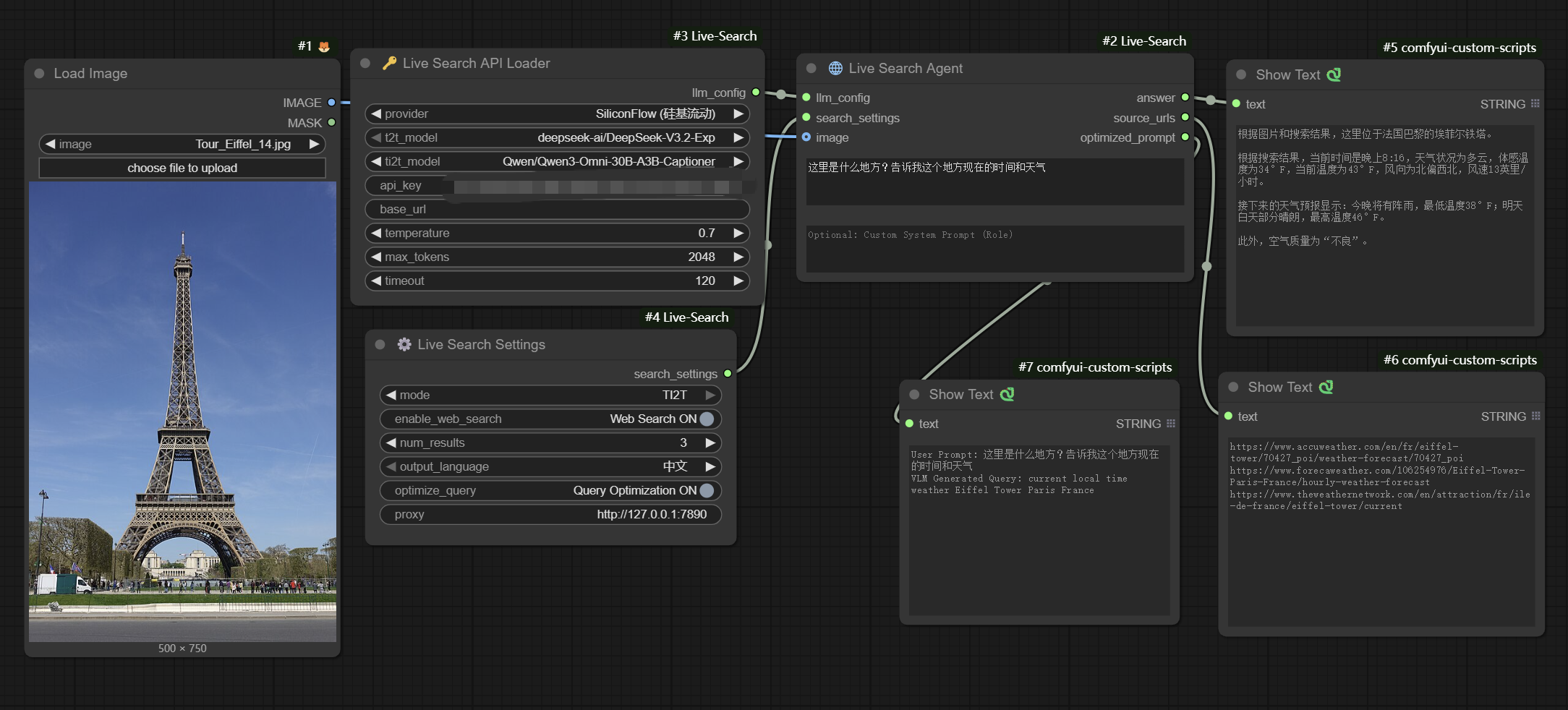 | TI2T · Eiffel Tower + Web Search: upload an Eiffel Tower photo, let GPT‑5.1 VLM generate
 current local time weather Eiffel Tower Paris France, run DuckDuckGo, and answer “这里是巴黎埃菲尔铁塔 … 当前温度 …”. |
| 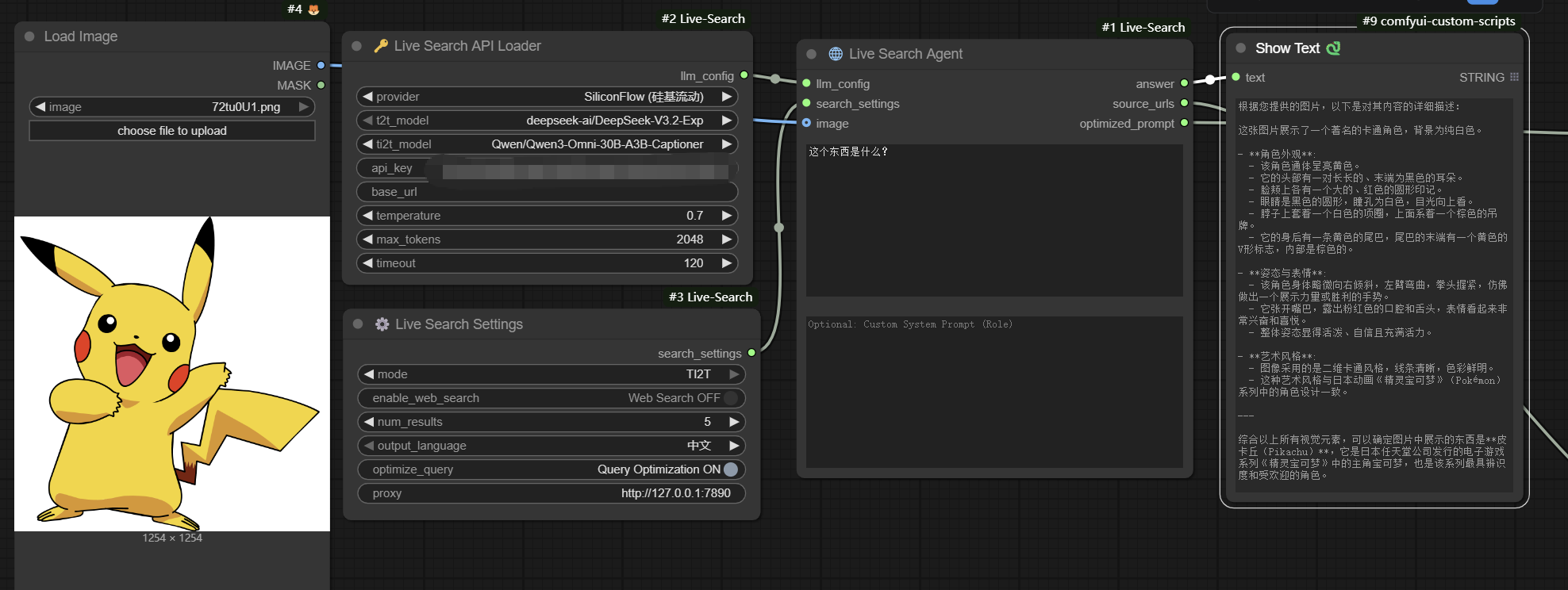 | TI2T · Cartoon Recognition: feed a Pikachu image with prompt “这个东西是什么?”,VLM 模型在
 Web Search OFF 下直接描述颜色、特征与动画背景。 |
| 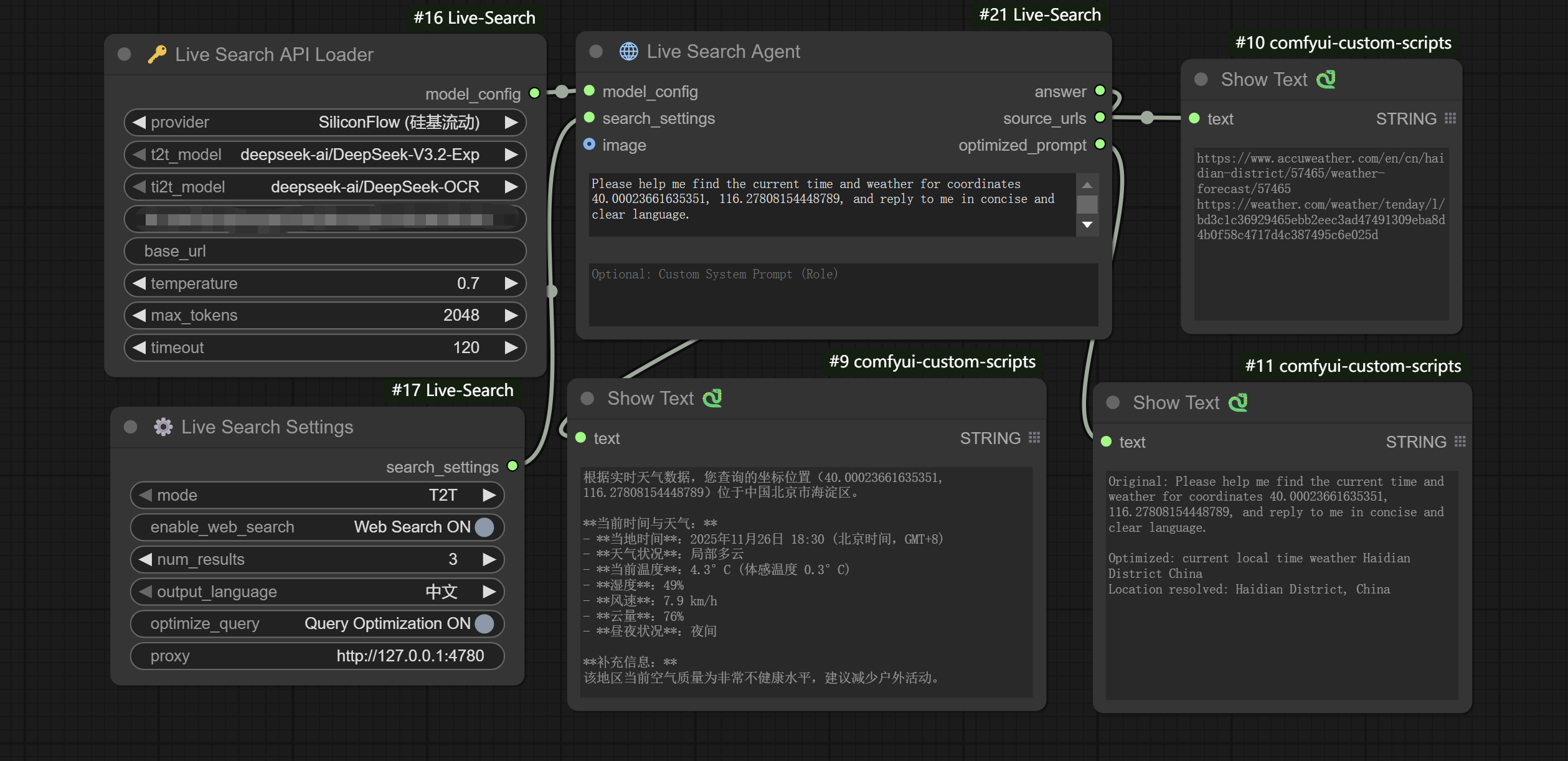 | T2T · GPS Weather Lookup: text prompt “Please help me find the current time and weather for coordinates 40.00023661635351, 116.27808154448789...”,启用 web search 获取海淀区实时天气并输出中文摘要。 |
Tip: mix and match Settings (mode, language, proxy) with different providers to recreate these flows or capture your own demos.
Modular Node Workflow (Recommended) ⭐
🔑 Live Search API Loader
Configure LLM API and model parameters.
| Parameter | Description | |-----------|-------------| | provider | Choose provider: OpenAI, SiliconFlow, DeepSeek, Gemini, Anthropic, Qwen, Doubao, Ollama, etc. | | t2t_model | Text-only model for T2T mode (LLM) | | ti2t_model | Vision-language model for TI2T mode (VLM). Shows “No VLM models available” if the provider has none. | | api_key | API key (optional, supports .env) | | base_url | API endpoint (optional, falls back to provider defaults) | | temperature | Temperature (0.0-2.0) | | max_tokens | Maximum output length | | timeout | Request timeout |
⚙️ Live Search Settings
Configure search behavior.
| Parameter | Description |
|-----------|-------------|
| mode | T2T (text) or TI2T (text + image). TI2T expects an IMAGE input on the Agent node. |
| enable_web_search | Enable/disable web search (OFF = use as pure LLM) |
| num_results | Number of search results (1-10) |
| output_language | Output language: 中文 or English |
| optimize_query | LLM-powered search keyword optimization (English-focused for better search recall) |
| proxy | Proxy address (optional) |
🌐 Live Search Agent
Main search node, connects to the above two nodes.
| Input | Type | Description |
|-------|------|-------------|
| prompt | STRING | Your question |
| model_config | MODEL_CONFIG | From API Loader |
| search_settings | SEARCH_SETTINGS | From Settings |
| (optional) image | IMAGE | Required when mode = TI2T. Pass any ComfyUI image tensor (RGB/RGBA). |
| (optional) role | STRING | Custom system prompt injected before the default instructions. |
| Output | Description | |--------|-------------| | answer | AI-generated answer | | source_urls | Referenced source links | | optimized_prompt | Optimized search query |
🔍 Why Only DuckDuckGo?
This node uses real web scraping for search, not API calls. In our testing:
✅ DuckDuckGo Advantages:
- Automation-friendly with lenient anti-bot measures
- Works reliably even with proxy configuration
- Search quality fully meets real-time information retrieval needs
- Open-source friendly with strong community support
❌ Google Issues:
- Extremely strict anti-scraping mechanisms (CAPTCHAs, IP blocks, User-Agent detection)
- Often returns empty results or CAPTCHA pages even with proxies
googlesearch-pythonlibrary is unstable in production- Frequent access leads to temporary IP bans
💡 If You Need Google Search Quality:
- Consider using official Google Custom Search API (paid)
- Or use third-party services like SerpAPI (paid)
We chose DuckDuckGo to ensure the node works reliably across all environments.
⚙️ Configuration (Optional)
For local users who don't want to paste their API key every time, there are two configuration methods:
Method 1: Use .env File (Recommended) ⭐
- Copy
.env.exampleto.env - Edit
.envand fill in your API keys:
OPENAI_API_KEY=sk-your-openai-key-here
DEEPSEEK_OFFICIAL_API_KEY=sk-your-deepseek-key-here
Advantages:
- ✅ Industry standard practice
- ✅ Automatically excluded by
.gitignore, won't be accidentally committed - ✅ More secure and professional
Method 2: Use api_config.json
- Rename
api_config_example.jsontoapi_config.json - Edit and fill in your API keys:
{
    "openai_api_key": "sk-...",
    "deepseek (official)_api_key": "sk-..."
}
API Key Priority
Node Input (Highest) > .env File > api_config.json (Lowest)
Note: On cloud platforms, always use the
api_keywidget in the node for security.
📄 License
Apache 2.0 License