
ComfyUI Extension
ComfyUI-Switti
Custom nodes for running the Switti text-to-image model inside ComfyUI with support for checkpoint loading, VAE, CLIP encoders, and pipeline building.
RyukoMatoiFan/ComfyUI-Switti
Nodes5
On cloudLocal install
Categoryloaders, generators
Stars0
Updated10 months ago
Nodes (5)
Load Switti Checkpoint
The brain, and the toggles you can ignore
loaders
Load Switti Dual CLIP
Two encoders and a swap-proof check
loaders
Build Switti Pipeline
The one node you must not forget
loaders
Switti Sampler
Autoregressive, so there's no steps slider
generators
Load Switti VAE Checkpoint
Your SD VAE will be rejected
loaders
Readme
ComfyUI-Switti
Custom nodes for running the Switti text-to-image model inside ComfyUI.
Nodes
- Load Switti Checkpoint
- Load Switti VAE Checkpoint
- Load Switti Dual CLIP
- Build Switti Pipeline
- Switti Sampler
Required Models
You must provide three sets of weights:
- Switti core checkpoint (
.safetensors) - Switti VQVAE checkpoint (
.safetensors) - Two text encoders:
clip-vit-large-patch14CLIP-ViT-bigG-14-laion2B-39B-b160k
The CLIP entries can be folders placed in ComfyUI/models/text_encoders or
.safetensors files with matching names in that same folder.
Workflow
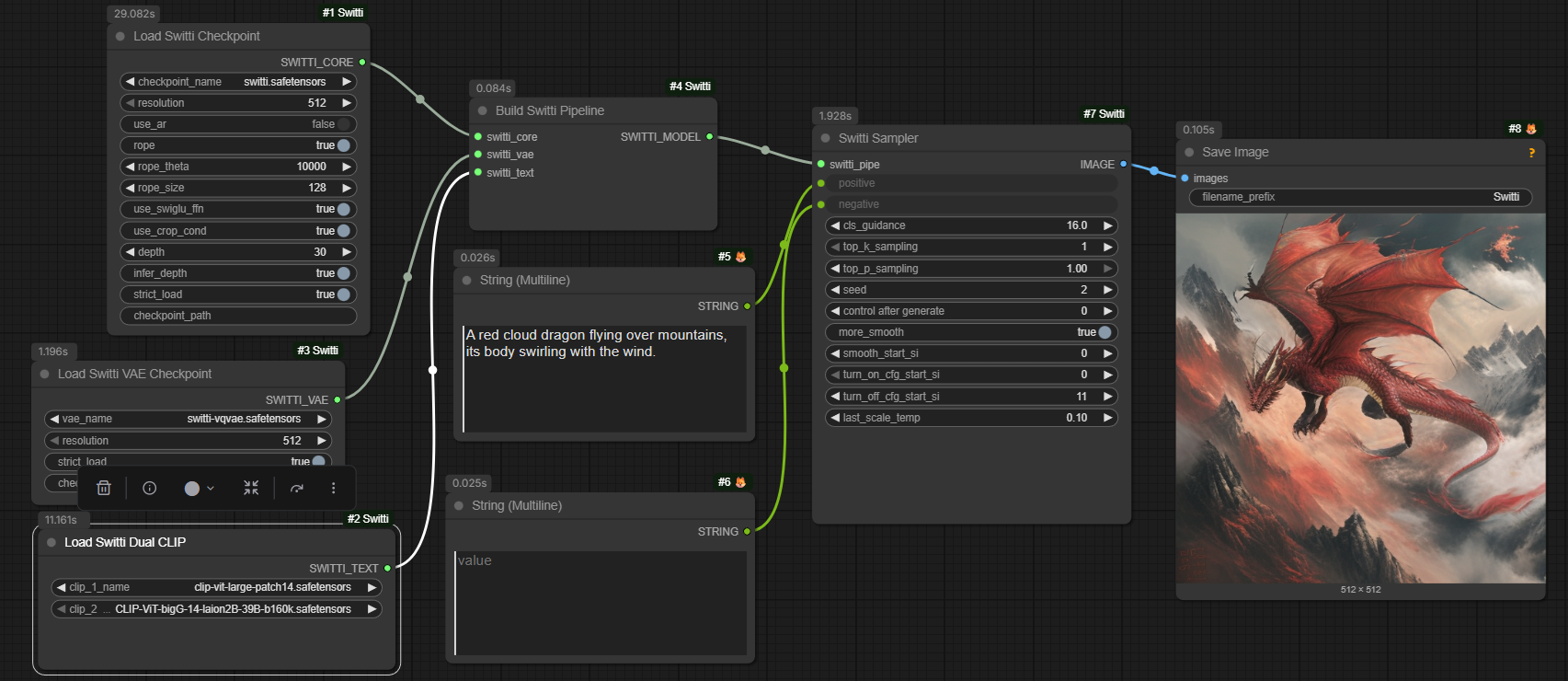
Load workflows/switti_basic.json in ComfyUI and fill in:
- Switti core checkpoint (diffusion_models folder)
- Switti VAE checkpoint (vae folder)
- CLIP encoders (text_encoders folder)
Make sure core and VAE resolutions match (512 or 1024).
Notes
- Standard SD VAEs and SDXL CLIP weights are not compatible with Switti.
- If CLIP inputs are swapped, you will get a size mismatch error.