
ComfyUI-Advanced-Tile-Processing
Advanced tiling plugin for ComfyUI solving VRAM limitations in 4K/8K+ image generation using intelligent tiling and seamless weighted fusion with multiple blending modes.
Nodes (2)
ComfyUI-Advanced-Tile-Processing
ComfyUI-Advanced-Tile-Processing is an advanced custom node plugin suite designed specifically for ComfyUI. It aims to solve VRAM out-of-memory (OOM) bottlenecks in ultra-high-resolution image generation and processing by employing intelligent tiling and multiple advanced fusion techniques for seamless merging, enabling stable processing of 4K, 8K, and even higher resolution images on standard consumer-grade graphics cards.
🌟 Core Features
-
Smart Dimension Awareness: Automatically calculates optimal slicing coordinates. Supports "edge fallback" strategy to ensure complete coverage of the original image without introducing black borders (padding), thus avoiding artifacts generated by models.
-
Multiple Advanced Fusion Techniques: Supports linear blending, Gaussian blending, multi-band fusion (Laplacian Pyramid), and direct stitching.
-
Histogram Matching: Based on the Reinhard algorithm, matches color distribution between adjacent tiles before fusion to eliminate color differences.
-
Optimal Seamline Computation: Supports dynamic programming and centerline seam modes with search radius limitation, automatically finding the minimum energy path to avoid cutting important content.
-
Metadata-Driven Workflow: The Splitter generates a unique
TILE_CONFIGobject containing original dimensions, scaling factors, and coordinates. The Merger automatically reads configurations for one-click restoration without manual parameter alignment. -
Deep Compatibility: Perfectly compatible with ComfyUI's list execution mechanism. Supports submitting tiles as
BATCHfor maximum inference speed or asLISTfor loop node processing. When VRAM is insufficient,LISTis recommended overBATCH. -
High-Performance Architecture: Fully based on PyTorch tensor operations with GPU acceleration, ensuring performance remains optimal when handling large images.
-
Dynamic Size Support (Tiled Upscale): Supports dynamic size adjustment (Tiled Upscale), allowing upscaling after tiling. The Merger can automatically detect fragment size changes and dynamically adjust canvas size.
🛠 Installation Instructions
-
Environment Requirements: ComfyUI 0.4.0+, Python 3.10+, PyTorch 2.0+.
-
Navigate to your ComfyUI custom nodes directory:
cd ComfyUI/custom_nodes/
- Clone this repository:
git clone [https://github.com/QL-boy/ComfyUI-Advanced-Tile-Processing.git](https://github.com/QL-boy/ComfyUI-Advanced-Tile-Processing.git)
- Restart ComfyUI.
🧩 Node Details
1. 🔧 Advanced Tile Splitter (Splitter)
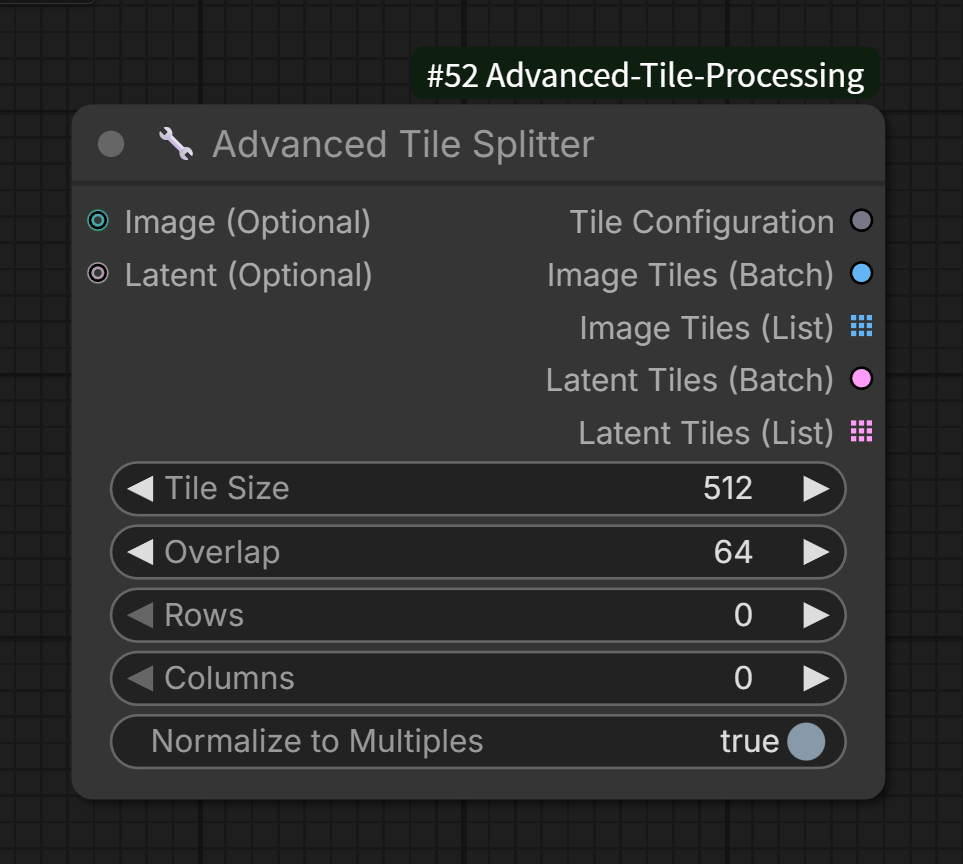 Splits the input large image or latent space into overlapping smaller tiles.
-
Input Ports:
-
image: (optional) Original image. -
latent: (optional) Latent space data.
-
-
Core Parameters:
-
tile_size: Tile resolution (e.g., 512, 1024). -
overlap: Overlapping pixels between two tiles. Recommended to be 10% or more oftile_sizefor optimal blending. -
rows: Fixed number of rows (automatically calculated when set to 0). -
columns: Fixed number of columns (automatically calculated when set to 0). -
normalize: Whether to align dimensions to multiples of 64 (recommended for compatibility).
-
-
Output Ports:
-
tile_config: Core configuration file (must be connected to Merger), containing all metadata required for merging. -
tiles_image_batch: Merges all tiles into a Batch Tensor for high-performance sampling. -
tiles_image_list: (List mode) List of tile images, triggering ComfyUI loop execution. -
tiles_latent_batch: Merged Latent Batch. -
tiles_latent_list: (List mode) List of tile Latents.
-
2. 🔧 Advanced Tile Merger (Merger)
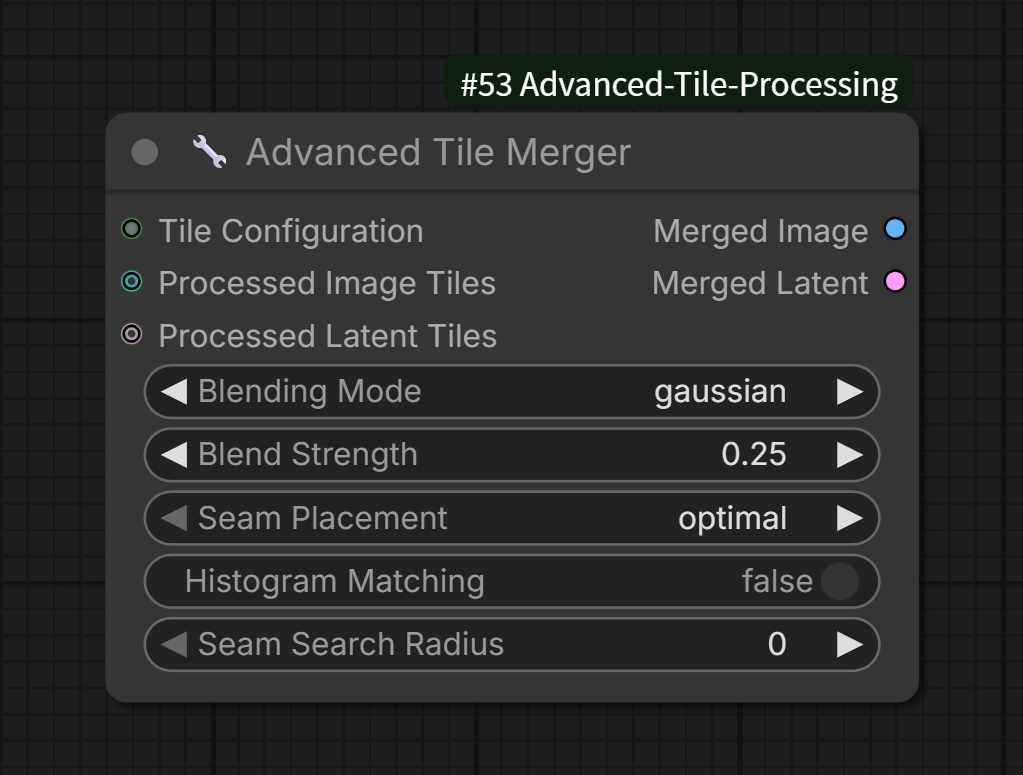 Seamlessly reconstructs processed fragments based on tile configuration.
-
Input Ports:
-
tile_config: Configuration object output by Splitter. -
processed_tiles_image: (optional) Processed image fragments. -
processed_tiles_latent: (optional) Processed latent fragments.
-
-
Core Parameters:
-
blend_mode: Fusion mode-
linear: Linear blending. -
gaussian(default): Gaussian weight blending, higher weight at the center with smooth decay towards edges, providing the most natural fusion. -
multi_band: Multi-band fusion (Laplacian Pyramid), highest quality fusion effect, suitable for high-contrast edges. -
none: Hard edge stitching (will have noticeable seams).
-
-
blend_strength: Fusion strength, controlling feathering degree. -
seam_mode: Seamline mode-
optimal: Dynamic programming to compute the minimum energy path. -
middle: Directly use the centerline of the overlapping area.
-
-
histogram_matching: Whether to enable histogram matching to eliminate color differences between adjacent tiles. -
seam_search_radius: Seamline search radius, limiting seamline fluctuations around the centerline.
-
-
Output Ports:
-
merged_image: Merged complete image. -
merged_latent: Merged complete Latent.
-
-
Internal Mechanism:
The node automatically unpacks LIST inputs. If your upstream is a loop node, ensure all tiles have been processed before feeding them into the Merger.
📖 Core Algorithm Principles
1. Tiling Strategy
The splitter employs intelligent coordinate calculation to ensure:
-
Complete coverage of the original image without gaps
-
Even distribution of overlapping regions
-
Support for fixed row/column numbers or automatic calculation
-
Support for dimension alignment to multiples of 8 or 64
2. Multi-Mode Fusion Techniques
A. Linear Blending
Simple linear interpolation in overlapping regions, fast but may produce blurring at edges.
B. Gaussian Blending
Uses Gaussian kernel functions to generate weight masks, with high center weights smoothly decaying towards edges:
$$M(x,y) = e^{-\frac{(x-x_c)^2+(y-y_c)^2}{2\sigma^2}}$$
C. Multi-band Blending
High-quality fusion based on Laplacian pyramid:
-
Build Gaussian and Laplacian pyramids of images
-
Fuse at each level separately
-
Reconstruct image from the top level
Advantages:
-
Preserves high-frequency details
-
Smoothly transitions low-frequency information
-
Eliminates ghosting effects
D. Optimal Seamline
Compute minimum energy path through dynamic programming:
$$E_{\text{total}} = E_{\text{color}} + \lambda \cdot E_{\text{geometry}}$$
Where:
-
$E_{\text{color}}$ is color difference
-
$E_{\text{geometry}}$ is geometric constraint (staying close to centerline)
-
$\lambda$ is balancing parameter
3. Histogram Matching
Based on the Reinhard algorithm, matches statistical characteristics of source image to reference image:
$$I_{\text{matched}} = \frac{(I - \mu_s)}{\sigma_s} \times \sigma_t + \mu_t$$
Where:
-
$\mu_s, \sigma_s$ are mean and standard deviation of source image
-
$\mu_t, \sigma_t$ are mean and standard deviation of target image
4. Latent Space Merging
For latent space, a simplified "center crop" strategy is used:
-
Each tile takes the center part within overlapping regions
-
Directly pastes onto canvas without blending
-
8x downsampling correspondence
🚀 Usage Recommendations
Best Practice Configurations
| | | |---|---| |Scenario|Recommended Parameters| |General image stitching|overlap=64, blend_mode="gaussian", blend_strength=0.25| |High contrast images|overlap=128, blend_mode="multi_band", blend_strength=0.3| |Significant color differences|Enable histogram_matching, seam_mode="optimal"| |Speed priority|blend_mode="linear", seam_mode="middle"|
Performance Optimization
-
Batch Mode: When tile count is low (≤4) and VRAM is sufficient, use Batch mode for highest performance
-
List Mode: When tile count is high or VRAM is limited, use List mode for sequential processing
-
Search Radius: Set appropriate seam_search_radius (e.g., 10-20) to accelerate optimal seam computation
Common Workflows
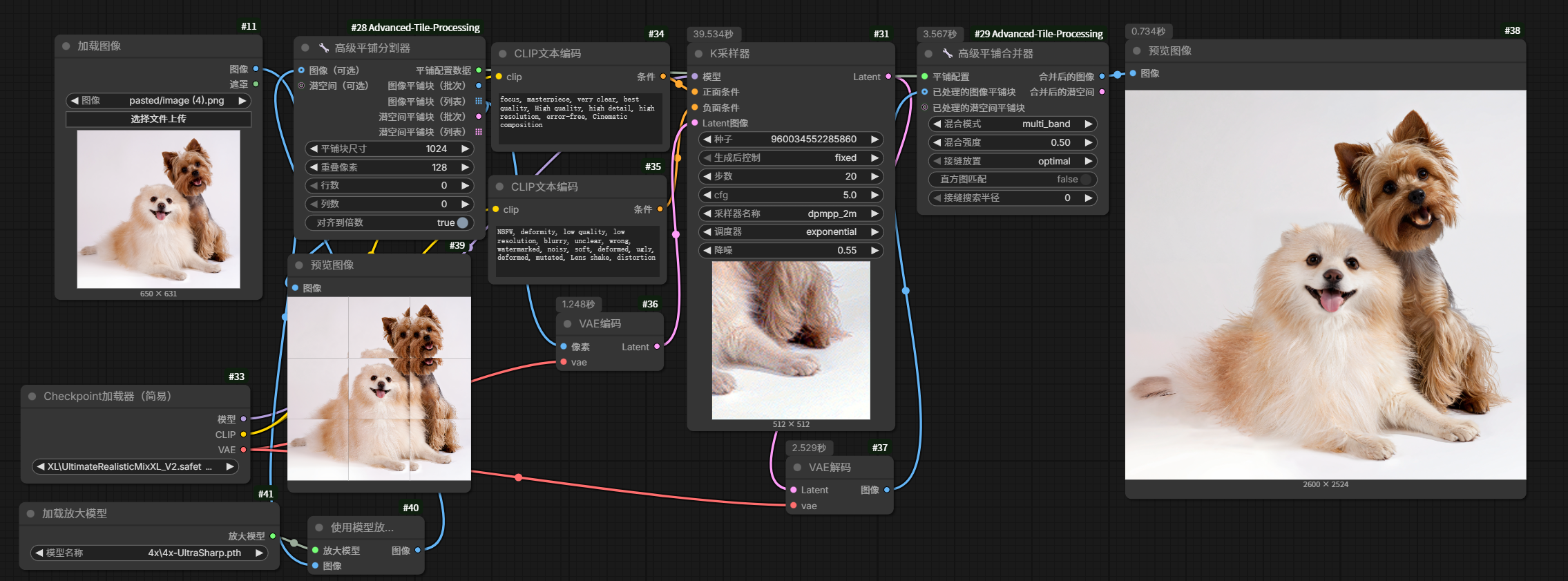
SDXL 经典分块采样高清修复复刻
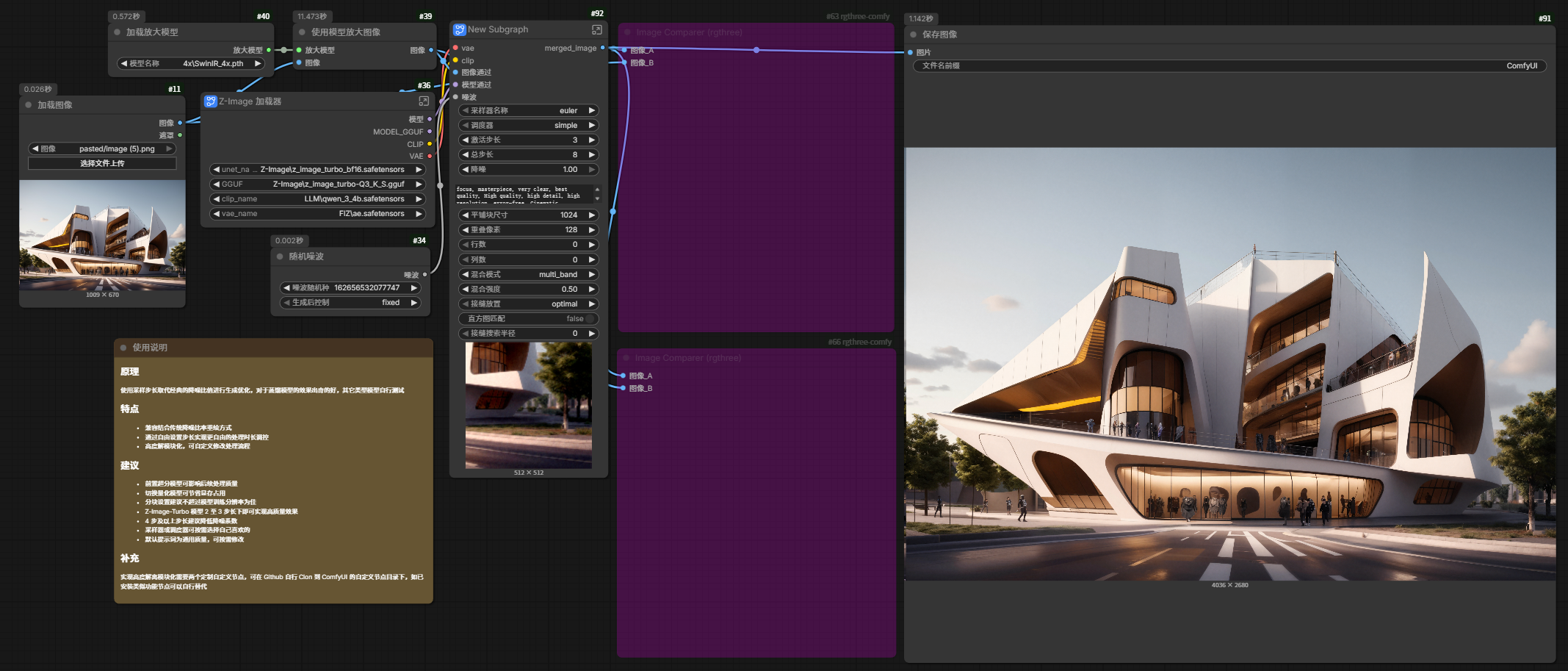
Z-Image质量升级
⚠️ Common Issues (FAQ)
-
Q: Why are there faint marks at the edges after merging?
- A: Try increasing
overlap(recommended to be at least 64) and ensureblend_modeis set togaussianormulti_band. Additionally, check if thedenoisevalue during redrawing is too high, as excessive denoising can cause significant changes in tile content.
- A: Try increasing
-
Q: Does it support merging latent space?
- A: Yes. However, due to the characteristics of the VAE encoder, overlapping merges in latent space use hard cutting, which may result in minor color differences upon decoding. It is generally recommended to perform the final merge in image space.
-
Q: Multi-band fusion is very slow. What should I do?
- A: Multi-band fusion requires building image pyramids, which is indeed slower. For scenarios requiring real-time performance, it's recommended to use gaussian mode. You can also reduce the number of pyramid levels (default is 5 in the code).
-
Q: Optimal seamline computation produces abnormal cuts. What should I do?
- A: Try increasing
seam_search_radiusto limit the seamline near the center, or directly useseam_mode="middle".
- A: Try increasing
-
Q: Why do I get multiple images as output even though I connected the nodes?
- A: Ensure you are using
Advanced Tile Mergerand have correctly connectedtile_config. If the output is still a list, check if you have connected an old node that does not support List after the Merger.
- A: Ensure you are using
📊 Technical Specifications
-
Maximum Supported Dimensions: Theoretically unlimited, depends on system memory
-
Maximum Tile Count: 32×32 grid
-
Data Types: Supports float32, float16, bfloat16
-
Device Support: CUDA GPU (recommended), CPU (slower)
-
Dependencies:
-
torch >= 2.0.0
-
numpy >= 1.20.0
-
scipy >= 1.7.0 (for Gaussian filtering)
-
🔧 Development Notes
Extension Interface
The plugin registers a custom type TILE_CONFIG, which can be extended via:
from comfy.graph_utils import GraphBuilder
GraphBuilder.add_node_type("TILE_CONFIG", lambda x: isinstance(x, dict) and "splits" in x)
Module Structure
ComfyUI-Advanced-Tile-Processing/
├── __init__.py              # Node registration
├── nodes/
│   ├── tile_splitter.py     # Splitter
│   ├── tile_merger.py       # Merger
├── utils/
│   └── blending.py          # Fusion algorithms
└── README_CN.md             # Chinese documentation
🤝 Contribution and Feedback
Feel free to submit Issues or Pull Requests. If you find areas for improvement while using this project, please reach out.
📜 License
This project is open-source under the Apache-2.0 license.