
ComfyUI-MIDI3D
THIS NODE IS WIP. ComfyUI wrapper for MIDI-3D: Multi-Instance Diffusion for single image to compositional 3D scene generation.
Nodes (9)
Stitch up to seven binary masks into one instance mask (SAM-friendly)
The one node that downloads the whole MIDI-3D model for you
MV-Adapter plus a whole lot of VRAM
Feed MIDI-3D an image and a mask, get back per-object inputs
The file-path version of MIDI-3D preprocess (skip ComfyUI's loaders)
This is where the image actually becomes a 3D scene
Merge the scene into one mesh so you can actually export it
Painting multi-view-consistent textures onto your MIDI-3D meshes
Turn a color-coded picture into the mask MIDI-3D actually wants
Work in Progress! This node is not finished.
ComfyUI-MIDI3D
ComfyUI nodes for MIDI-3D multi-instance 3D scene generation.
MIDI-3D generates compositional 3D scenes from a single image with instance segmentation, handling multiple objects simultaneously using multi-instance diffusion.
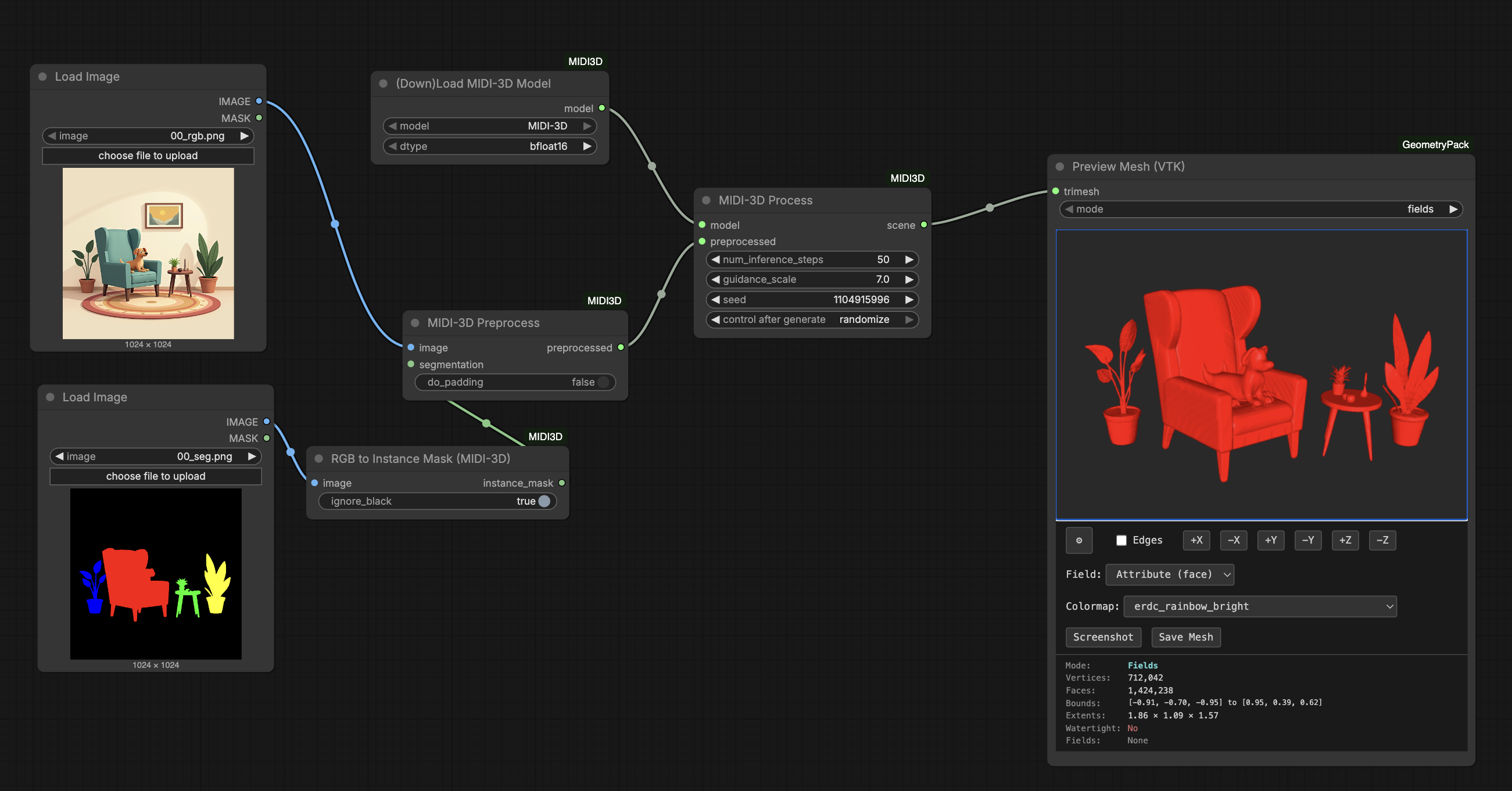
Features
- Multi-Instance Generation: Generate multiple 3D objects from a single segmented image
- Compositional Scenes: Automatically compose objects into a coherent 3D scene
- Texture Support: Apply multi-view consistent textures using MV-Adapter
- ComfyUI Integration: Seamless integration with ComfyUI's node-based workflow
- GeometryPack Compatible: Outputs Scene objects compatible with mesh processing nodes
Installation
- Clone this repository into your ComfyUI custom nodes directory:
cd ComfyUI/custom_nodes
git clone https://github.com/YOUR_USERNAME/ComfyUI-MIDI3D.git
- Install dependencies:
cd ComfyUI-MIDI3D
pip install -r requirements.txt
- Restart ComfyUI
Nodes
Core Nodes
- Load MIDI-3D Model: Download and load the MIDI-3D diffusion pipeline
- MIDI-3D Preprocess: Prepare RGB image and segmentation mask from ComfyUI tensors
- MIDI-3D Preprocess (Files): Load and prepare images from file paths
- MIDI-3D Process: Run multi-instance diffusion to generate 3D scene
Texture Nodes
- Load Texture Models: Load MV-Adapter and texture projection models
- MIDI-3D Texture: Apply multi-view consistent textures to generated meshes
Utility Nodes
- Scene to Trimesh: Convert multi-mesh Scene to single merged Trimesh for export
- Create Instance Mask: Generate instance segmentation from color-coded mask
- Split Mask by Color: Split segmentation mask into individual instances
Usage
-
Prepare Input:
- Load or create an RGB image
- Create an instance segmentation mask (color-coded, each object a different color)
-
Preprocess:
- Use
MIDI-3D Preprocessto prepare the images for processing - The node handles padding and normalization automatically
- Use
-
Generate 3D Scene:
- Load the model with
Load MIDI-3D Model - Run
MIDI-3D Processto generate the 3D scene - Output is a Scene object containing individual meshes
- Load the model with
-
Optional - Add Textures:
- Load texture models with
Load Texture Models - Apply textures with
MIDI-3D Texture
- Load texture models with
-
Export:
- Use
Scene to Trimeshto merge objects into a single mesh - Connect to mesh export nodes (e.g., from GeometryPack)
- Use
Requirements
- PyTorch with CUDA support
- diffusers
- transformers
- trimesh
- scikit-image
- open3d-cpu
- mvadapter
- pymeshlab
- jaxtyping
See requirements.txt for complete dependencies.
Community
Questions or feature requests? Open a Discussion on GitHub.
Join the Comfy3D Discord for help, updates, and chat about 3D workflows in ComfyUI.
Credits
- MIDI-3D: Official Repository
- MV-Adapter: Hugging Face
- ComfyUI: Official Repository
License
See LICENSE file for details.