
ComfyUI Extension
ComfyUI-animetimm
ComfyUI custom node for tagging anime images using TIMM models from animetimm, supporting general tags, character tags, artist tags, and rating tags with batch image processing.
MakkiShizu/ComfyUI-animetimm
Nodes1
On cloudLocal install
CategoryAnimeTimm
Stars10
Updated10 months ago
Readme
ComfyUI-animetimm
ComfyUI custom node for tagging anime images using models from animetimm.
Features
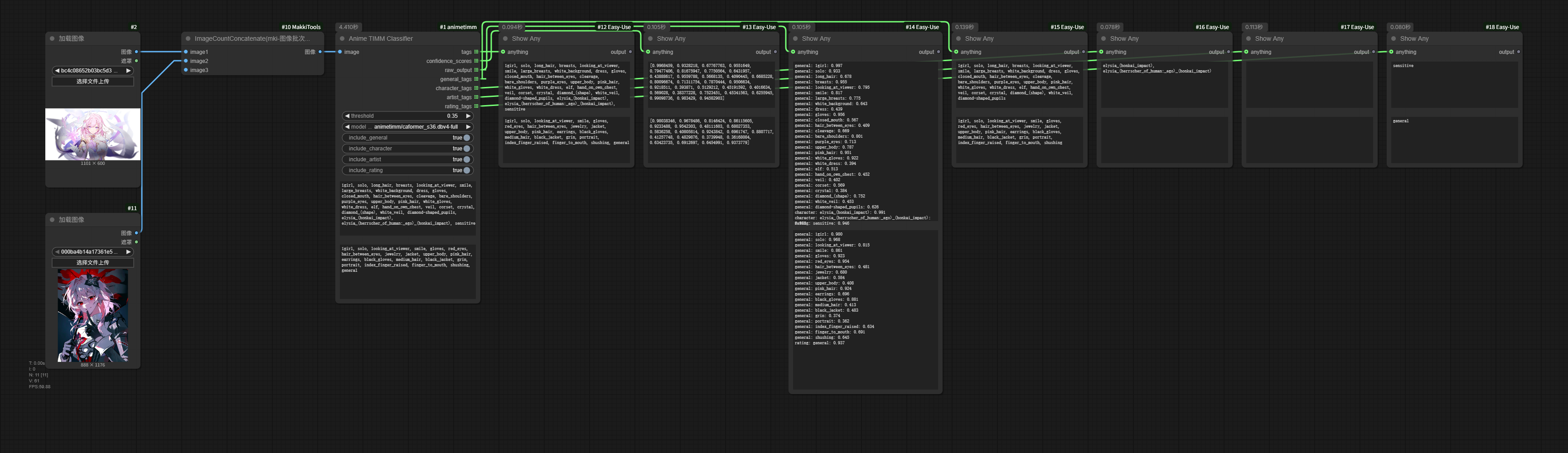
- Performs anime image tag prediction using various TIMM models from animetimm
- Supports classification of general tags, character tags, artist tags, and rating tags
- Supports batch image processing
Installation
Recommended
- Install via ComfyUI-Manager.
Manual
- Navigate to
ComfyUI/custom_nodesin your terminal (cmd). - Clone the repository into the
custom_nodesdirectory using the following command:git clone https://github.com/MakkiShizu/ComfyUI-animetimm cd ComfyUI-animetimm - Install the dependencies in your Python environment.
- For Windows portable version, run the following command in
ComfyUI\custom_nodes\ComfyUI-animetimm:..\..\..\python_embeded\python.exe -m pip install -r requirements.txt - If using venv or conda, activate your Python environment first, then run:
pip install -r requirements.txt
- For Windows portable version, run the following command in
Usage
Anime TIMM Classifier
The node provides the following parameters:
image: Input imagethreshold: Confidence threshold (default 0.35), only tags with confidence above this value will be outputmodel_repo: Select model repository (default animetimm/caformer_s36.dbv4-full)include_general: Whether to include general tags (default True)include_character: Whether to include character tags (default True)include_artist: Whether to include artist tags (default False)include_rating: Whether to include rating tags (default True)replace_underscore: Whether to replace underscores in tags with spaces (default True)use_custom_threshold: Whether to use only the custom threshold from input (ignoring the best_threshold from selected_tags.csv) (default to False)
Output
tags: Comma-separated tag stringconfidence_scores: Corresponding confidence score listraw_output: Raw output with categories and confidence scoresgeneral_tags: General tagscharacter_tags: Character tagsartist_tags: Artist tagsrating_tags: Rating tags
Notes
- Model files need to be downloaded on first run, which may take some time
- Models will be cached in the
ComfyUI/models/animetimmdirectory after first use - GPU is recommended for inference to achieve better performance
- Different models have trade-offs between accuracy and speed, choose according to your needs
- Some models (e.g.,
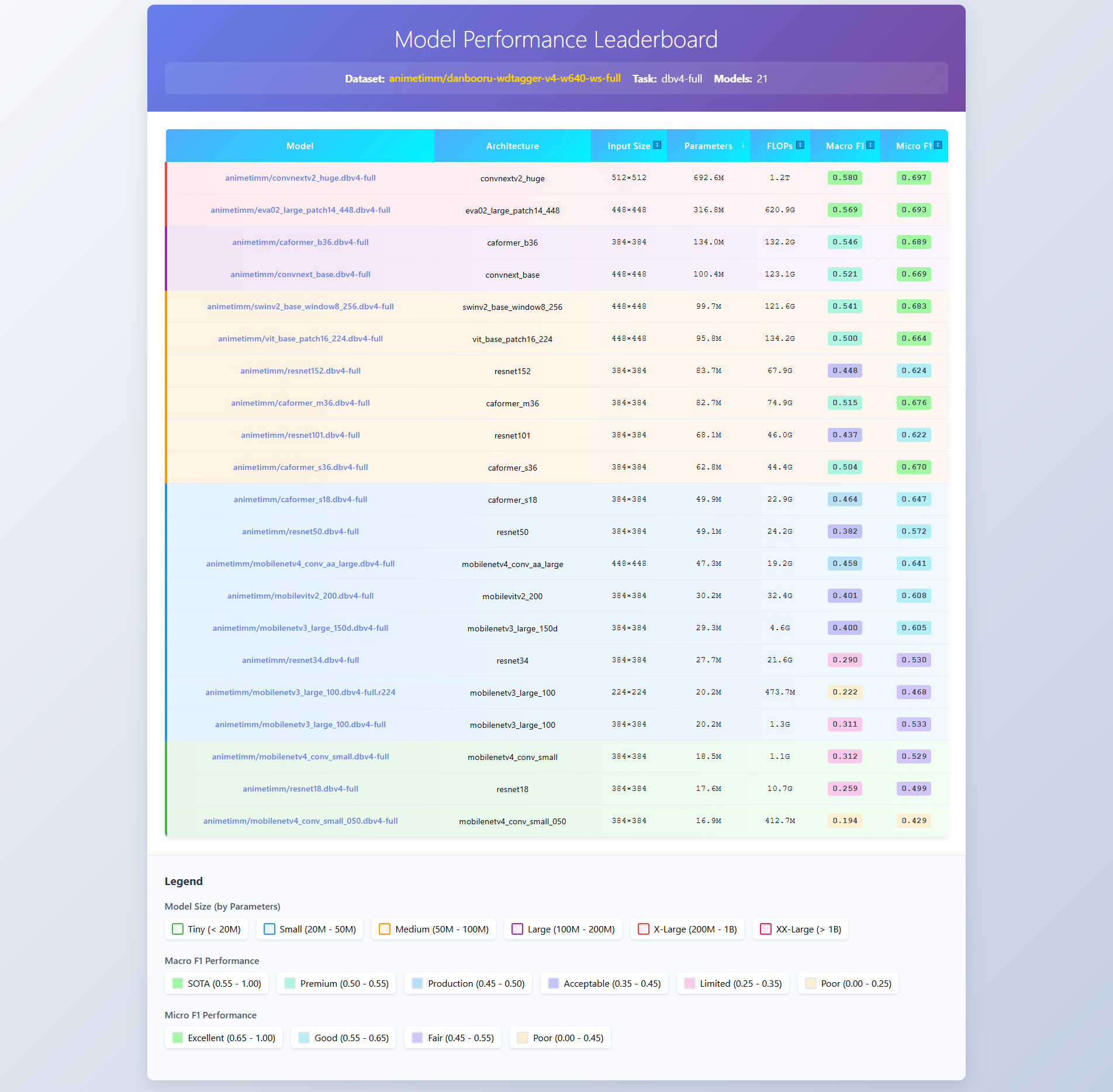
eva02_large_patch14_448.dbv4-full) require larger VRAM
Performance
Ranklist: dbv4-full-ranklist
Troubleshooting
Model download fails
The official repository is publicly accessible, but you must log in and accept the terms to access its files and content. If download from the official repository fails, the node will automatically try to download from a backup repository.