
ComfyUI-checkpoint-Discovery-Hub
Checkpoint Discovery Hub — An advanced browser for your ComfyUI models. Easily explore, filter, and load your checkpoints, manage presets, favorites, and Civitai metadata — all from a sleek and intuitive interface.
⭐ Give a star, it shines and keeps us motivated! ✨
🔬 ComfyUI-Checkpoint-Discovery-Hub



Browse and manage your checkpoints directly inside ComfyUI. Discover models, sync metadata with Civitai, create presets, mark favorites, and filter by folders — all in a modern and responsive interface.
- GitHub: https://github.com/Light-x02/ComfyUI-checkpoint-Discovery-Hub
- Node name in ComfyUI: Checkpoint Discovery Hub
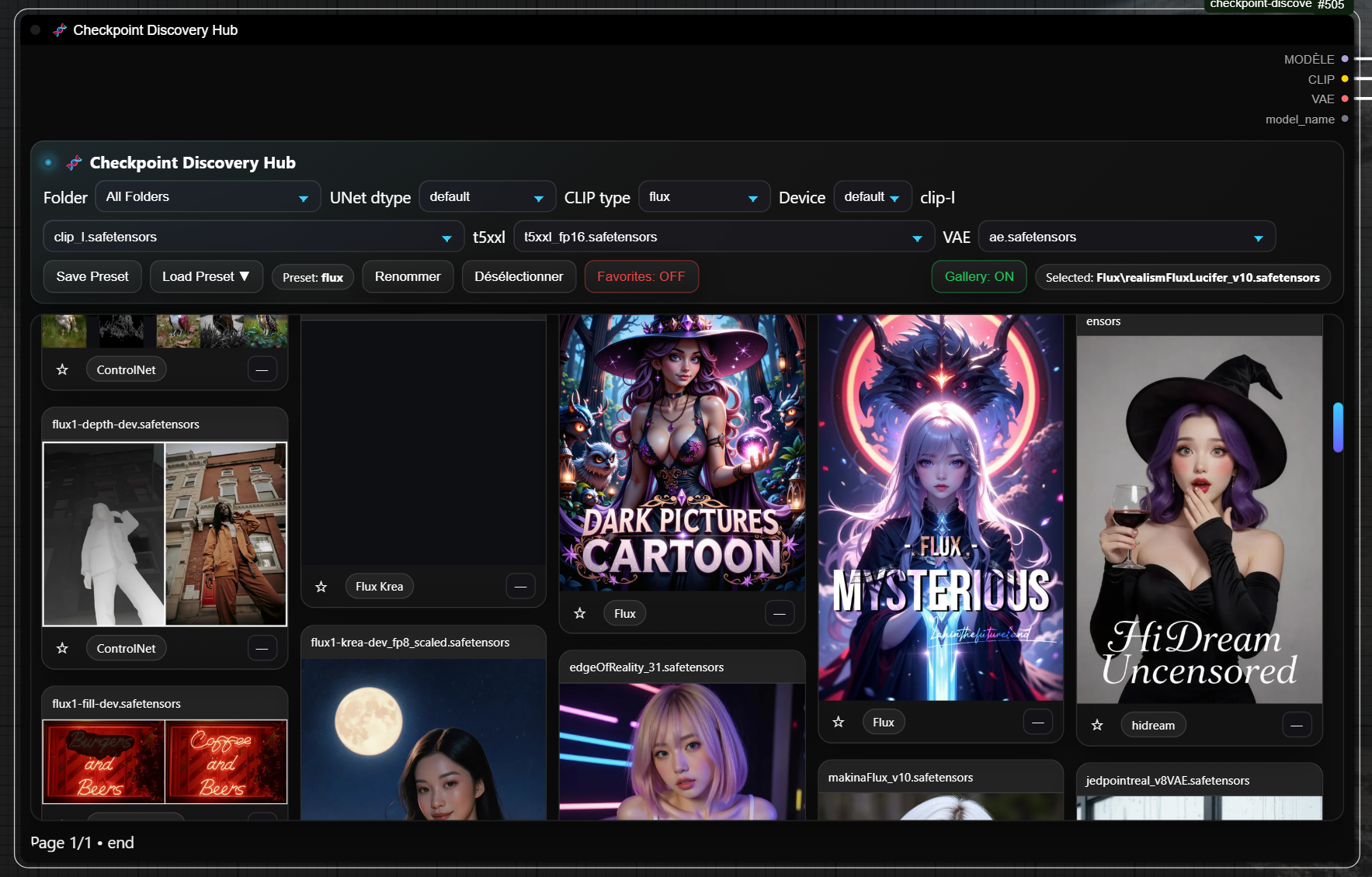
11/10/25
Change
Unified UI state storage — replaced per-node cdh_ui_state.json entries (e.g. "-1_579", "-1") with a single global object.
This improvement can fix incorrect persistence of the last settings when multiple Checkpoint Discovery Hub nodes were present, which could cause conflicts.
Migration/Cleanup
Auto-detect old map-based UI state; pick the most recent valid state and rewrite the file to the new flat format (auto-clean).
JS alignment
- LocalStorage key normalized (no
node.id). /set_ui_stateno longer sendsnode_id/gallery_id./get_ui_statecalled without params — now consumes the global state.
Fix
Corrected VAELoader.vae_list() TAESD F1 encoder/decoder flag mapping so taef1 appears when both files exist.
Backward-compat
Old files are still read once and transparently migrated.
✨ Main Features
- Model browser: display checkpoints by folder and type.
- Presets system: save, rename, and reapply model setups instantly.
- Favorites: mark and filter only your starred checkpoints.
- Civitai sync: fetch metadata and preview images directly from Civitai.
- Custom clip labels: auto-renames CLIP 1/2 labels (e.g. t5xxl, clip-l).
- Smart UI restore: automatically remembers all selections after restart.
- Modern design: adaptive layout, quick access buttons, dark-themed interface.
🧩 Installation
Method 1: Via ComfyUI Manager
- Open ComfyUI Manager.
- Go to Custom Nodes.
- Search for "ComfyUI-checkpoint-Discovery-Hub" and install.
- Restart ComfyUI to load the node.
Method 2: Manual Installation
git clone https://github.com/Light-x02/ComfyUI-checkpoint-Discovery-Hub.git
Restart ComfyUI after cloning.
🚀 Usage
Outputs:
- MODEL, CLIP, and VAE with selected checkpoint configuration.
- All current selections are automatically saved and restored.
Toolbar Controls
- Folder: filter by model directory.
- UNet dtype / CLIP type / Device: quick model configuration.
- Save / Load Preset: manage model setups.
- Favorites: toggle starred checkpoints.
- Gallery ON/OFF: collapse or expand the full model browser.
💾 Presets
- Save any setup (checkpoint, dtype, CLIP, VAE).
- Rename or clear your active preset.
- The last used preset is remembered between sessions.
🖼️ Civitai Integration
- Sync: fetch and save preview images and metadata for local models.
- Open ↗: directly open the Civitai page after syncing.
Compatibility
Compatible with the extension ComfyUI-ImageMetadataExtension. This integration ensures metadata compatibility with Civitai, allowing details such as model to be correctly captured and displayed on the Civitai platform.
❤️ Credits
Created by Light-x02
⭐ Give a star if you like this project — it really helps and keeps the motivation high!