
ComfyUI Extension
ComfyUI_SimpleGoogleTranslate
Minimal and easy-to-use Google Translate text node for ComfyUI using the googletrans library with automatic language detection and full language support. (Description by CC)
KAVVATARE/ComfyUI_SimpleGoogleTranslate
Nodes1
On cloudLocal install
Categoryutils/Text
Stars4
Updated4 months ago
Nodes (1)
Readme
SimpleGoogleTranslate for ComfyUI
A minimal and easy-to-use Google Translate text node for ComfyUI. This extension provides a simple interface to translate text directly inside your workflow using Google Translate.
🌟 Features
- Lightweight & Simple: Only one node — clean and easy to use.
- Google Translate (unofficial): Uses the
deep-translatorlibrary'sGoogleTranslatorbackend. - Automatic Language Detection: Set
source_langtoauto. - Full Language List Support: All languages supported by
deep_translator.GoogleTranslator. - Multiline Input: Ideal for prompts, captions, or large text blocks.
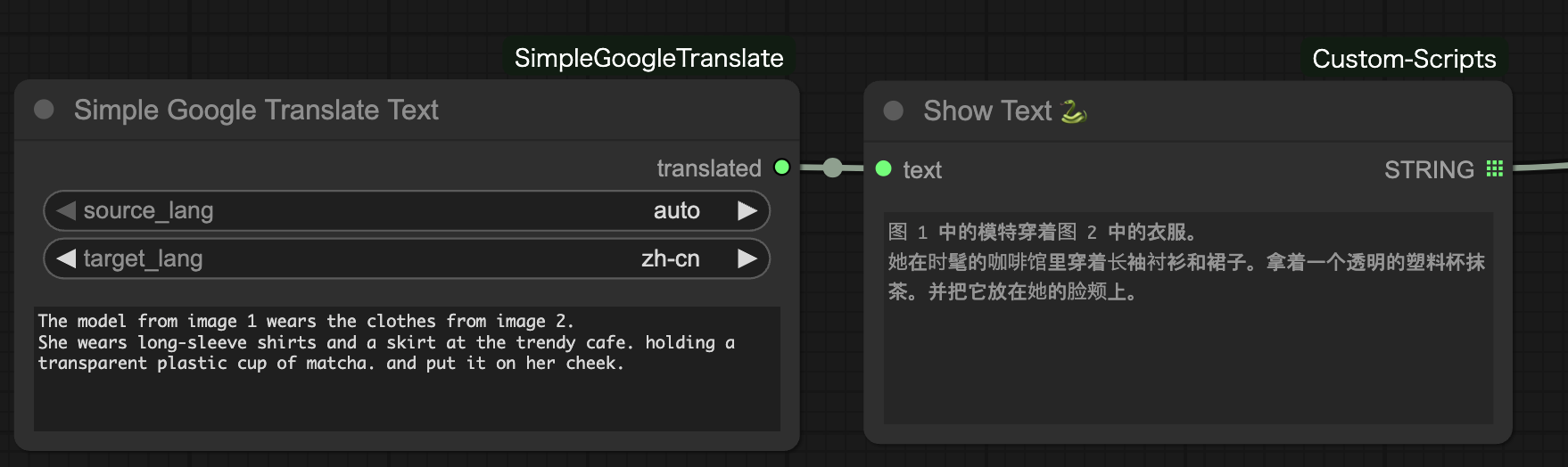
🧩 Node Overview
Simple Google Translate Text
- Inputs:
source_lang: original language (orauto)target_lang: translation output languagetext: content to translate
- Outputs:
translated(STRING): translated text
📦 Installation
-
Clone or copy this folder into your ComfyUI
custom_nodesdirectory:cd ComfyUI/custom_nodes git clone https://github.com/KAVVATARE/ComfyUI-SimpleGoogleTranslate.git -
Or manually create the folder:
ComfyUI/custom_nodes/ComfyUI_SimpleGoogleTranslate/ -
Restart ComfyUI
📚 Requirements
deep-translator>=1.11.4
This package will auto-install when ComfyUI loads the extension, as long as your folder contains:
requirements.txt
📁 File Structure
ComfyUI_SimpleGoogleTranslate/
│
├── __init__.py
├── simple_google_translate.py
└── requirements.txt
📝 Example Workflow
⚠️ Notes
- This extension uses
deep-translator's Google Translate backend, an unofficial Google Translate interface. - If translation stops working, Google may have updated their service.
- For production use, consider official APIs such as DeepL or Google Cloud Translate.
📄 License
Free to use, modify, and integrate into your own projects. Attribution is not required but appreciated. 🙂