
Comfyui-General-API-Node
A suite of powerful and versatile utility nodes for ComfyUI, designed to streamline complex workflows involving Large Language Models and text manipulation.
Nodes (16)
Bulk tag swaps from a JSON or key=value table
Ollama, OpenAI, Gemini, DeepSeek, all of it
Grab one item out of a list by index — the smallest node in the pack, and one you'll keep using
Turn an LLM's JSON blob into individual wires — the node that makes 'prompt from model' workflows sane
Pull a character bio or prompt template straight from your input folder
Strip the ```json fences out of LLM replies before your parser chokes on them
A last-pass scrub for messy prompts — dedupe, fix commas, drop empty brackets
Pull hex colors, coordinates, numbers out of any LLM text
Persist prompts, LLM replies, and logs to the output folder
Actually see what a string contains without hunting through logs
The humble constant node that every workflow ends up needing
Up to 8 find-and-replace operations in one node — your prompt cleanup workhorse
Split text into a list and run the whole downstream graph once per item
Route on 'Error', check a pattern, branch your workflow
Split a string into a real list — the partner node for Get List Element
Type {subject} in a template, get an input port. The prompt-builder that meets you halfway
ComfyUI General API Node Pack
Created by FeiMao-326
</div>English
A suite of powerful and versatile utility nodes for ComfyUI, designed to streamline complex workflows involving Large Language Models and text manipulation. This pack is created by FeiMao-326 and is modernized for 2026 models.
✨ Nodes Included
This pack contains the following nodes available under the FeiMao-326 category:
- General API Node: [Core] The Ultimate Multimodal LLM Engine.
- 2026 SOTA Model Support: Native adaptation for Gemini 3.1 Pro/Flash, GPT-5.4, Llama 4, and Claude 3.5.
- Smart Task Routing: Automated redirection for Google Gemini. Use standard names like
gemini-3.1-proorgemini-3.1-pro-image-previewfor chat/vision; it automatically switches to Image Gen mode when the model name includes theimage-keyword. - Double VRAM Cleanup: Specialized for local Ollama. When
cleanup_local_gpuis enabled, the node triggers a REST APIkeep_alive: 0and a CLI fallback to physically purge model data from VRAM immediately after execution. - Advanced Multimodal Vision: Supports concurrent parsing and comparison of 2 or more images.
- Built-in Proxy Support: Native
system_proxyparameter (e.g.http://127.0.0.1:7890) safely bridges network gaps without polluting global OS logic. - Force JSON mode: Enable
force_json_formatto guarantee 100% structured API responses ready for the downstream JSON Parser. - Seed Logic: Includes industrial-grade seed control (
fixed,increment,randomize).
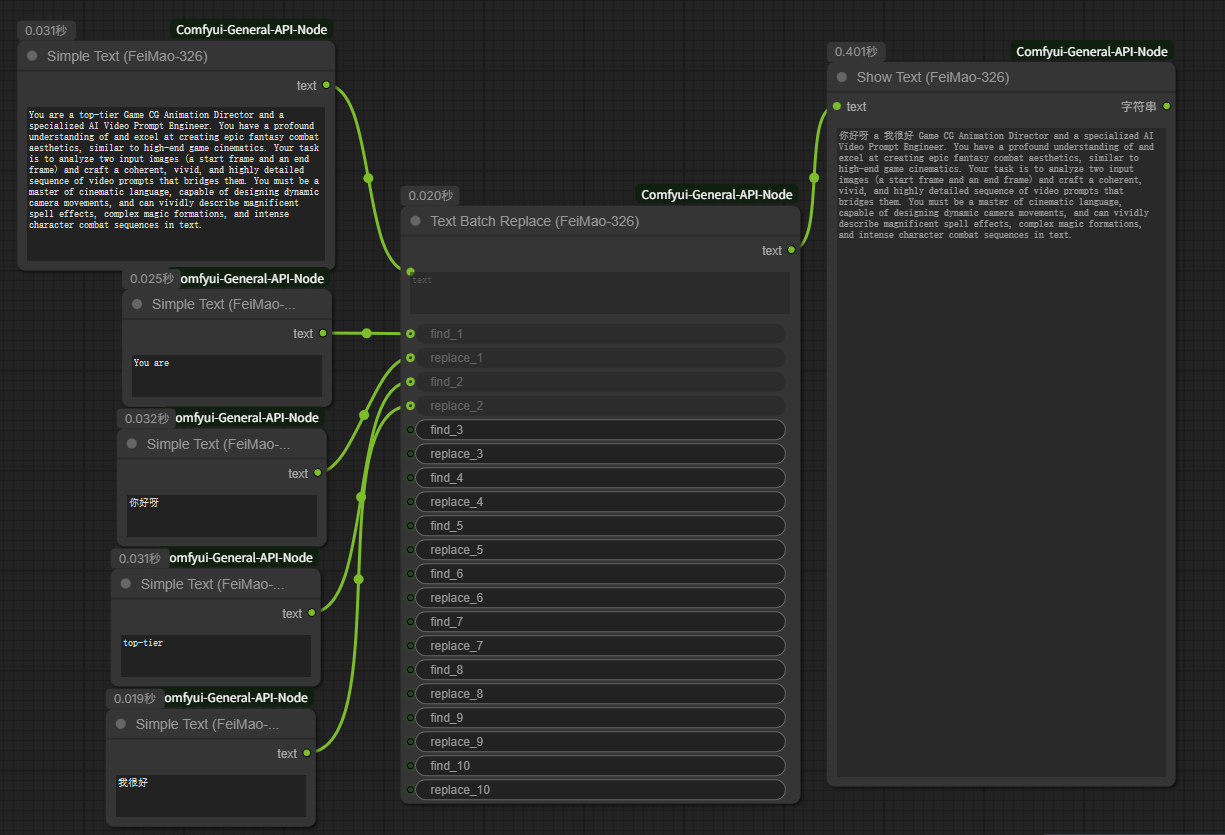
- Text Batch Replace: A powerful text utility for performing up to 8 find-and-replace operations in a single node.
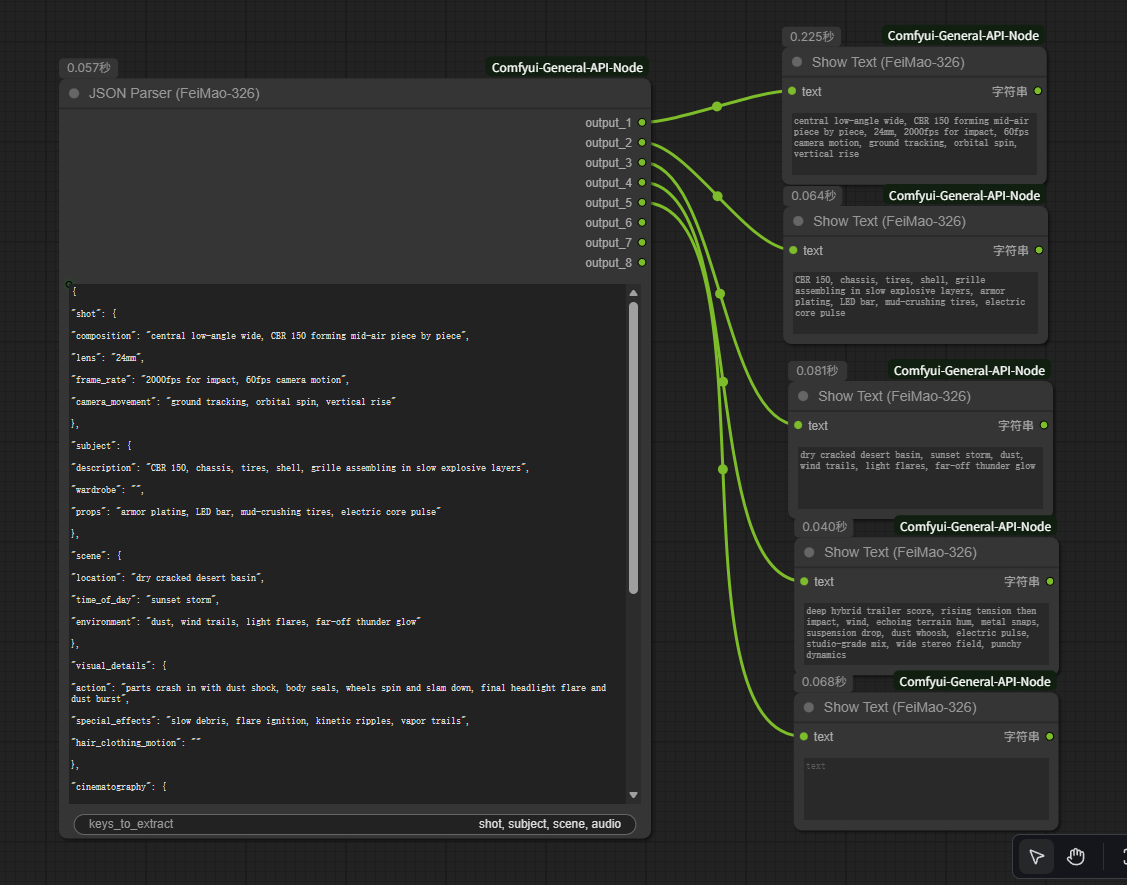
- JSON Parser: Deconstructs complex, nested JSON payloads into multiple separate text outputs with a built-in labeled preview. It deeply searches for user-defined keys, perfect for handling structured prompts.
- Show Text: Displays input text directly on the node UI.
- Simple Text: A simple text input node for passing strings to other nodes.
- Text Split By Delimiter: Splits a text string into a list based on a delimiter.
- Get List Element: Retrieves a specific element from a list by index.
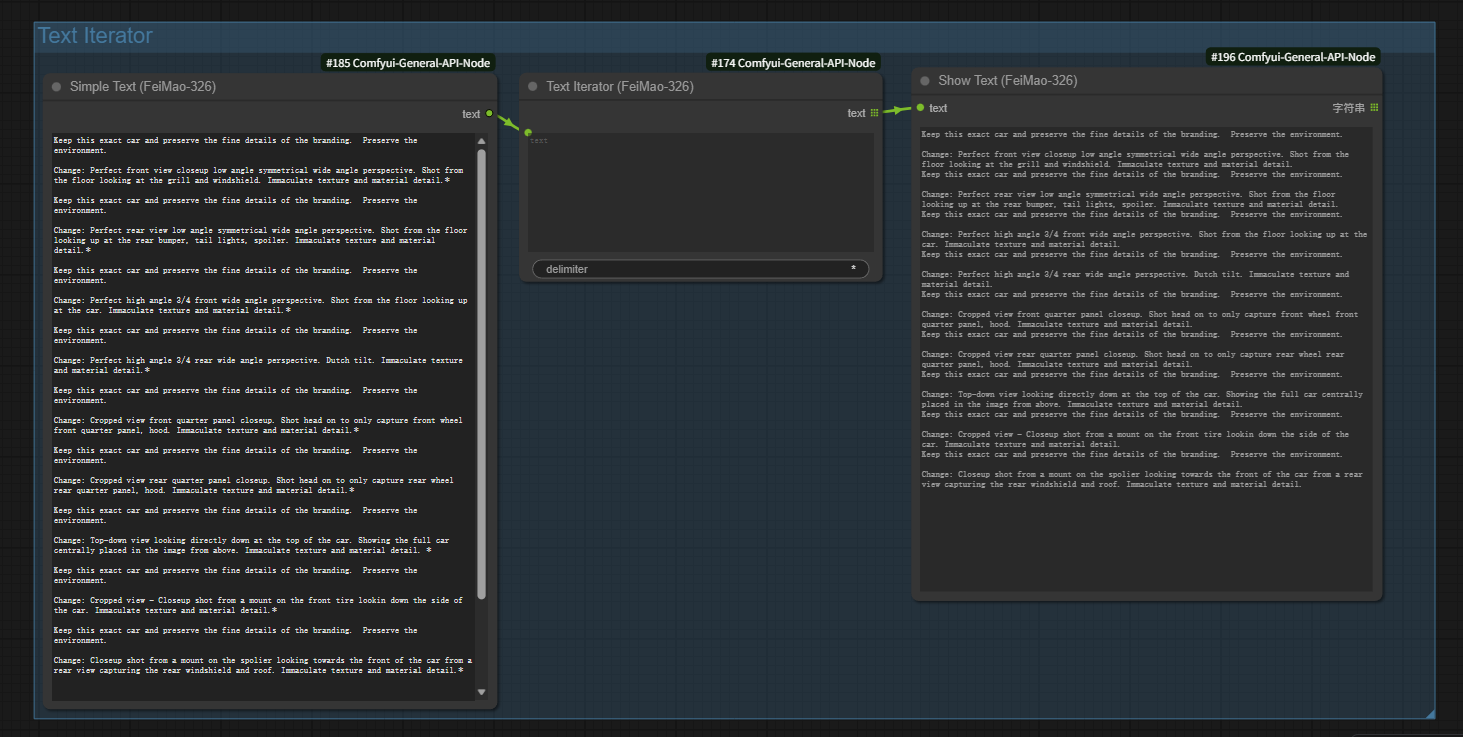
- Text Iterator: Splits text by delimiter and outputs it as a batch, triggering batch execution for downstream nodes.
- Markdown Extractor: Intelligent regex-based extraction of
```jsonor code blocks from LLM responses. - Text Template (Dynamic): [Recommended] Dynamic slot template.
{var}automatically generates input ports. Supports all languages. - Prompt Cleaner: Normalizes prompts by removing duplicates, extra commas, and empty brackets.
- Text Logic Switch: Flow control (If-Else) based on content matching (Contains, Regex, Exact, etc.).
- Regex Extractor Pro: Advanced pattern capture with capture group support.
- Dictionary Translator: Bulk mapping/replacement via JSON or Key=Value dictionaries.
- Save Text: Persist generated prompts or long texts to local TXT/JSON files, supporting
appendmode. - Load Text: Read TXT/JSON files from your input folder directly into the workflow for templating or context injection.
🔧 Installation
-
Clone the Repository
- Open your terminal.
- Navigate to your ComfyUI
custom_nodesdirectory:cd path/to/your/ComfyUI/custom_nodes/ - Clone this repository:
git clone https://github.com/FeiMao-326/Comfyui-General-API-Node.git
-
Install Dependencies
- Navigate into the newly cloned folder:
cd Comfyui-General-API-Node - Install the required dependencies:
pip install -r requirements.txt
- Navigate into the newly cloned folder:
-
Restart ComfyUI
- After completing the steps above, please restart ComfyUI completely.
💡 How to Use
General API Node
-
Finding the Node: In ComfyUI, you can find the node by right-clicking ->
Add Node->FeiMao-326->FeiMao-326 General API Node.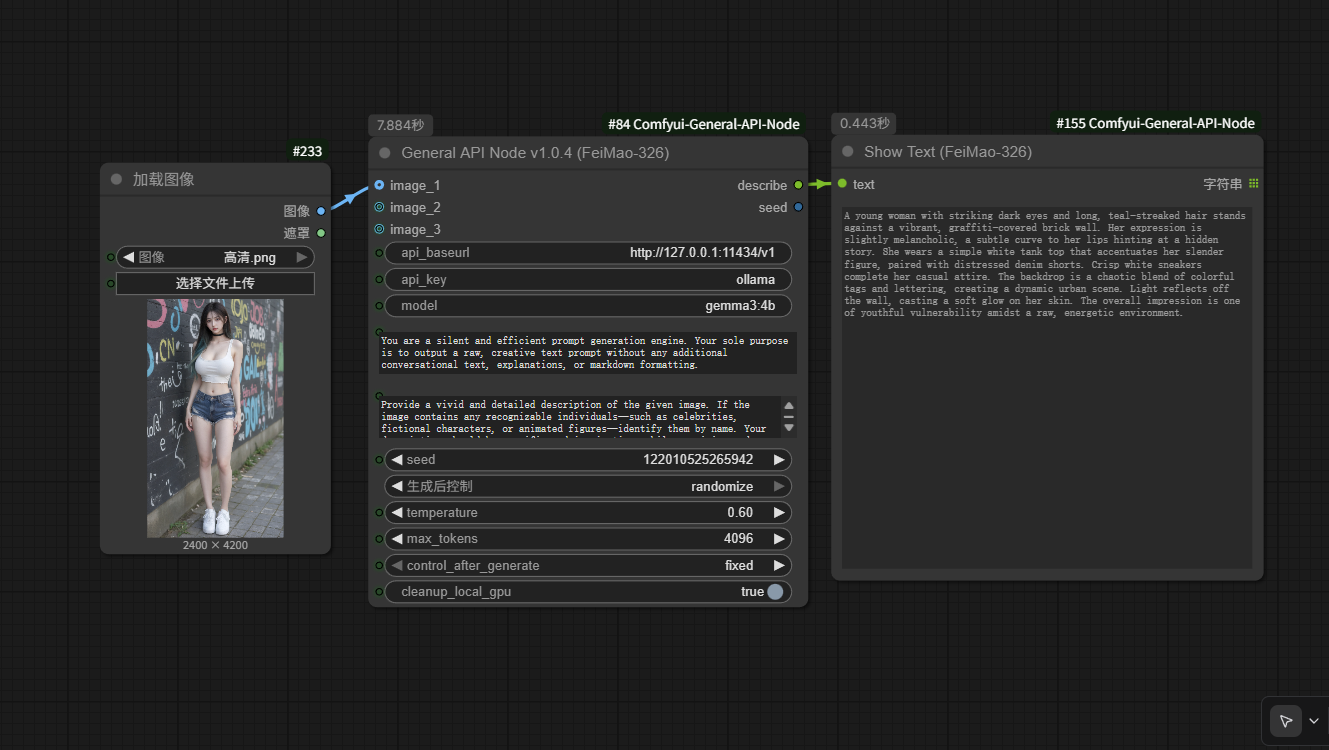
-
Seed Control Setup: To enable automatic seed changes (e.g.,
randomize), connect theseedoutput of the node back to its ownseedinput. This creates a loop that updates the seed after each run. -
Usage Scenarios:
- 📝 Text-Only Generation: Leave both
image_1andimage_2disconnected. - 🖼️ Single Image Description: Connect an image to
image_1. - 🎬 Dual Image for Video Transitions: Connect a start frame to
image_1and an end frame toimage_2. - 📸 Multi-Image Analysis: You can connect multiple images (
image_1,image_2,image_3...etc) for complex analysis tasks.
- 📝 Text-Only Generation: Leave both
-
Universal API Connection Guide (Configuration Table): Built on the OpenAI-compatible protocol, this node seamlessly integrates with 99% of cloud LLMs and local frameworks.
| Vendor / Framework | api_baseurl | model (Example) | Notes |
| :--- | :--- | :--- | :--- |
| Local Ollama | http://127.0.0.1:11434/v1 | gemma4:e4b / llama3 | Native VRAM cleanup support |
| Local LM Studio | http://127.0.0.1:1234/v1 | (Loaded model name) | Popular cross-platform tool |
| Local WebUI (Oobabooga)| http://127.0.0.1:5000/v1 | (Loaded model name) | Classic open-source WebUI |
| Local vLLM / TGI | http://127.0.0.1:8000/v1 | (Deployed model name) | Enterprise-grade engines |
| OpenAI GPT-5 | https://api.openai.com/v1 | gpt-5.4-thinking / gpt-4o | Vision (VQA) supported |
| DeepSeek | https://api.deepseek.com/v1 | deepseek-chat | High performance, cost-effective |
| Alibaba Qwen | https://dashscope.aliyuncs.com/compatible-mode/v1 | qwen-vl-plus / qwen-max | vl models support Vision |
| Zhipu AI (GLM) | https://open.bigmodel.cn/api/paas/v4 | glm-4v / glm-4 | 4v models support Vision |
| Moonshot (Kimi) | https://api.moonshot.cn/v1 | moonshot-v1-8k | Great for long-context tasks |
| Groq (Ultra-Fast) | https://api.groq.com/openai/v1 | llama-3.1-70b-versatile | Ultra-fast LPU inference |
| NVIDIA NIM | https://integrate.api.nvidia.com/v1 | meta/llama-4-maverick | Official or Self-Hosted |
| Google Gemini (Native)| https://generativelanguage.googleapis.com/v1beta/ | gemini-3.1-pro / ...-image-preview| Node auto-converts to REST |
> [!TIP]
> **Google Gemini Image Generation**: The API supports native Gemini Image Gen. To enable **Image Generation modes**, the model name MUST contain the keyword `image-` (e.g., `gemini-3.1-pro-image-preview`). For standard chat or vision (VQA), use regular names like `gemini-3.1-pro`.
5. 🌐 Built-in System Proxy (system_proxy) Guide:
This node has built-in proxy support. **No need to modify system environment variables.** Just enter your local proxy address.

**How it works**: Your proxy software (e.g., Clash, V2rayN) opens a local HTTP listening port when running. Simply enter that port address into the `system_proxy` field.

**Common proxy software defaults**:

| Proxy Software | Default Value |
| :--- | :--- |
| **Clash / Clash Verge** | `http://127.0.0.1:7890` |
| **V2rayN** | `http://127.0.0.1:10809` |
| **Shadowsocks (SS/SSR)** | `http://127.0.0.1:1080` |
| **Qv2ray** | `http://127.0.0.1:8889` |

> [!IMPORTANT]
> **When do you need to fill this in?**
> - Using **local Ollama / LM Studio** or **domestic APIs (DeepSeek, Alibaba, Zhipu)** → **Leave blank**.
> - Proxy software is running in **Global/System Proxy** mode → **Leave blank** (system already routes traffic).
> - Proxy software is running in **Rule-based mode** (browser works, but Python apps can't access foreign APIs) → **Fill this in**. This is the exact pain point this feature solves.
6. 🗂️ Force JSON Format (force_json_format) Guide:
When enabled, the node forces the LLM to return a **100% clean JSON string** without any surrounding chatter like "Sure! Here is your JSON:".
> [!TIP]
> **Recommended Pipeline**: `General API Node (force_json_format ✅)` → `Markdown Extractor` → `JSON Parser`. This pipeline achieves fully automated, zero-intervention structured data extraction.

Text Batch Replace
- Perform multiple find-and-replace operations sequentially.
JSON Parser
- Automatically parses LLM JSON outputs into independent string slots based on defined keys.
Simple Text / Show Text
- Basic input and visual display modules.
Text Split / Get Element / Iterator
- Essential tools for handling lists and batch execution flows.
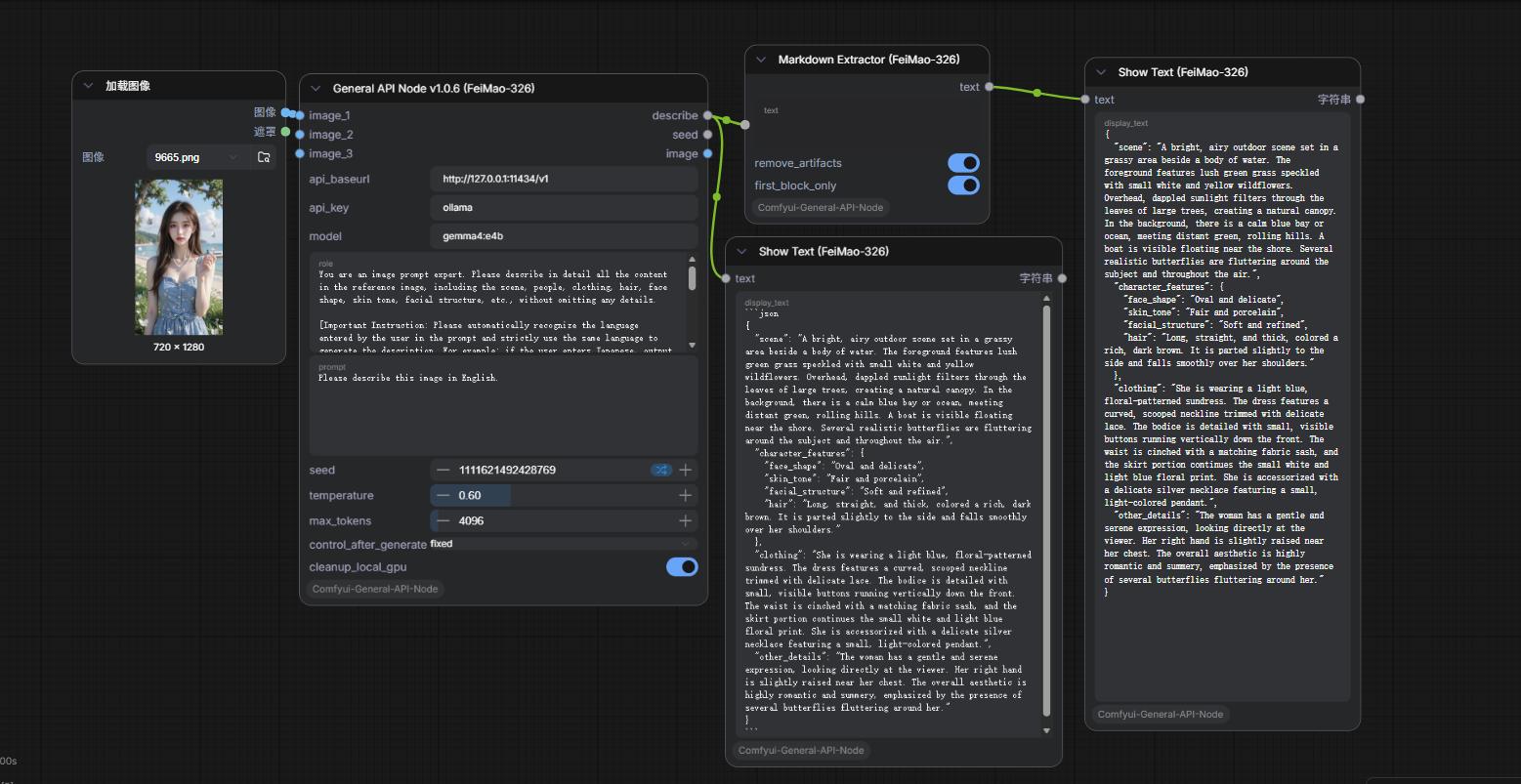
Markdown Extractor
- Problem: LLMs often reply with chatter like "Sure! Here is your JSON:
json ...". - Solution: Automatically identifies and extracts clean content from Markdown code blocks.
- Scenario: When LLM generates a JSON structure, passing it directly to JsonParser would crash due to Markdown syntax. This node ensures a "smooth" connection.
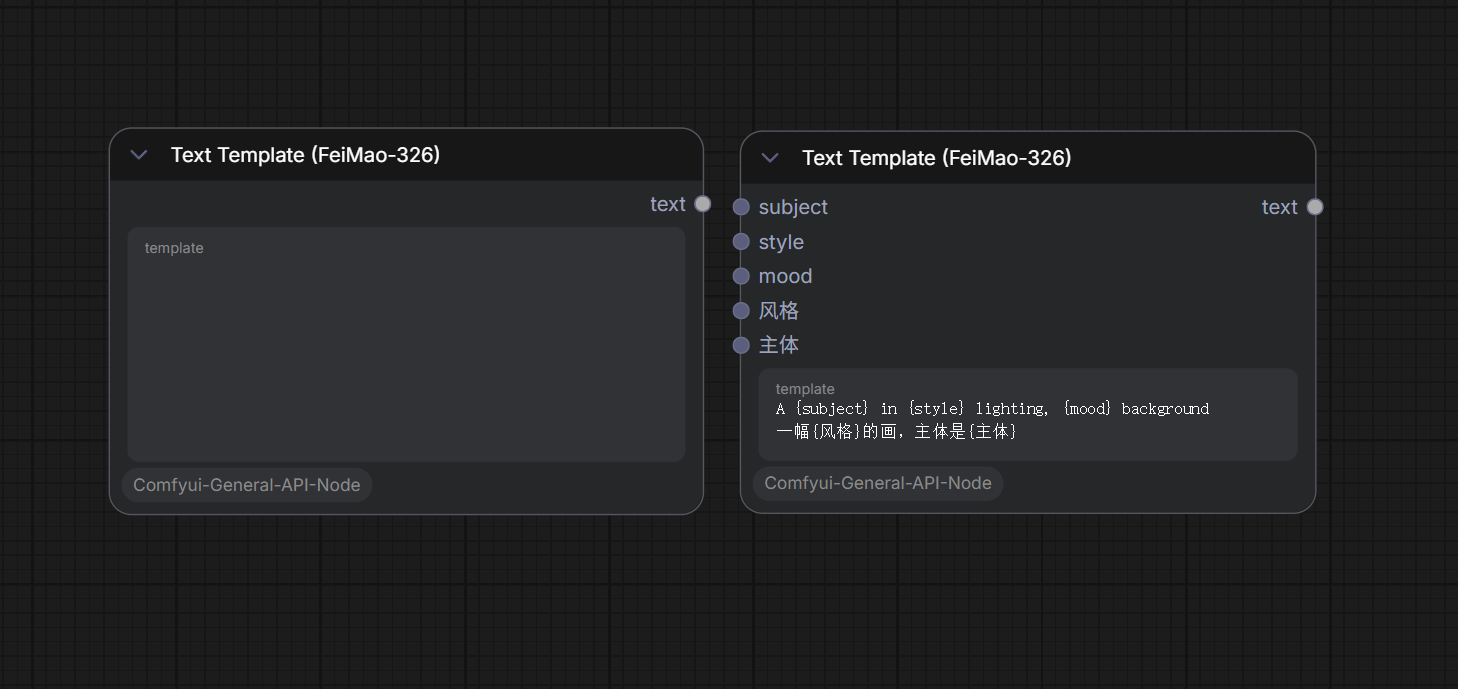
Text Template (Dynamic)
- Concept: Write a template with variables:
A {subject} in {style} lighting, {mood} background. - Magic: The node instantly creates input slots for
subject,style, andmood. - Note: In Nodes 2.0 (Vue UI), right-click and "Refresh" the node after modifying variables.
Prompt Cleaner
- Function: Removes duplicate keywords, merges extra commas, and cleans inconsistent spaces.
- Scenario: Multiple prompt concatenations often result in messy punctuation (e.g.,
, ,). Use this as a "final touch" before KSampler.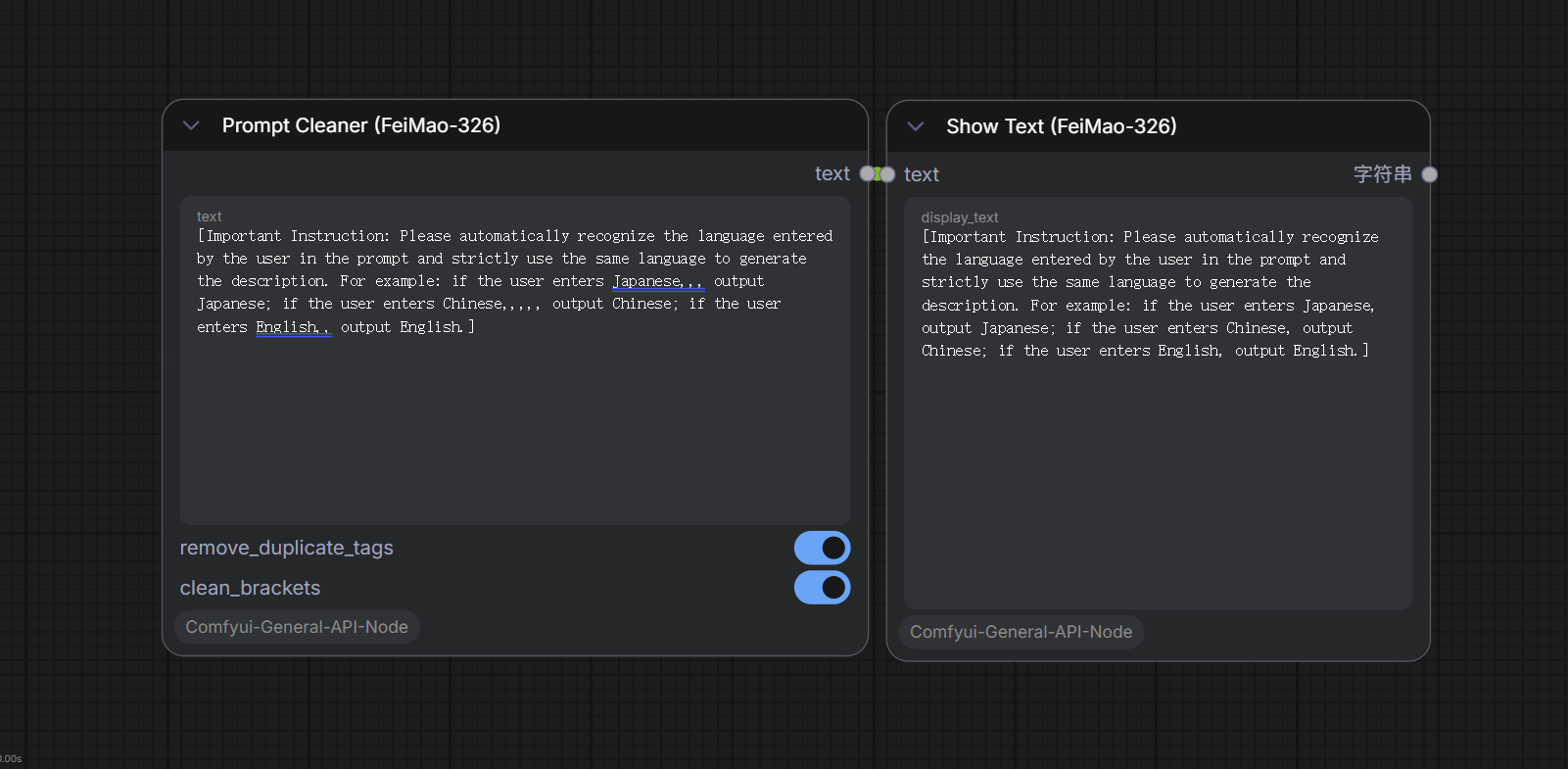
Text Logic Switch
- Function: Flow control (If-Else). If input text contains a keyword (or matches regex), output travels to the "True" port, otherwise "False".
- Scenario: Check if LLM output contains "Error" to stop the workflow or switch to a fallback model.
Regex Extractor Pro
- Function: Precise data extraction using Capture Groups.
- Scenario: Extract specific info like HEX color codes (#FFFFFF) or numeric coordinates from a long LLM description.
Dictionary Translator
- Function: Bulk tag replacement using a mapping table (JSON or Simple Text Pairs).
- Scenario: Map common Chinese terms to professional SD tags (e.g., replace "Cinematic" with "cinematic lighting, 8k, highly detailed").
Save Text
- Function: Saves any text output from your workflow to a local file in ComfyUI's
outputdirectory. filename: Enter a filename likeresult.txt. Subdirectories are supported (e.g.,prompts/scene_01.txt— folders are created automatically).appendtoggle: When OFF, the file is overwritten each run. When ON, new content is appended to the end (ideal for batch runs that accumulate results).- Scenario: Save 1000 generated prompts to a txt file during a batch production session.
Load Text
- Function: Reads a local file from ComfyUI's
inputdirectory and outputs it as a string. - Supported formats:
.txt,.json,.md,.csv. - How to use: The node automatically scans the
inputfolder on startup and lists available files in a dropdown. Just select a file. - Scenario: Place a pre-written character bio, world-building doc, or long prompt template into the
inputfolder, then inject it intoGeneral API Nodewith one click — no manual copy-paste needed.
📜 License
This project is licensed under the Apache 2.0 License.