
ComfyUI Extension
ComfyUI Resemble Enhance
A custom ComfyUI node for audio enhancement using Resemble AI's Resemble Enhance model. Created using OpenHands, Cline, and DeepSeek.
EuphoricPenguin/resemble-enhance-comfyui
Nodes1
On cloudLocal install
Categoryaudio
Stars8
Updated6 months ago
Readme
ComfyUI Resemble Enhance
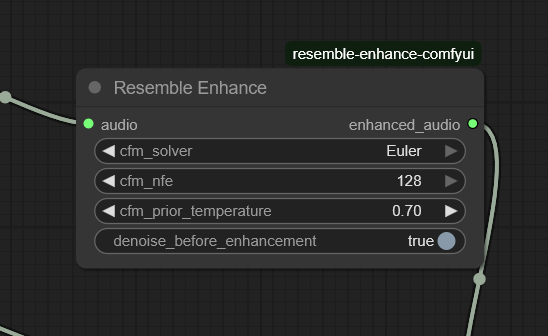
A custom ComfyUI node for audio enhancement using Resemble AI's Resemble Enhance model. Created using OpenHands, Cline, and DeepSeek.
Installation
-
Clone this repository into your ComfyUI
custom_nodesdirectory:cd ComfyUI/custom_nodes git clone https://github.com/EuphoricPenguin/resemble-enhance-comfyui -
Install dependencies:
cd comfyui_resemble_enhance pip install -r requirements.txt -
Restart ComfyUI
Usage
- CFM ODE Solver: Choose solver method (Midpoint recommended)
- CFM Number of Function Evaluations: Higher values yield better quality but are slower (1-128, default: 64)
- CFM Prior Temperature: Higher values can improve quality but reduce stability (0.0-1.0, default: 0.5)
- Denoise Before Enhancement: Enable if your audio contains heavy background noise
Model Download
The node automatically downloads the required models from HuggingFace. The models are stored in the models directory within the node folder.
License
This project is licensed under the MIT License - see the LICENSE file for details.