
Qwen Layers Diffuser Pipeline
Decompose images into semantic RGBA layers using Qwen-Image-Layered model. Features AI-powered layer naming, PSD/TIFF export with proper layer structure, original resolution support, and VRAM management. Includes 18 nodes for layer decomposition, manipulation, and saving.
Nodes (18)
The boring-but-essential node that makes your image compatible with the RGBA VAE
Turn a flat latent batch back into frames
Turn a flat photo into real PSD layers — the node that made people say Photoshop is dead
Qwen-Image-Edit-style conditioning, tuned for layer decomposition
The reshape that turns multi-layer latents into something the VAE can decode
Flatten your Qwen layers back into one image — with real blend modes
Name your Qwen layers like a human instead of Layer_3
Turn decoded Qwen frames into proper RGBA layers with masks
Stop guessing what's in your layer batch — this node tells you
Bring your saved PSD layers back into the graph for another pass
Ready-made decomposition prompts so you don't have to write them
Fix the stacking order of your layers before you save or composite
Get a real layered Photoshop file out of your Qwen decompose
Grab just the flower layer out of your Qwen decomposition
The empty latent that seeds a whole stack of Qwen layers at once
ComfyUI's normal VAE loader chokes on 4 channels — this one doesn't
The tiny string joiner that holds your layer-name lists together
The polite way to get your 15GB of VRAM back after a Qwen decompose
Eric Qwen Layer Nodes
A ComfyUI node package for working with the Qwen-Image-Layered model. Decomposes images into multiple RGBA layers (background, subjects, elements) and saves them as layered PSD files.

-orange)
Screenshots
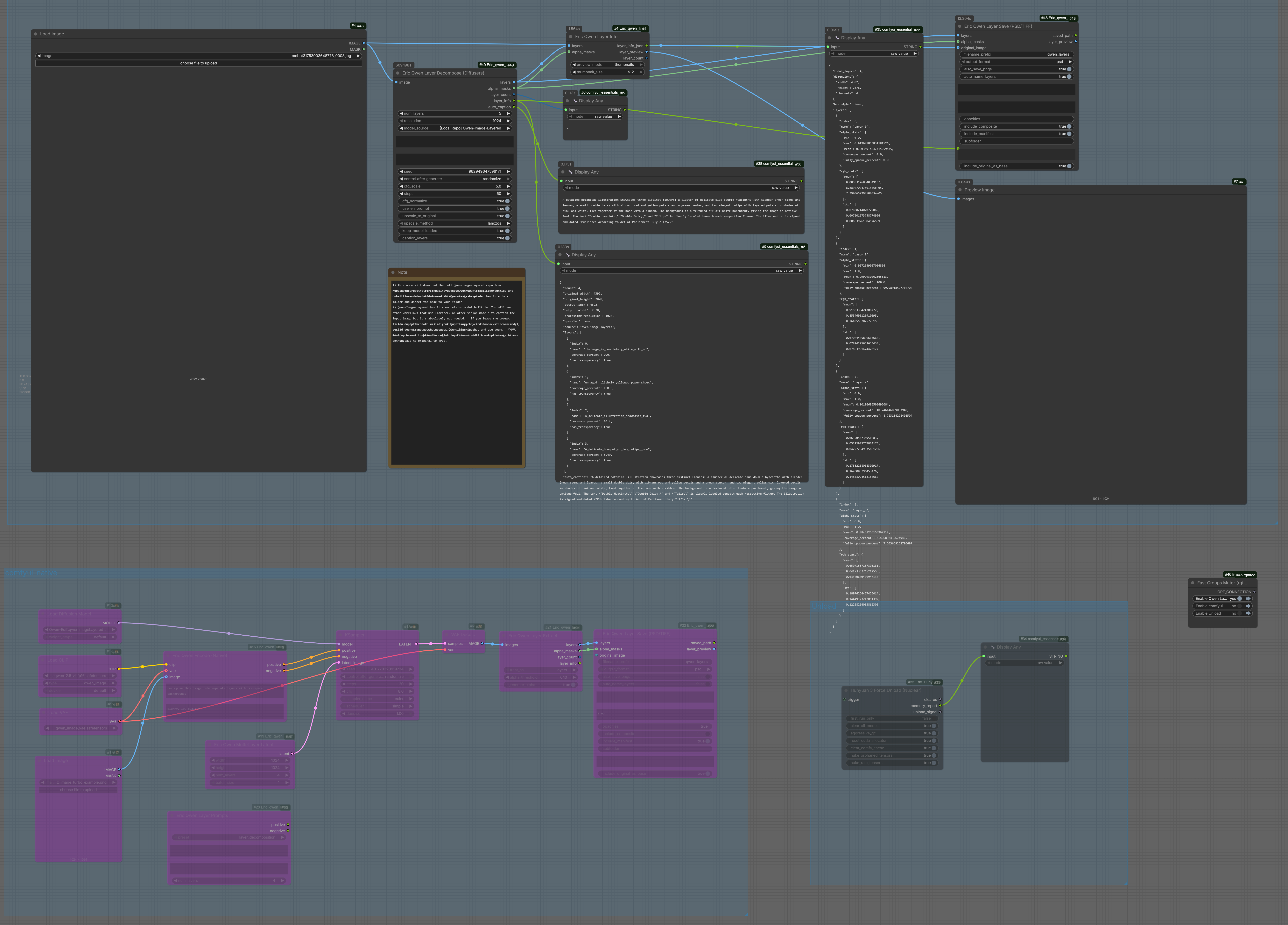
Complete Workflow
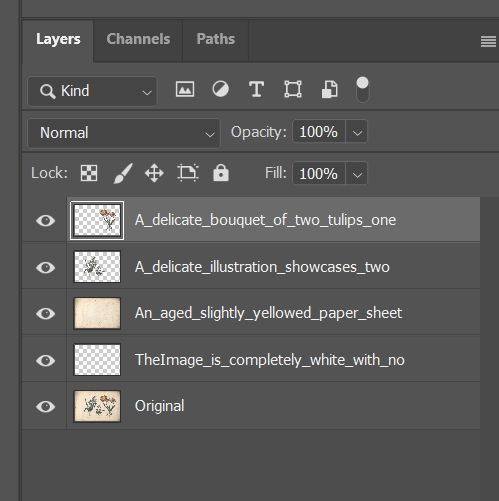
Photoshop Layers Output
Features
- 🎨 Automatic Layer Decomposition - Separate images into semantic layers (background, subjects, elements)
- 📝 AI-Powered Layer Naming - Use the built-in vision model to generate descriptive layer names
- 💾 PSD/TIFF Export - Save layers as Photoshop files with proper layer structure
- 🔄 Original Resolution Support - Scale layers back to original input size
- ⚡ Pipeline Caching - Keep model loaded for fast batch processing
- 🧹 VRAM Management - Unload models when done to free GPU memory
Installation
-
Clone or download this repository into your ComfyUI
custom_nodesfolder:cd ComfyUI/custom_nodes git clone https://github.com/EricRollei/Eric_qwen_layer.git -
Install dependencies:
pip install psd-tools tifffile diffusers transformers accelerate -
Restart ComfyUI
Model Setup
The Qwen-Image-Layered model can be loaded in two ways:
Option A: Automatic Download from HuggingFace
- Select "HuggingFace (Download)" in the model_source dropdown
- Model will be downloaded automatically on first run (~15GB)
Option B: Local Installation (Recommended)
- Download the model from Qwen/Qwen-Image-Layered
- Place it in
ComfyUI/models/diffusion_models/Qwen-Image-Layered/ - Select
[Local Repo] Qwen-Image-Layeredin the model_source dropdown
Node Reference
Core Nodes
Eric Qwen Layer Decompose (Diffusers)
The main decomposition node. Takes an image and separates it into multiple RGBA layers.
| Input | Type | Description | |-------|------|-------------| | image | IMAGE | Input image to decompose | | num_layers | INT | Number of layers to generate (2-10) | | resolution | COMBO | Processing resolution: 1024 (~1MP) or 640 (~0.4MP) | | model_source | COMBO | HuggingFace download or local model | | prompt | STRING | Optional prompt to guide decomposition | | negative_prompt | STRING | Optional negative prompt | | seed | INT | Random seed for reproducibility | | cfg_scale | FLOAT | CFG scale (1.0-20.0) | | steps | INT | Inference steps (10-100) | | cfg_normalize | BOOLEAN | Enable CFG normalization | | use_en_prompt | BOOLEAN | Use English for auto-captioning | | upscale_to_original | BOOLEAN | Upscale output to match input size | | keep_model_loaded | BOOLEAN | Keep pipeline in VRAM after processing | | caption_layers | BOOLEAN | Use vision model for layer names (slower but descriptive) |
| Output | Type | Description | |--------|------|-------------| | layers | IMAGE | Batch of RGBA layer images | | alpha_masks | MASK | Batch of alpha channel masks | | layer_count | INT | Number of layers generated | | layer_info | STRING | JSON with layer metadata and names | | auto_caption | STRING | AI-generated image description |
Eric Qwen Layer Save (PSD/TIFF)
Save decomposed layers to various formats.
| Input | Type | Description | |-------|------|-------------| | layers | IMAGE | Layer images from decompose node | | filename_prefix | STRING | Output filename prefix | | output_format | COMBO | psd, tiff, png_sequence, or zip | | also_save_pngs | BOOLEAN | Also save individual PNG files | | auto_name_layers | BOOLEAN | Auto-generate layer names from coverage | | layer_names | STRING | Custom layer names (one per line) | | layer_info | STRING | JSON from decompose node (extracts names) | | original_image | IMAGE | Original input - layers scaled to match | | include_original_as_base | BOOLEAN | Add original as bottom PSD layer |
Eric Qwen Unload Model
Free VRAM by unloading the cached pipeline.
| Input | Type | Description | |-------|------|-------------| | trigger | * | Connect any output to trigger after completion |
Layer Manipulation Nodes
| Node | Description | |------|-------------| | Eric Qwen Layer Selector | Select specific layers by index | | Eric Qwen Layer Reorder | Reorder layers in the stack | | Eric Qwen Layer Composite | Flatten layers into single image | | Eric Qwen Layer Info | Display layer information |
Utility Nodes
| Node | Description | |------|-------------| | Eric Qwen Layer Load | Load layers from PSD/TIFF/PNG files | | Eric Qwen Layer Describe | Use external vision model for layer naming | | Eric Qwen String Join | Join multiple strings with separator |
Native Workflow Nodes (Experimental)
For advanced users wanting to use ComfyUI's native model loading:
| Node | Description | |------|-------------| | Eric Qwen Add Alpha | Add alpha channel to RGB images | | Eric Qwen Encode | Native VAE encoding for RGBA | | Eric Qwen Layer Extract | Extract layers from latent | | Eric Qwen Multi-Layer Latent | Create multi-layer latent structure | | Eric Qwen Layer Prompts | Generate layer-specific prompts | | Eric Qwen RGBA VAE Loader | Load the RGBA VAE model |
Workflow Examples
Basic Layer Decomposition
[Load Image] → [Eric Qwen Layer Decompose] → [Eric Qwen Layer Save]
Full Resolution with Original Base
[Load Image] ──┬──→ [Eric Qwen Layer Decompose] → layers ──────→ [Eric Qwen Layer Save]
               │                                    ↓                      ↑
               │                              layer_info ─────────────────→│
               │                                                           │
               └──────────────────────────────→ original_image ───────────→┘
This workflow:
- Decomposes the image into layers
- Scales all layers back to the original image resolution
- Includes the original image as the bottom layer in the PSD
- Uses layer names from the decompose node
With AI Layer Naming
Enable caption_layers: True on the Decompose node to get descriptive names like:
- "Aged_paper_background_with_text"
- "White_flower_with_green_leaves"
- "Orange_chrysanthemum_bloom"
VRAM Management
[Decompose (keep_model_loaded=False)] → [Save]
Or keep model loaded and manually unload:
[Decompose (keep_model_loaded=True)] → [Save] → [Unload Model]
Tips
-
Resolution: Use 1024 for best quality (~1MP output). Use 640 for faster processing.
-
Layer Count: Start with 4 layers. Increase for complex images with many distinct elements.
-
Original Image: Connect to Save node to:
- Scale layers to original resolution
- Include original as reference layer in PSD
-
Caption Layers: Adds ~5-10 seconds per layer but gives semantic names.
-
VRAM: The model uses ~15GB VRAM. Use Unload Model node when switching to other workflows.
Photoshop Pro Tip: Full-Resolution Layer Extraction
When you connect the original_image input, the PSD contains both the AI-generated layers AND your original image at full resolution. This unlocks a powerful workflow:
- Ctrl+Click on any Qwen layer thumbnail to load it as a selection
- Select the original image layer (bottom layer)
- Ctrl+J to copy the selected area to a new layer
This gives you full original resolution elements with AI-powered semantic selection! The Qwen layers act as intelligent masks - the AI understands "these pixels are the flowers" - but you extract from the pristine original.
Requirements
- ComfyUI
- Python 3.10+
- PyTorch 2.0+
- CUDA GPU with 16GB+ VRAM recommended
Python Dependencies
diffusers>=0.27.0
transformers>=4.51.3
accelerate
psd-tools>=1.9.0
tifffile
Pillow
numpy
torch
Known Limitations
- Large images (>4K) are resized to ~1MP for processing
- Layer naming with vision model adds processing time
- PSD layer names limited to ASCII (Unicode/CJK characters sanitized automatically)
- Native workflow nodes are experimental
License
This software is available under a dual licensing model.
For Non-Commercial Use
This work is licensed under a modified Creative Commons Attribution-NonCommercial 4.0 International License, with additional requirements:
Attribution Requirements:
- You must give appropriate credit to Eric Hiss as the original author
- Include a link to the original repository: https://github.com/EricRollei/Eric_qwen_layer
- Maintain copyright and license notices in all copies
- If you modify the software, clearly indicate changes made
Restrictions:
- You may not use the material for commercial purposes
- You may not redistribute without required attribution
For the full text of the CC BY-NC 4.0 License, visit: http://creativecommons.org/licenses/by-nc/4.0/
For Commercial Use
A separate commercial license is required for commercial use of this software.
Contact: Eric Hiss
- Email: [email protected]
- Email: [email protected]
Third-Party Components
This project uses:
- Diffusers (Apache 2.0) - Hugging Face diffusion library
- psd-tools (MIT) - PSD file handling
- tifffile (BSD) - TIFF file handling
- Qwen-Image-Layered - Qwen/Alibaba model (check model license at HuggingFace)
Disclaimer
THE SOFTWARE IS PROVIDED "AS IS", WITHOUT WARRANTY OF ANY KIND, EXPRESS OR IMPLIED, INCLUDING BUT NOT LIMITED TO THE WARRANTIES OF MERCHANTABILITY, FITNESS FOR A PARTICULAR PURPOSE AND NONINFRINGEMENT. IN NO EVENT SHALL THE AUTHORS OR COPYRIGHT HOLDERS BE LIABLE FOR ANY CLAIM, DAMAGES OR OTHER LIABILITY, WHETHER IN AN ACTION OF CONTRACT, TORT OR OTHERWISE, ARISING FROM, OUT OF OR IN CONNECTION WITH THE SOFTWARE OR THE USE OR OTHER DEALINGS IN THE SOFTWARE.
Copyright (c) 2025 Eric Hiss. All rights reserved.
Acknowledgments
- Qwen Team for the Qwen-Image-Layered model
- Hugging Face for the Diffusers library
- ComfyUI community
- Claude (Anthropic) - AI pair programming assistant for code development and documentation
Support
For issues and feature requests, please open an issue on GitHub.
For commercial licensing inquiries, contact [email protected].
Author
Eric Hiss (EricRollei)
- GitHub: @EricRollei
- Email: [email protected]