ComfyUI-TimestepShiftModel
This is a ComfyUI implementation of the timestep shift technique used in a/NitroFusion: High-Fidelity Single-Step Diffusion through Dynamic Adversarial Training. For more details, visit the official a/NitroFusion GitHub repository.
ComfyUI-TimestepShiftModel
This is a ComfyUI implementation of the timestep shift technique used in NitroFusion: High-Fidelity Single-Step Diffusion through Dynamic Adversarial Training.
For more details, visit the official NitroFusion GitHub repository.
Usage
Clone this repository into the ComfyUI/custom_nodes directory:
git clone https://github.com/ChenDarYen/ComfyUI-TimestepShiftModel.git
Download the NitroSD models from Hugging Face or use the following commands:
wget https://huggingface.co/ChenDY/NitroFusion/resolve/main/nitrosd-realism_comfyui.safetensors
wget https://huggingface.co/ChenDY/NitroFusion/resolve/main/nitrosd-vibrant_comfyui.safetensors
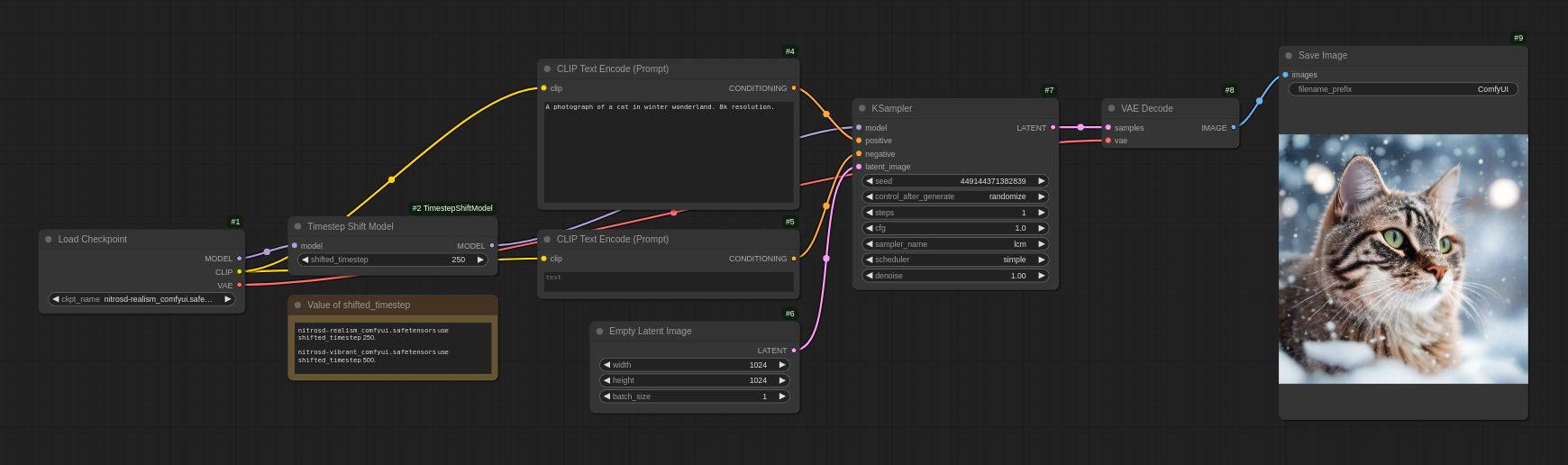
The Timestep Shift Model node takes a model and a shifted_timestep value as input, producing a timestep-shifted model.
Apart from this step, the workflow is the same as a standard text-to-image generation workflow.
Have fun with the example workflow ComfyUI_NitroSD_workflow.json!