
ComfyUI-PolyMask
ComfyUI nodes for loading images and drawing polygon masks interactively on them with a polygon lasso style tool
Nodes (2)
ComfyUI-PolyMask
A ComfyUI custom node for creating polygon masks directly in the workflow editor.


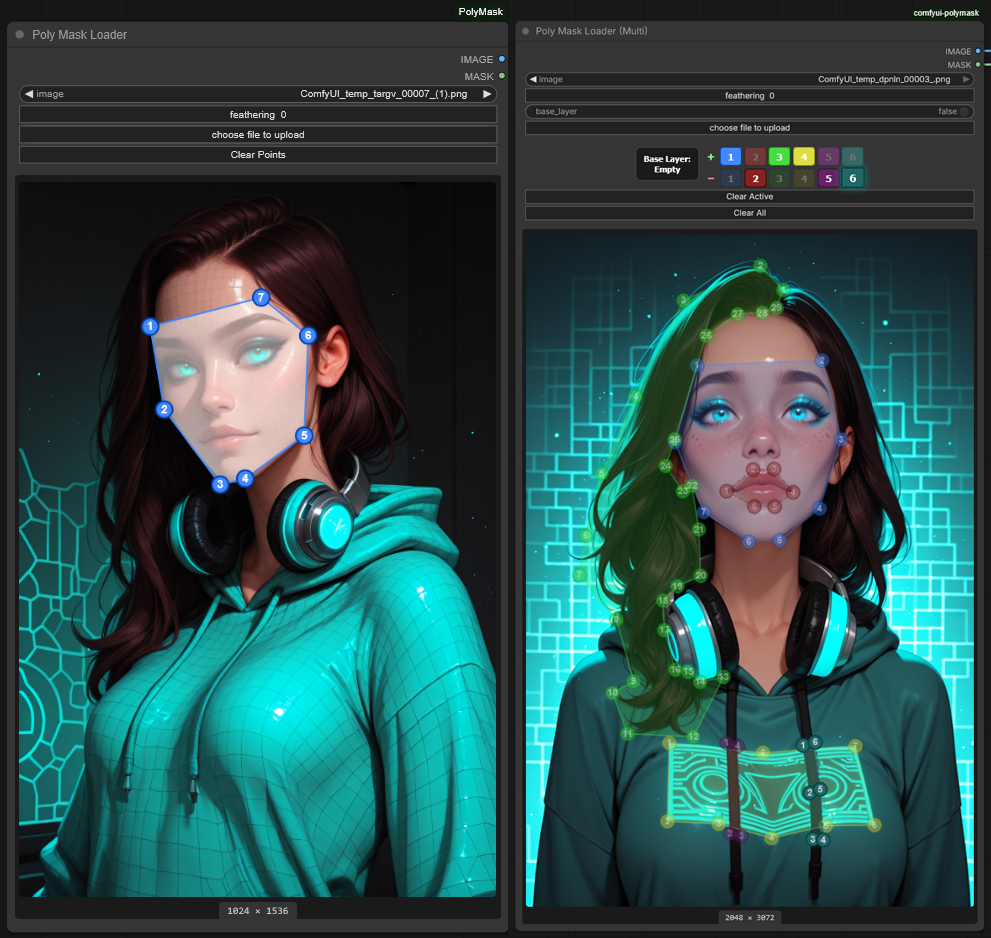
Features
- Poly Mask Loader - Single polygon mask creation
- Poly Mask Loader (Multi) - Up to 6 polygons to contribute to the shape of one mask via additive/subtractive modes and base layer control
Controls
| Action | Result | |--------|--------| | Left click on canvas | Add point to active polygon | | Left click + drag point | Move point | | Left click on line | Insert new point | | Right click on point | Delete point | | Click button in + row | Set polygon to additive mode & select | | Click button in − row | Set polygon to subtractive mode & select | | Click "Base Layer" button | Toggle base layer between empty and full | | Click "Clear Active" button | Clear all points from the active polygon | | Click "Clear All" button | Clear all points from all polygons and reset base layer to empty |
Polygon Modes
| Mode | Symbol | Effect | |------|--------|--------| | Additive | + | Adds polygon shape to the mask | | Subtractive | − | Removes polygon shape from the mask |
- Polygons are processed in order (1→6)
- Higher-numbered polygons override lower ones in overlapping areas
- Subtractive polygons appear with darker colors and dashed lines
Base Layer
The Base Layer button (left side of polygon selector) controls the starting state of the mask:
| State | Value | Effect |
|-------|-------|--------|
| Empty (default) | false | Base layer of mask starts transparent |
| Full | true | Base layer of mask starts fully opaque |
Visual Indicator: When base layer is set to Full, the canvas displays a subtle white overlay and border outline.
Auto-Switch Behavior: When you add the first point to a subtractive polygon while the base layer is empty and no other polygons exist, the base layer automatically switches to Full (since subtractive mode requires something to subtract from).
Note: The base_layer input is a boolean parameter. When connecting external nodes to control the base layer state, use false for empty and true for full.
Parameters
- Feathering - Blur/soften mask edges (0-100)
Installation
Option 1: Git Clone
cd ComfyUI/custom_nodes/
git clone https://github.com/Carasibana/ComfyUI-PolyMask.git
Option 2: Download ZIP
- Download the repository as ZIP
- Extract to
ComfyUI/custom_nodes/ComfyUI-PolyMask
Then restart ComfyUI.
Usage
Find the nodes under the image category:
Poly Mask Loader- For single polygon masksPoly Mask Loader (Multi)- For multiple polygon masks with additive/subtractive support
Example Workflow
- Add a
Poly Mask Loader (Multi)node - Select an image
- Click a number in the + row to create an additive polygon
- Draw points on the canvas to define the mask area
- Optionally click a number in the − row to create a subtractive polygon that cuts out from existing masks
- The base layer will automatically switch to Full when you add your first subtractive point (if it was empty and no other polygons exist)
- Adjust feathering as needed
- Use the Base Layer button to manually toggle between Empty and Full if needed
License
MIT License - see LICENSE for details.