
ComfyUI-Z-Engineer
Custom node for ComfyUI that integrates a local LLM via OpenAI-compatible API to engineer optimal prompts for Z-Image Turbo workflows. (Description by CC)
Nodes (6)
Prompt enhancement through LM Studio or Ollama
Sharded safetensors loaded as a CLIP
Load Z-Image-Engineer as a quantized Qwen3 GGUF
Enhance prompts with the model that encodes them
Type two words, get a 250-word Z-Image prompt — the fast local enhancer
The fast Z-Image prompt writer that is NOT your text encoder (read this before you wire it)
ComfyUI Z-Engineer
Run Z-Image-Engineer-V6 fully inside ComfyUI: load the Qwen3-4B prompt model from sharded HuggingFace safetensors or GGUF quants, use it as the Z-Image Turbo text encoder (CLIP), and use the same loaded model as a local prompt enhancer with a live preview on the node. No LM Studio or external server required.
Also runs the fast 1.2B LFM2.5-Z-Image-Engineer as a standalone prompt enhancer (GGUF or safetensors, on CUDA / ROCm / MPS / CPU via plain torch — no llama.cpp build needed). See LFM2.5 Engineer below.
Nodes
| Node | What it does |
| --- | --- |
| Z-Engineer CLIP Loader (Safetensors / Shards) | Loads a single .safetensors file or a sharded HF folder (model-00001-of-00003.safetensors + index) as a Z-Image text encoder. This is how you load the 3-piece Z-Image-Engineer-V6 release directly. |
| Z-Engineer CLIP Loader (GGUF) | Loads a llama.cpp-style Qwen3 GGUF (Q3_K_M ... F16, MXFP4, NVFP4) as a Z-Image text encoder. Uses ComfyUI-GGUF for on-the-fly dequant when installed; otherwise falls back to FP16 dequant at load time. |
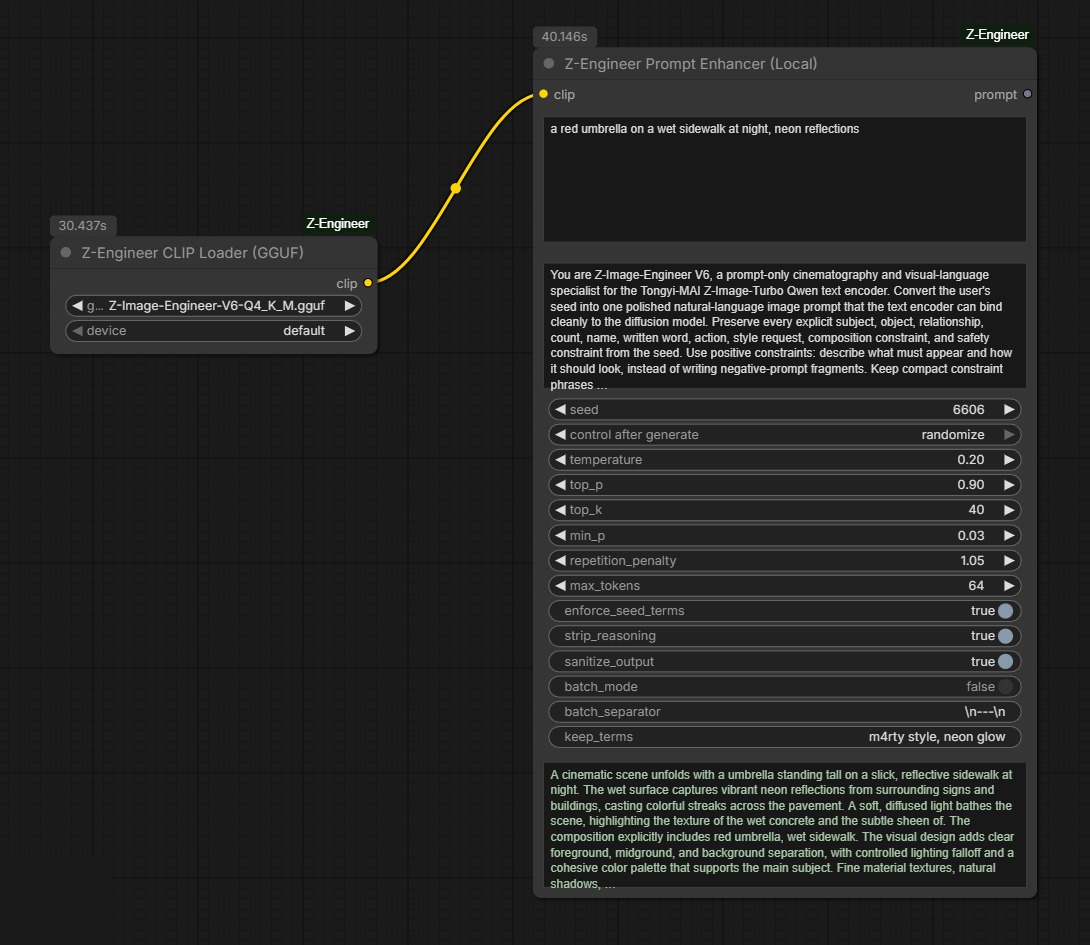
| Z-Engineer Prompt Enhancer (Local) | Takes the loaded CLIP and generates the polished V6 prompt in-process (ComfyUI's own model management — no server). The enhanced prompt is previewed on the node and returned as a STRING. |
| Z-Engineer LFM2.5 Enhancer Loader (GGUF / Safetensors) | Loads LFM2.5-1.2B-Z-Image-Engineer (any GGUF quant, or the HF safetensors/ folder) as a standalone prompt-writer LLM. Runs on plain torch/transformers — CUDA, ROCm, MPS or CPU. Not a CLIP. |
| Z-Engineer Prompt Enhancer (LFM2.5 Local) | Same enhancer controls/preview as the Local node, but driven by the LFM2.5 model (~3x faster than Qwen3-4B). Wire its STRING output into CLIP Text Encode. |
| Z-Engineer Prompt Enhancer (API) | Legacy path: OpenAI-compatible /chat/completions (LM Studio, llama.cpp server, Ollama). Kept for users who prefer an external server. |
Installation
ComfyUI Manager / Registry
Search for ComfyUI Z-Engineer in ComfyUI Manager, or:
comfy node install comfyui-z-engineer
Manual
cd ComfyUI/custom_nodes
git clone https://github.com/BennyDaBall930/ComfyUI-Z-Engineer.git
pip install -r ComfyUI-Z-Engineer/requirements.txt
Restart ComfyUI.
Model installation
Put the model under ComfyUI/models/text_encoders/:
Sharded safetensors (the published V6 release):
ComfyUI/models/text_encoders/Z-Image-Engineer-V6/
├── model-00001-of-00003.safetensors
├── model-00002-of-00003.safetensors
├── model-00003-of-00003.safetensors
└── model.safetensors.index.json
Download from BennyDaBall/Z-Image-Engineer-V6. The folder shows up in the loader dropdown as Z-Image-Engineer-V6/.
GGUF (recommended for low VRAM):
ComfyUI/models/text_encoders/Z-Image-Engineer-V6-Q4_K_M.gguf
Download any quant from BennyDaBall/Z-Image-Engineer-V6-GGUF (Q4_K_M is a good default; F16 for maximum fidelity). Installing ComfyUI-GGUF is strongly recommended — the quant then stays quantized in VRAM.
NVFP4 / MXFP4: the NVFP4 quant (built for RTX 50 / Blackwell) needs the gguf Python package 0.19.0 or newer (installed automatically from this node's requirements; manual: pip install -U "gguf>=0.19.0" in ComfyUI's Python, then restart). With an older gguf the loader stops with a clear message instead of a cryptic error. The Z-Engineer GGUF loader also adds a fast GPU dequant for NVFP4 and MXFP4 to ComfyUI-GGUF, which otherwise falls back to slow numpy for these types. Once a Z-Engineer GGUF loader has run in a session, the stock CLIPLoaderGGUF uses it too.
Usage
As text encoder + prompt enhancer (one model, both jobs)
- Add Z-Engineer CLIP Loader (GGUF) (or the Safetensors/Shards loader) and pick the model.
- Wire
clipinto your normal CLIP Text Encode for the Z-Image Turbo pipeline — the V6 model doubles as the Qwen3-4B text encoder. - Add Z-Engineer Prompt Enhancer (Local), wire the same
clipin, and type your raw seed prompt. - Wire the enhancer's
promptoutput into the CLIP Text Encodetextinput. - Queue — the enhanced prompt appears right on the enhancer node.
[Z-Engineer CLIP Loader] ──clip──┬──> [Z-Engineer Prompt Enhancer (Local)] ──prompt──> [CLIP Text Encode] ──> ...
                                 └────────────────────────────────clip───────────────────────^
Recommended enhancer settings (V6)
temperature:0.20,top_p:0.9,top_k:40,min_p:0.03repetition_penalty:1.05max_tokens:320enforce_seed_terms:true— deterministically re-appends seed phrases (counts, colors, quoted text) if the model drops themstrip_reasoning/sanitize_output:true
LFM2.5 Engineer (V4) — fast prompt writer (not a text encoder)
LFM2.5-1.2B-Z-Image-Engineer-V4 is the 1.2B LiquidAI-based Engineer: ~3x faster than Qwen3-4B, ideal for batch prompt expansion and low-VRAM boxes.
- Drop any quant (e.g.
LFM2.5-1.2B-Z-Image-Engineer-V4-Q4_K_M.gguf) — or the repo'ssafetensors/folder — intoComfyUI/models/text_encoders/. - Add Z-Engineer LFM2.5 Enhancer Loader and pick it.
- Add Z-Engineer Prompt Enhancer (LFM2.5 Local), wire
llmin, type your seed. The V4 system prompt is the node default. - Wire the
promptSTRING into your CLIP Text Encode.
Or skip the wiring: load the ready-made example_workflows/z_image_turbo_lfm25_enhancer.json (also in ComfyUI's template browser under Workflows → Browse Templates → ComfyUI-Z-Engineer) — LFM2.5 writes the prompt, Z-Image-Engineer-V6 GGUF encodes it, Z-Image Turbo renders.
[Z-Engineer LFM2.5 Enhancer Loader] ──llm──> [Z-Engineer Prompt Enhancer (LFM2.5 Local)] ──prompt──> [CLIP Text Encode]
[Z-Engineer CLIP Loader (Qwen3-4B model)] ──────────────────────────────clip──────────────────────────────^
⚠️ LFM2.5 cannot be the Z-Image text encoder. Z-Image Turbo's conditioning comes from Qwen3-4B; ComfyUI has no lfm2 encoder path, so this model only writes prompts. Keep a Qwen3-4B model (Z-Image-Engineer via the Z-Engineer CLIP loaders, or the stock encoder) as your CLIP. The CLIP loaders refuse lfm2 files with a clear message instead of the old cryptic Unexpected text model architecture type in GGUF file: 'lfm2' error from ComfyUI-GGUF.
The GGUF is dequantized at load (~2.5 GB in fp16) and runs through torch + transformers, so AMD ROCm / APU setups work out of the box — no llama.cpp, no ComfyUI-GGUF needed for this path. Requires transformers>=4.54 (LFM2 support) in your ComfyUI environment.
Trigger words / keep terms
Put LoRA trigger words (or any phrase that must survive verbatim) into the optional keep_terms input, separated by commas: m4rty style, neon glow. The model is instructed to weave them in unchanged, and any it still drops are deterministically re-appended to the final prompt — exact casing preserved. Available on the Local, LFM2.5 and API enhancer nodes.
Resizable text boxes
Each multiline box on the enhancer nodes (seed prompt, system prompt, previews) can be resized vertically on its own with the grip in its bottom-right corner — no need to grow the whole node. Box heights are saved with the workflow; double-click the grip corner to reset a box to automatic sizing.
Batch mode
Enable batch_mode to process several seed prompts in one call (split by batch_separator, default \n---\n, falling back to lines). Outputs are joined with the same separator and each one is shown in the preview.
VRAM notes
- GGUF Q4_K_M with ComfyUI-GGUF: ~3-4 GB for text encoding.
- Prompt enhancing with a GGUF quant: the enhancer dequantizes the weights once per run (~8 GB for the 4B model) so every quant generates at about the same speed (~33 tok/s on an RTX 5090, vs 5-14 tok/s when dequantizing per token). The copy is freed when the run ends, and it is skipped automatically when there is not enough free VRAM.
- Sharded/single safetensors (FP16): ~9 GB during generation.
- Without ComfyUI-GGUF, GGUFs are dequantized to FP16 at load (full FP16 footprint).
- Loading never spikes VRAM: weights stay on the offload device until first use, and the model participates in ComfyUI's normal model management (it unloads like any other model).
Requirements
- ComfyUI new enough to ship native Z-Image support (
comfy/text_encoders/z_image.py, v0.3.75+) requests(API node),gguf>=0.19.0(NVFP4 support, GGUF fallback + LFM2.5 path)transformers>=4.54for the LFM2.5 nodes (already required by current ComfyUI; upgrade if yours is older)- Optional but recommended: ComfyUI-GGUF
License
MIT